Purpose: This document defines the internal operational logic of the Customer Success π Function. It governs the process of receiving and resolving client feedback and issues during the post-handover and warranty period.
Why This Matters
This π Function is dedicated to managing the client experience after project completion, ensuring a systematic and professional approach to all post-handover support. It provides a centralized system for tracking client issues from reception to resolution, which is critical for maintaining high client satisfaction and fostering long-term loyalty. Strategically, it transforms client feedback into a valuable data asset for improving service quality and identifying common product or service issues. For the support team, it ensures no request is lost and provides clear data on team performance and resolution times.
The Big Picture
Architecturally, this π Function is activated during the warranty phase of a π§ Project. It is built around the π§ Customer Success Ticket as the standard object, which can be created automatically from external channels like a Zalo support account. Each ticket serves as a case file for a clientβs request. To manage the internal work required for a resolution, π§οΈ Resolution Task sub-objects are created and assigned to technical staff. This structure separates client communication (managed in the ticket) from the internal work needed to solve the issue (managed in the tasks).
OBJECT TYPES & WORKFLOWS
1. π§ After Care (Standard Object)
- Process Description: Manages the overall post-project relationship with a client, including scheduled check-ins, warranty support, and identifying potential new sales opportunities (upsells).
- Example: βAfter-Sales Care for Sarah & Michael Westbrookβ.
Workflow
Status Details
Data Fields
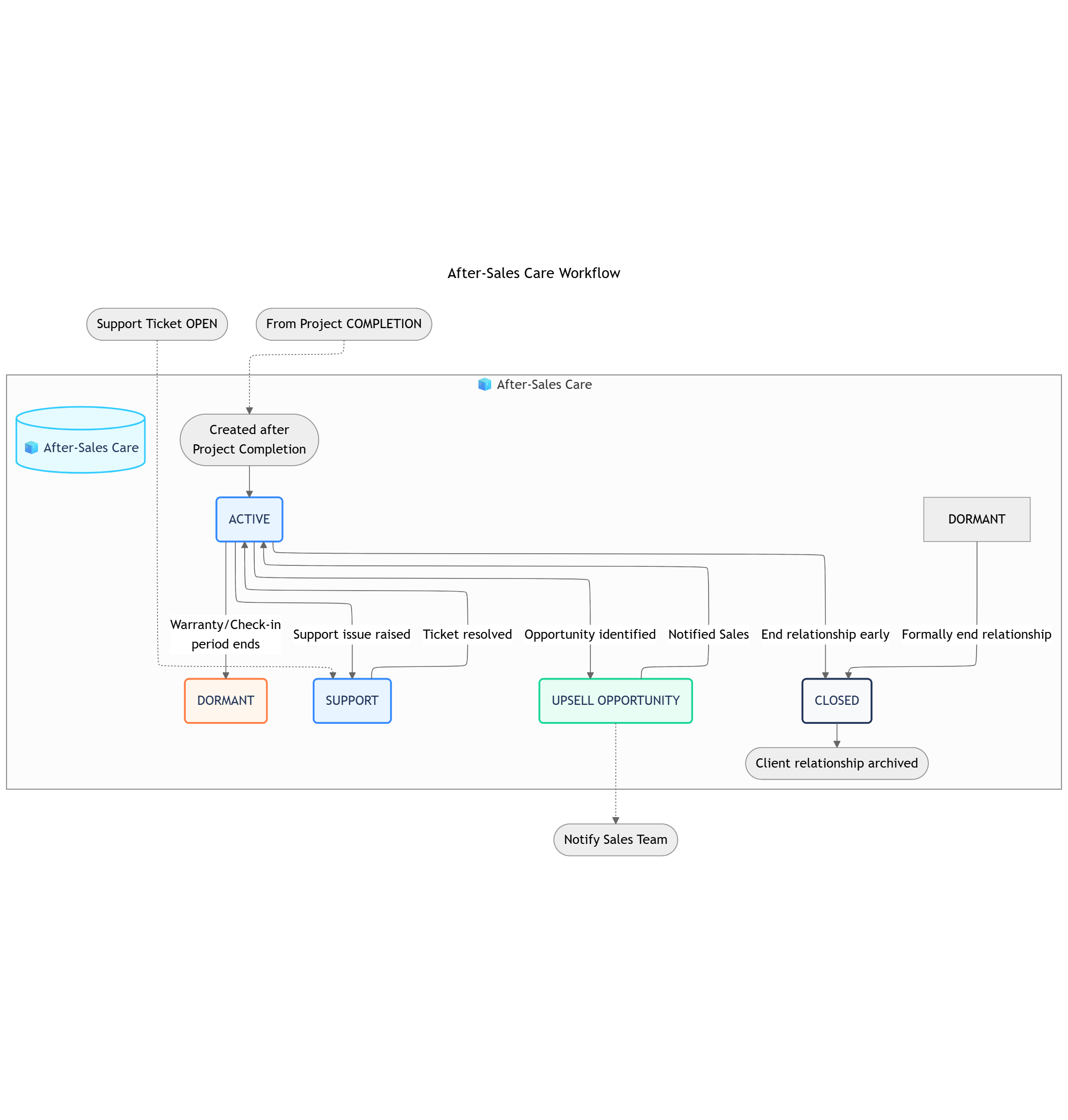
After-sale Care Workflow
βββ> SUPPORT
β
ACTIVE ββββ€
β
βββ> UPSELL OPPORTUNITY
β
DORMANT β CLOSED
| Status | Business Logic | Advanced Settings |
|---|
| 1. ACTIVE | The client is under warranty or in a period of active monitoring. Regular check-ins are scheduled and performed. This is the default state. | Automation: The Schedule & Trigger Recurring Check-ins rule is active. |
| 2. SUPPORT | The client has an active support request or issue that needs resolution. | Transition Permissions: CS Agent. Condition: A π§οΈ Support Ticket sub-object should be open. |
| 3. UPSELL OPPORTUNITY | A potential new sales opportunity has been identified during a check-in. This status is shown in the video. | Automation: Can trigger a notification to the original Sales Representative in the Sales & CRM βΉοΈ Space. |
| 4. DORMANT | The active warranty and check-in period has ended. The client is now in a long-term, low-touch monitoring phase. | Transition Permissions: CS Agent, CS Manager. |
| 5. CLOSED | The relationship with the client has formally ended (e.g., they sold the property). The record is archived. | This is a terminal status. |
| Markdown | | |
| Group | Field Name (Type) | Notes |
|---|
| Core Information | Customer (Object Connection) | Links to the original Sales & CRM/π§ Customer Object. |
| Project (Object Connection) | Links to the completed Project Management/π§ Project Object. |
| Status (Status) | The current state of the after-sales relationship (e.g., ACTIVE, UPSELL OPPORTUNITY). |
| Relationship Management | Assigned Agent (User) | The Customer Success agent responsible for the client (e.g., Grace). |
| Next Check-in (Date) | The date of the next scheduled follow-up. |
| Last Check-in (Date) | A record of the most recent completed check-in. |
| Customer Health (Select) | A qualitative assessment of the clientβs satisfaction (e.g., Healthy, At Risk). |
| Feedback (Rich Text) | A space to log notes and direct feedback from the client. |
| Linked Project Data | Project Type (Text, Lookup) | Pulled from the linked Project Object (e.g., βResidential Full Home Renovationβ). |
| Project Manager (User, Lookup) | The manager of the original project. |
| Warranty End Date (Date, Lookup) | A critical date pulled from the Contract or Project for tracking support eligibility. |
2. π§ Customer Success Ticket (Standard Object)
- Process Description: Manages a single client request or issue from the moment it is received until it is fully resolved and closed.
- Example: βTicket #CS101: Kitchen cabinet hinge requires adjustmentβ. βTicket #CS102: Feedback on living room paint colorβ.
Workflow
Status Details
Data Fields
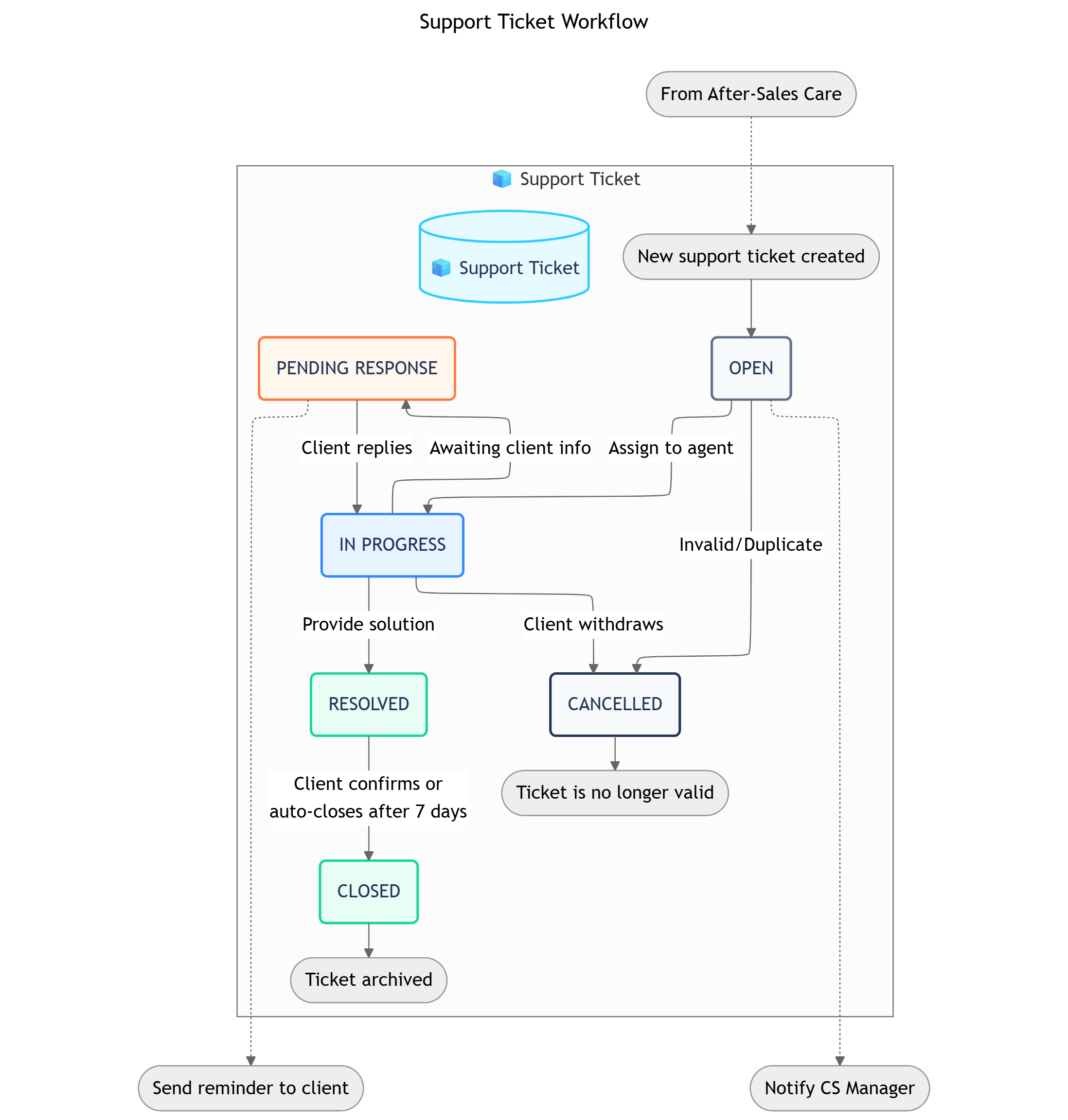
Ticket Workflow
OPEN β IN PROGRESS β PENDING RESPONSE β RESOLVED β CLOSED
β
CANCELLED
| Status | Business Logic | Advanced Settings |
|---|
| 1. OPEN | A new ticket has been created and is awaiting assignment to a Customer Success agent. | Automation: Notifies the CS team manager or queue about a new unassigned ticket. |
| 2. IN PROGRESS | An agent has been assigned and is actively working on a resolution for the clientβs issue. | Transition Permissions: Assigned CS Agent. |
| 3. PENDING RESPONSE | The agent has responded to the client and is awaiting further information or confirmation. | Automation: Can send an automatic reminder to the client after a set number of days. |
| 4. RESOLVED | A solution has been provided to the client, and the agent believes the issue is fixed. | Automation: Can automatically move the status to CLOSED if the client does not reply within a set timeframe (e.g., 7 days). |
| 5. CLOSED | The ticket is officially closed and archived. No further action is expected. | This is a terminal success status. |
| 6. CANCELLED | The ticket was withdrawn by the client or deemed invalid. | This is a terminal failure status. |
| Group | Field Name (Type) | Notes |
|---|
| Core Information | Ticket ID (Auto-number) | A unique, sequential identifier for the support ticket. |
| Subject (Text) | A brief summary of the clientβs issue. |
| Status (Status) | The current stage of the ticket in its lifecycle (e.g., OPEN, IN PROGRESS). |
| Parent After-Sales Care (Object Connection) | Links the ticket back to the main client relationship Object. |
| Details & Classification | Description (Rich Text) | The full, detailed description of the issue provided by the client. |
| Category (Select) | A category to classify the ticket type (e.g., Electrical, Plumbing, Furniture, Warranty Claim). |
| Priority (Select) | The urgency of the ticket (e.g., Low, Medium, High, Urgent). |
| Attachments (Files) | Allows for uploading photos or documents related to the issue. |
| Assignment & Timeline | Assigned Agent (User) | The CS Agent responsible for resolving the ticket. |
| Date Created (Date/Time) | An automatic timestamp for when the ticket was created. |
| Date Resolved (Date/Time) | An automatic timestamp for when the ticket status is changed to RESOLVED. |
| Resolution | Resolution Notes (Rich Text) | A final summary written by the agent explaining how the issue was resolved. |
OBJECT RELATIONSHIPS
| Relationship | Type | Description |
|---|
π§ After-Sales Care β π§ Customer | Reference | Each after-care record is linked to the master Customer object, providing a single source of truth for client information. |
π§ After-Sales Care β π§ Project | Reference | Each record is linked to the specific Project that was completed, giving the CS team full historical context on the work performed. |
π§ After-Sales Care β π§οΈ Support Ticket | Parent-Child | Each after-care record can have one or more Support Ticket sub-objects to manage specific client issues or warranty requests. |
π§οΈ Support Ticket β π§οΈ Resolution Task | Parent-Child | For complex issues, a single Support Ticket can be broken down into multiple actionable internal Tasks to coordinate the resolution. |
AUTOMATIONS
Within-Function
Cross-Function
Cross-System
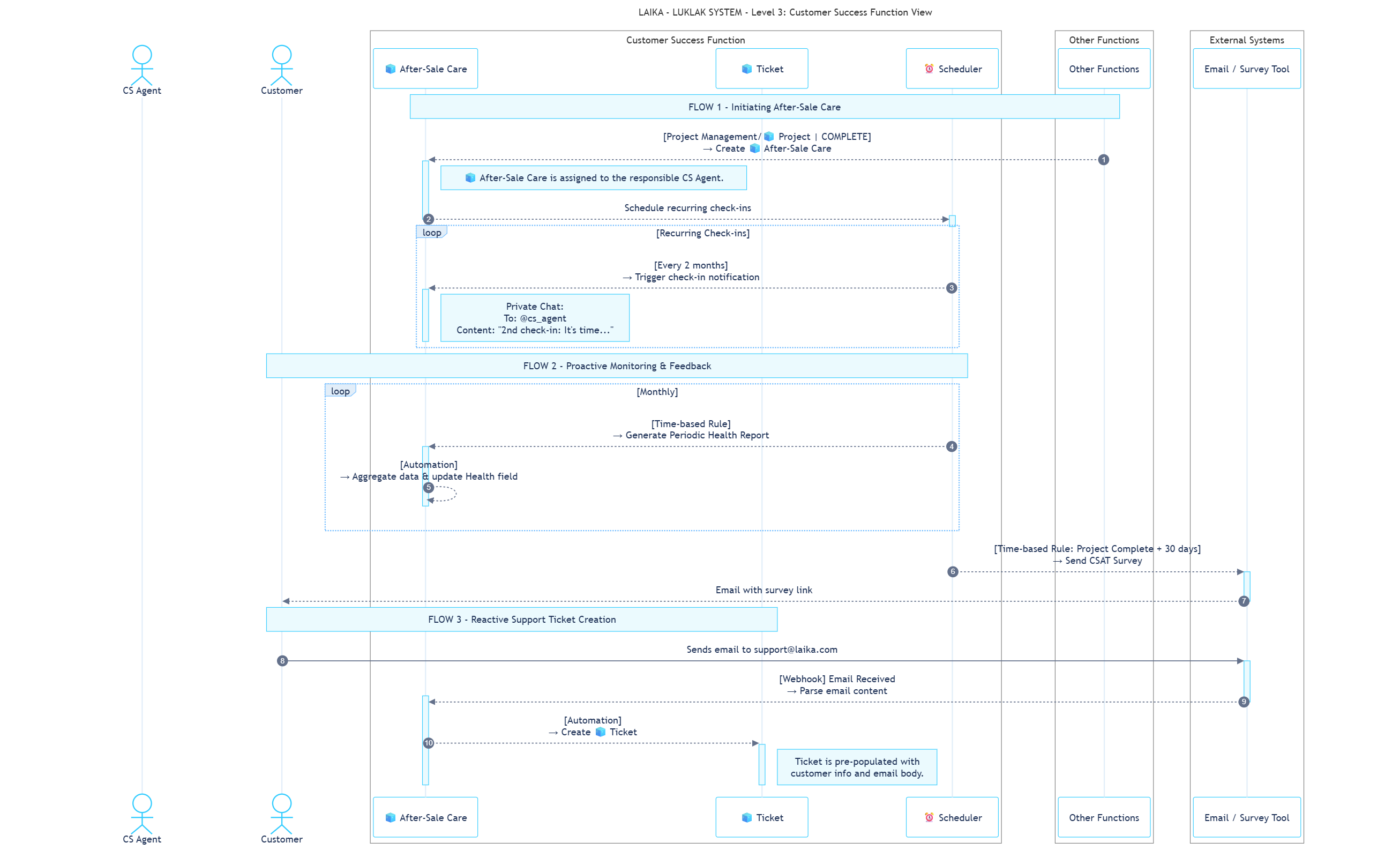
These rules operate within the Customer Success Space to ensure proactive and consistent client relationship management.| Sequence | ID | Rule Name | Trigger | Action | Description |
|---|
| 2 | ICS-01 | Schedule & Trigger Recurring Check-ins | Create: π§ After-Sales Care | Send Message: π§ After-Sales Care Chat | When an π§ After-Sales Care Object is created, the system automatically schedules future check-ins. On the scheduled date, it notifies the assigned CS agent. [cite_start]e.g., β@Grace 2nd check-in: Itβs timeβ¦β [cite: 1272] |
| 4 | ICS-02 | Generate Periodic Health Report | Time-based: Monthly | Update: π§ After-Sales Care | A monthly automation aggregates data (e.g., support tickets, check-in notes) to update a Customer Health field (e.g., Healthy, At Risk) for proactive monitoring. |
This rule describes how the Customer Success function is initiated by the Project Management team.| Sequence | ID | Direction | Rule Name | Trigger | Action |
|---|
| 1 | CF-09 | Incoming | Create After-Sales Care Object | Status Change: Project Management/π§ Project to COMPLETE | [cite_start]A new π§ After-Sales Care Object is automatically created in the Customer Success βΉοΈ Space and assigned to the responsible CS agent, Grace. [cite: 1247] |
These rules connect the Customer Success function with external platforms for client feedback and support.| Sequence | ID | Rule Name | Trigger | Action | Description |
|---|
| 3 | CS-10 | Send CSAT Survey | Time-based: 30 days after Project is COMPLETE | API Call: Email / Survey Tool | The system automatically sends an email to the client with a link to a Customer Satisfaction (CSAT) survey to gather feedback on the completed project. |
| 5 | CS-11 | Create Support Ticket from Email | Webhook: Email received at [email protected] | Create: π§οΈ Support Ticket | When a client sends an email to the support address, an integration automatically parses it and creates a new π§οΈ Support Ticket sub-object under their π§ After-Sales Care Object. |
WORKVIEWS & DASHBOARDS
Workviews
Dashboards
Filters
| Workview | Description |
|---|
| 1. Ticket Kanban Board | A board view showing all π§ Customer Success Tickets, organized in columns by their status. |
| 2. Resolution Task List | A detailed list view of all π§οΈ Resolution Tasks, filterable by assignee and due date. |
| Widget | Description |
|---|
| 1. Ticket Resolution Time | A chart showing the average time it takes to move a ticket from NEW to RESOLVED. |
| 2. Tickets by Type/Priority | A pie chart breaking down the volume of tickets by their type (e.g., Warranty Claim, Feedback) and priority. |
| 3. Average CSAT Score | A scorecard widget displaying the average Customer Satisfaction score based on survey responses. |
| Filter | Criteria |
|---|
| 1. Unassigned Tickets | Status is NEW. |
| 2. Overdue Tasks | Status is not DONE AND Due Date is in the past. |
ROLES, PERMISSIONS & NOTIFICATIONS
Roles
Permissions
Notifications
| Role | Description |
|---|
| CS Staff | The primary user who communicates with clients, manages tickets, and creates resolution tasks. |
| Head of CS | Manages the CS team, handles escalated tickets, and monitors team performance via dashboards. |
| Technical Staff | The user assigned to Resolution Tasks (e.g., a technician or designer) who performs the work to fix an issue. |
This π Function uses Scheme 3 - Moderate Permissions.
View π§ Object: Only users assigned directly to the Object can view it.
Update π§ Object: Only users assigned directly to the Object can update it.
This π Function uses Scheme 2 - Notify Related People.
- All notifications are sent only to the users directly assigned or involved in an object.
Whatβs Next?
- Project Management Function: Review the function that manages the project during the construction and handover phases, which precedes the warranty period managed here.