Purpose: This document defines the internal operational logic of the Interior Design ๐ Function. It governs the creation, review, and approval of all client-facing design deliverables.
Why This Matters
This ๐ Function streamlines the creative process by organizing all design deliverables under a single package, ensuring a consistent and clear approval workflow for each asset type. It provides a centralized hub for all design communication and files, reducing the risk of errors from using outdated versions. Strategically, this creates an auditable record of client feedback and approvals, accelerates the design phase, and ensures a smooth handover of finalized assets to the project execution teams.
The Big Picture
Architecturally, this ๐ Function is initiated in parallel with a ๐ง Project. The central object is the ๐ง Design, which acts as the main container for the entire design scope. This package holds four distinct types of sub-objects: ๐ง๏ธ Floor Plan, ๐ง๏ธ Concept, ๐ง๏ธ 3D, and ๐ง๏ธ 2D, each representing a key deliverable. Each of these sub-objects follows its own lifecycle of creation, feedback, and approval, allowing for granular tracking of the entire design effort.
OBJECT TYPES & WORKFLOWS
1. ๐ง Design (Standard Object)
- Process Description: The top-level container for a complete design package for a client project. It groups all related deliverables like floor plans, concepts, and 3D/2D drawings.
- Example: โDesign - Sarah & Michael Westbrookโ.
Workflow
Status Details
Data Fields
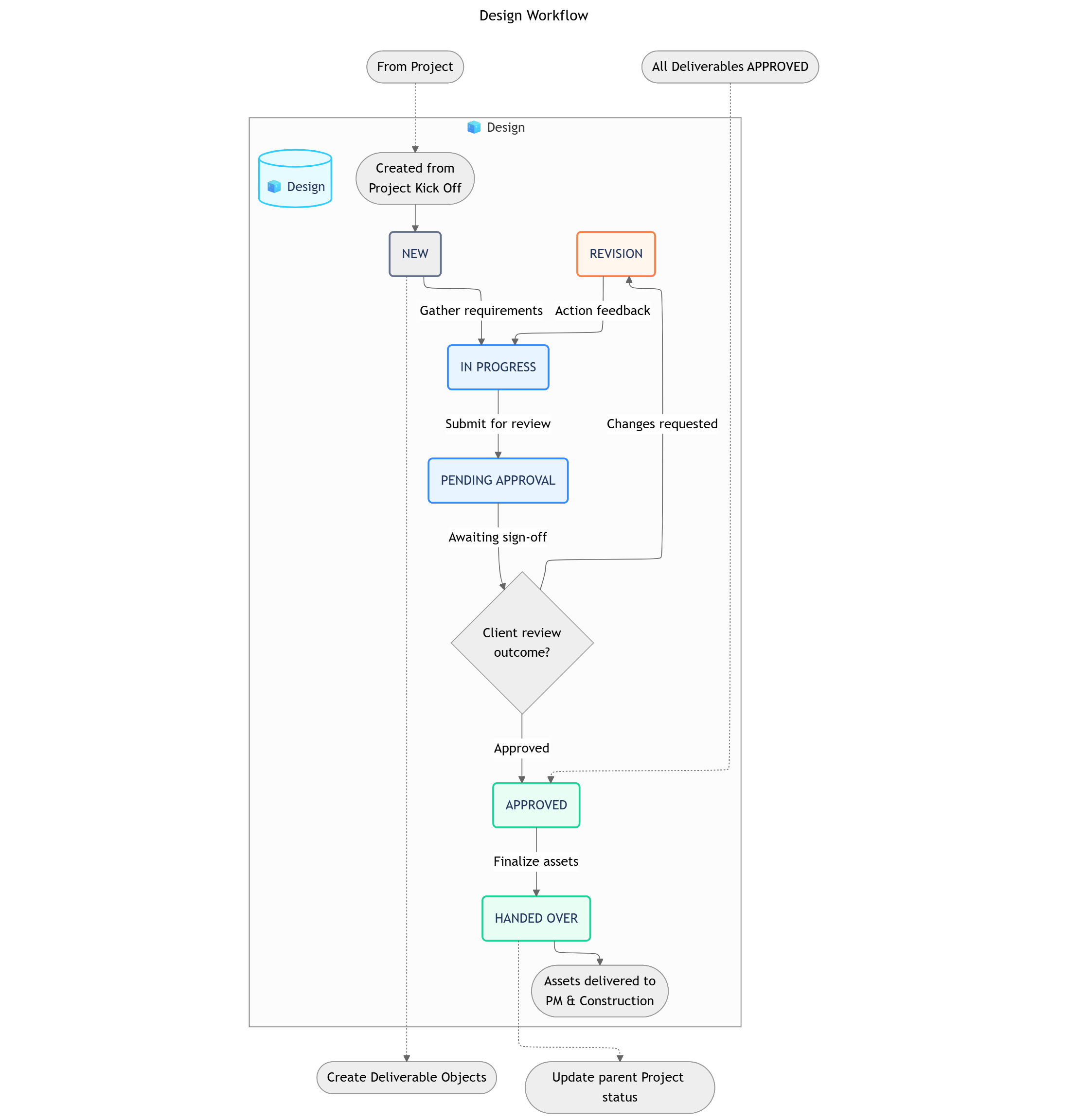
Design Package Workflow
โโโโโโ> REVISION โโโโโโ
โ โ
NEW โ IN PROGRESS โ PENDING APPROVAL โ APPROVED โ HANDED OVER
| Status | Business Logic | Advanced Settings |
|---|
| 1. NEW | The Design Object has been created and is in the initial briefing phase where requirements are gathered. | Automation: A set of standard child ๐ง๏ธ Deliverable Objects (e.g., Floor Plan, Concept, 3D Render) can be created from a template. |
| 2. IN PROGRESS | The design team is actively working on the various deliverables within the design package. | Transition Permissions: Lead Designer. |
| 3. PENDING APPROVAL | All individual deliverables are complete, and the entire package is awaiting final sign-off from the client. | Automation: Can trigger a notification to the client and sales rep for the final review meeting. |
| 4. REVISION | The client has requested changes, sending the design package back to the IN PROGRESS status for the team to action. | Data Input: A required field for โRevision Notesโ should capture the clientโs feedback. |
| 5. APPROVED | The client has formally approved the entire design package. | Condition: All child ๐ง๏ธ Deliverable Objects must be in APPROVED status before the parent package can be moved to APPROVED. |
| 6. HANDED OVER | The finalized and approved design assets have been delivered to the Project Management and Construction teams. | This is the terminal status for the Design functionโs workflow. It can trigger a status change on the parent ๐ง Project. |
| Group | Field Name (Type) |
|---|
| Basic Information | Package Code (Text), Related Project (Object Reference), Design Style (Dropdown), Lead Designer (User) |
2. Design Deliverables (Sub-Objects)
The following four objects (๐ง๏ธ Floor Plan, ๐ง๏ธ Concept, ๐ง๏ธ 3D, ๐ง๏ธ 2D) represent the core deliverables of the design process. They all share a common workflow for creation, feedback, and approval.
Shared Workflow
Shared Status Details
Shared Data Fields
Deliverable WorkflowTO DO โ IN PROGRESS โ PENDING REVIEW โ APPROVEDA deliverable in PENDING REVIEW can also be moved to a REVISION NEEDED status.
| Status | Business Logic | Advanced Settings |
|---|
| 1. TO DO | The deliverable has been planned but work has not yet started. | - |
| 2. IN PROGRESS | A designer is actively working on creating the deliverable. | Input Screen: Upload draft files and add notes. |
| 3. PENDING REVIEW | The deliverable has been submitted for client or manager feedback. | Automation: Notifies the relevant stakeholders (Client, Design Manager) to review the file. |
| 4. APPROVED | The deliverable has been officially approved. | Automation: Locks the record from further changes. |
| 5. REVISION NEEDED | The deliverable was reviewed and requires changes. | Input Screen: Feedback notes detailing the required revisions. |
| Group | Field Name (Type) |
|---|
| Deliverable Details | Title (Text), Designer (User), Due Date (Date), Version (Number), File (Attachment), Feedback Notes (Paragraph) |
OBJECT RELATIONSHIPS
| Relationship | Type | Description |
|---|
๐ง Design โ ๐ง๏ธ Floor Plan | Parent-Child | A design contains one or more floor plan deliverables. |
๐ง Design โ ๐ง๏ธ Concept | Parent-Child | A design contains one or more concept deliverables. |
๐ง Design โ ๐ง๏ธ 3D | Parent-Child | A design contains one or more 3D render deliverables. |
๐ง Design โ ๐ง๏ธ 2D | Parent-Child | A design contains one or more 2D technical drawing deliverables. |
๐ง Design โ ๐ง Project | Reference | Each design is linked to one master project. |
WORKVIEWS, DASHBOARDS & FILTERS
Workviews
Dashboards
Filters
| Workview | Description |
|---|
| 1. Deliverable Kanban Board | A board view for tracking all Design Deliverables (Floor Plans, 3D, etc.) through the workflow from TO DO to APPROVED. |
| 2. Design Asset Gallery | A visual gallery of all submitted deliverable files, allowing for quick visual review and comparison. |
| Widget | Description |
|---|
| 1. Design Progress Overview | Charts showing the status breakdown of all deliverables within a Design Package (e.g., 5 Approved, 2 Pending Review, 3 To Do). |
| 2. Feedback Cycle Time | A chart that measures the average time a deliverable spends in the PENDING REVIEW status before being approved or sent for revision. |
| Filter | Criteria |
|---|
| 1. Deliverables Awaiting Review | Status is PENDING REVIEW. |
| 2. Designs Needing Revision | Status is REVISION NEEDED. |
AUTOMATIONS
These rules operate within the Design & Build Space to facilitate collaboration between team members.| Sequence | ID | Rule Name | Trigger | Action | Description |
|---|
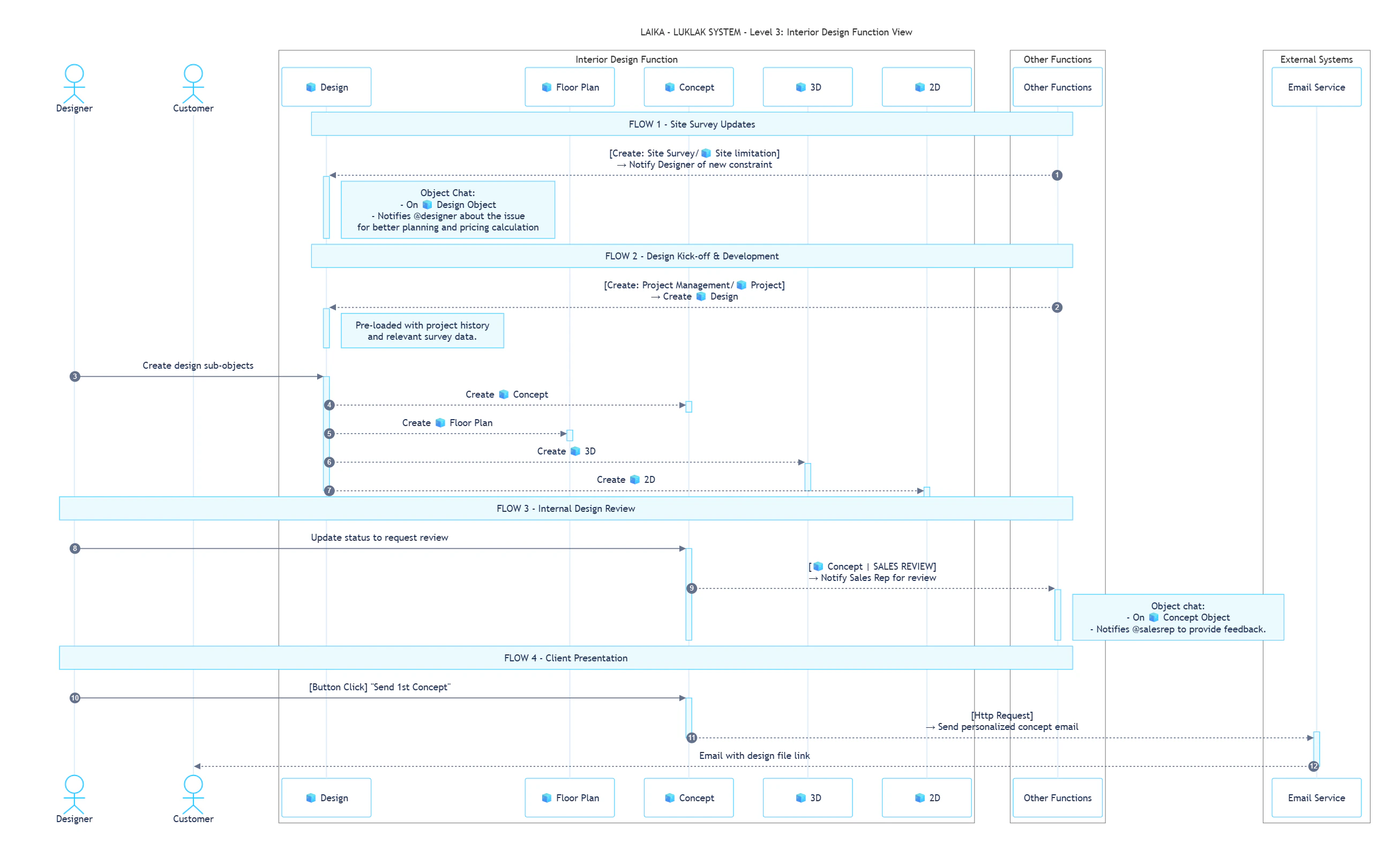
| 1 | ID-01 | Notify Designer of Site Limitation | Create: ๐ง Site limitation | Send Message: ๐ง Site limitation Chat | When a Site Worker creates a new ๐ง Site limitation Object, the system automatically notifies the assigned Designer. e.g., Alerting Max about the โOld Brick Wall Not Safeโ issue found by Tony |
| 2 | ID-02 | Request Internal Sales Review | Status Change: ๐ง๏ธ Concept to SALES REVIEW | Send Message: ๐ง๏ธ Concept Chat | When a Designer changes a ๐ง๏ธ Concept status, the system automatically notifies the responsible Sales Rep. e.g., Tagging @David for a review after Max completes the concept |
This rule describes how the Design function is initiated by the Project Management team.| Sequence | ID | Direction | Rule Name | Trigger | Action |
|---|
| 1 | CF-07 | Incoming | Create Design from Project Kick-off | Create: Project Management/๐ง Project | A new, linked ๐ง Design Object is automatically created in the Design & Build โน๏ธ Space, pre-loaded with all relevant history and survey data |
This rule connects the Design function with external communication platforms to interact with the client.| Sequence | ID | Rule Name | Trigger | Action | Description |
|---|
| 3 | CS-08 | Send Personalized Concept Email to Client | Button Click: โSend 1st Conceptโ | API Call: Email Service | A user clicks a button to automatically draft and send a personalized email to the client, pulling in data like their name, style preferences, and a link to the design file |
ROLES, PERMISSIONS & NOTIFICATIONS
Roles
Permissions
Notifications
| Role | Description |
|---|
| Design Manager | Approves final designs, manages the design teamโs workload, and ensures quality standards. |
| Designer | Creates, revises, and submits all design deliverables. |
| Client | Provides timely feedback and gives final approval on deliverables. |
This ๐ Function uses Scheme 4 - Extended Permissions.
View โน๏ธ Space: All users with a role in the Space.
View & Update ๐ง Object: All users who can view the Space.
Create ๐ง Object: Design Manager and Designer roles only.
Delete ๐ง Object: Design Manager role only.
This ๐ Function uses Scheme 3 - Balanced Notifications.
- Object Updates: Notifications for creating or updating an Object are sent only to the assignee and the person who created the Object.
- Messages: Chat messages sent within an Object will notify all users who are following that Object.
Whatโs Next?