The Business: Zenith English is a growing English language center managing the complete student lifecycle, from initial marketing campaigns and admissions to academic management and student support.The Challenge: As Zenith expanded, its operational data became fragmented across different departments. Marketing couldn’t track lead quality, Admissions struggled to coordinate with Finance on tuition, and Academic staff lacked a unified view of a student’s journey. This created data silos, manual handoffs, and a disconnected experience for both staff and students. This blueprint was designed to solve that by creating a single, unified system for the entire operation.
**ORGANIZATION STRUCTURE & WORKSPACES **
This is a Scalable Example: The structure shown here is for demonstration purposes. You can add, remove, or rename any 📂 Area, ⏹️ Space, 📋 Function, or 🧊 Object to perfectly tailor the system to your company’s unique workflow.
This diagram illustrates the clear hierarchy of functional units and business object types within the system. This format places the Function (the blueprint) directly under the Space (the instance) to clarify their relationship.
🏢 ZENITH ENGLISH (Organization)
│
├── 📂 MARKETING (Area)
│ └── ⏹️ Marketing Campaigns (Space)
│ └── 📋 Function: Marketing Campaigns
│ └── 🧊 Campaign
│ └── 🧊︎ Ad (Sub-Object)
│
├── 📂 ADMISSIONS (Area)
│ └── ⏹️ Admissions & CRM (Space)
│ └── 📋 Function: CRM
│ └── 🧊 Lead
│ └── 🧊︎ Placement Test (Sub-Object)
│
├── 📂 FINANCE (Area)
│ └── ⏹️ Tuition & Invoicing (Space)
│ └── 📋 Function: Invoicing
│ └── 🧊 Enrollment Agreement
│ └── 🧊︎ Invoice (Sub-Object)
│
├── 📂 ACADEMICS (Area)
│ └── ⏹️ Class Management (Space)
│ └── 📋 Function: Academic Management
│ └── 🧊 Course
│ └── 🧊︎ Class (Sub-Object)
│
└── 📂 STUDENT AFFAIRS (Area)
└── ⏹️ Student Support (Space)
└── 📋 Function: Student Affairs
└── 🧊 Student Record
└── 🧊︎ Progress Report (Sub-Object)
Virtual workspaces designed to serve specific user groups or objectives, helping to focus on relevant work by aggregating necessary items.
| Workspace Name | Design Rationale | Items Included (Dashboards, Filters, Spaces) |
|---|
| Executive Workspace | Aggregates key metrics on student enrollment, revenue, and academic performance for the leadership team. | - Dashboard: Center Performance Overview - Filter: High-Value Courses - Space (Read-only): Admissions & CRM, Class Management |
| Admissions Hub | A shared environment for Marketing and Admissions teams to track the entire lead-to-enrollment funnel. | - Space: Marketing Campaigns, Admissions & CRM, Tuition & Invoicing - Filter: Leads Pending Placement Test |
| Academic Operations | A central hub for Academic Managers, Teachers, and Student Affairs staff to manage classes and student progress. | - Space: Class Management, Student Support |
USER MANAGEMENT
Account Management
Global Groups
Global Roles
The system uses two types of accounts to clearly distinguish between human actions and automated system processes.
| Account Type | Description | Application at Zenith English |
|---|
| User Account | The standard account for team members, associated with a specific person who logs into the platform to work and collaborate. | For all Zenith English employees. |
| Functional Account | A special, non-login account used exclusively for Universal Automation to ensure a clear audit trail. | A single account, [email protected], will be created to execute all global automation rules. |
A group is a collection of user accounts, used to efficiently assign access permissions and notifications at scale.
| Group Name | Description & Example Members |
|---|
Marketing Department | Includes all members of the Marketing department. |
Admissions Team | Includes all admissions counselors and their manager. |
Finance Department | Includes all accounting and finance staff. |
Academic Board | Includes Academic Managers and senior teachers responsible for curriculum. |
Teaching Staff | Includes all full-time and part-time teachers. |
Student Affairs Team | Includes all student support officers. |
Board of Directors | Includes the CEO, Center Director, and senior management. |
A Role is an abstract placeholder or title (e.g., “Teacher”) not tied to a specific user or group. Permissions are assigned to the Role, and then actual users/groups are mapped to that Role within each specific Space.
| Role Name | Core Responsibilities |
|---|
Marketing Manager | Manages campaigns, advertising budgets, and lead generation performance. |
Admissions Counselor | Consults with leads, administers placement tests, and handles enrollment. |
Academic Manager | Manages courses, schedules classes, and oversees teaching quality. |
Teacher | Delivers lessons, assesses student performance, and provides feedback. |
Accountant | Manages tuition payments, invoicing, and other financial matters. |
Student Affairs Officer | Manages student care, tracks progress, and handles support requests. |
OBJECT RELATIONSHIP MODEL
A built-in, strict hierarchy between a standard Object and its Sub-Objects. This method is best for work breakdown structures.
Application at Zenith English:| Parent Object | Child Object(s) | Architectural Rationale |
|---|
Marketing/🧊Campaign | Marketing/🧊︎Ad | Work Breakdown Structure: Each 🧊Campaign is a major plan that is executed through multiple specific 🧊︎Ads. |
Admissions/🧊Lead | Admissions/🧊︎Placement Test | Process Breakdown Structure: A 🧊Lead must complete a 🧊︎Placement Test to determine their proficiency level before enrollment. |
Finance/🧊Enrollment Agreement | Finance/🧊︎Invoice | Financial Breakdown Structure: An 🧊Enrollment Agreement’s total tuition is broken down into multiple 🧊︎Invoices for installment payments. |
Academics/🧊Course | Academics/🧊︎Class | Academic Breakdown Structure: A 🧊Course (e.g., IELTS 7.0) is the curriculum blueprint, which is delivered via multiple 🧊︎Classes (e.g., Class I7A, I7B). |
Student Affairs/🧊Student Record | Student Affairs/🧊︎Progress Report | Performance Tracking Structure: A 🧊Student Record contains a chronological series of 🧊︎Progress Reports documenting academic performance over time. |
A centrally-managed library of reusable relationship types that standardize the meaning of bidirectional relationships across the entire system.
Application at Zenith English: This defines the core student journey between departments.| Connection Type | Object A | A → B Relationship | Object B | B → A Relationship |
|---|
| Marketing → Admissions | Marketing/🧊Ad | Generates | Admissions/🧊Lead | Sourced from |
| Admissions ↔ Finance | Admissions/🧊Lead | Signs | Finance/🧊Enrollment Agreement | For |
| Finance → Student Affairs | Finance/🧊Enrollment Agreement | Initiates | Student Affairs/🧊Student Record | Created from |
| Academics ↔ Student Affairs | Academics/🧊Class | Attended by | Student Affairs/🧊Student Record | Enrolled in |
A flexible field that allows one Object to reference one or more other Objects. This is the tool used to implement the relationships defined above.
Application at Zenith English:| Defined on Object | Field Name | Reference Type | Purpose |
|---|
Admissions/🧊Lead | Ad Source | Select 1 Marketing/🧊Ad | To track the marketing channel that generated the lead for ROI analysis. |
Finance/🧊Enrollment Agreement | Student | Select 1 Admissions/🧊Lead | To specify which lead this agreement is for. |
Student Affairs/🧊Student Record | Original Agreement | Select 1 Finance/🧊Enrollment Agreement | To link the student’s official record back to their financial agreement. |
Student Affairs/🧊Student Record | Enrolled Classes | Select multiple Academics/🧊Class | To track all classes a student is currently enrolled in or has completed. |
An embedded ‘spreadsheet’ within an Object to manage structured lists of data, ideal for modeling ‘contained’ one-to-many data.
Application at Zenith English:| Used on Object | Data Table Name | Example Columns | Rationale & Benefit |
|---|
Finance/🧊Enrollment Agreement | Payment Schedule | Installment, Amount, Due Date, Status, Related Invoice | Provides a clear, structured overview of the entire payment plan on the agreement. Simplifies tracking of paid and outstanding tuition fees. |
Academics/🧊Class | Attendance Sheet | Date, Student Name, Status (Present/Absent), Notes | Allows teachers to manage daily attendance directly within the class object, providing a centralized and easily auditable record of student participation. |
WORKVIEWS, DASHBOARDS, FILTERS & REMINDERS
This section defines the tools for aggregating and presenting data from across all functions, helping users work efficiently and enabling leadership to make informed decisions based on a holistic view of the business.
Global Workviews
Global Dashboards
Global Saved Filters
Filter Reminders
These are pre-saved work screens at the global level, consolidating work items from various Spaces for operational management purposes.
| Workview Name | View Type | Data Source & Filter Logic | Audience |
|---|
| All Active Classes | List View | Source: Academics/🧊Class Logic: Status IS NOT “Completed” AND “Cancelled” | Academic Manager, Center Director |
This dashboard is placed in the “Executive Workspace” to provide a 360-degree view of business performance.
| Dashboard Name | Purpose & Audience |
|---|
| Center Performance Overview | Provides a comprehensive overview of the admissions funnel, revenue, and class fill rates for the Board of Directors and Center Director. |
Detailed Structure of the “Center Performance Overview” Dashboard:| # | Gadget Name | Chart Type | Data Source (Functions & Objects) | Logic & Key Metrics |
|---|
| 1 | Admissions Funnel | Funnel Chart | Admissions/🧊Lead | Counts the number of 🧊Leads by Status (e.g., New, Contacted, Tested, Enrolled) to track conversion rates. |
| 2 | Monthly Revenue & Pending | Counter & Calculation | Finance/🧊Invoice | - Revenue: SUM(Amount) WHERE Status = “Paid” this month. - Pending: SUM(Amount) WHERE Status = “Pending”. |
| 3 | Top Lead Sources by Enrollment | Pie Chart | Finance/🧊Enrollment Agreement linked to Admissions/🧊Lead | COUNT(Enrollment Agreements) grouped by the Ad Source field on the 🧊Lead object. |
| 4 | Class Status Overview | Bar Chart | Academics/🧊Class | Counts the number of 🧊Classes by Status (e.g., Recruiting, In Progress, Completed). |
Saved filters that allow users to quickly access critical lists of work items.
| Filter Name | Data Source & Filter Logic | Purpose & Audience |
|---|
| Leads Pending Placement Test | Source: Admissions/🧊Lead Logic: Status = “Pending Test” | Helps Admissions Counselors to focus on and schedule tests for potential students. |
| High-Value Courses | Source: Academics/🧊Course Logic: Tuition Fee > 20,000,000 VND | Allows Marketing and Management to prioritize and track high-revenue educational programs. |
Automated notifications based on saved filters to ensure important tasks are not missed.
| Reminder Name | Data Source & Filter Used | Frequency & Time | Recipients (Roles/Groups) |
|---|
| Upcoming Invoice Due Reminder | Source: Finance/🧊Invoice Logic: Due Date is within the next 7 days AND Status IS NOT “Paid”. | Daily at 9:00 AM | - Accountant - Admissions Counselor |
| Inactive Lead Follow-up | Source: Admissions/🧊Lead Logic: Last Modified Date is more than 14 days ago AND Status IS NOT “Enrolled” OR “Lost”. | Daily at 8:30 AM | - Admissions Counselor |
GLOBAL LOGIC & AUTOMATION
Rules that connect Luklak with external applications and services (e.g., Website, Google Calendar, Payment Gateways, Email).
| Sequence | Rule # | Rule Name | Business Description |
|---|
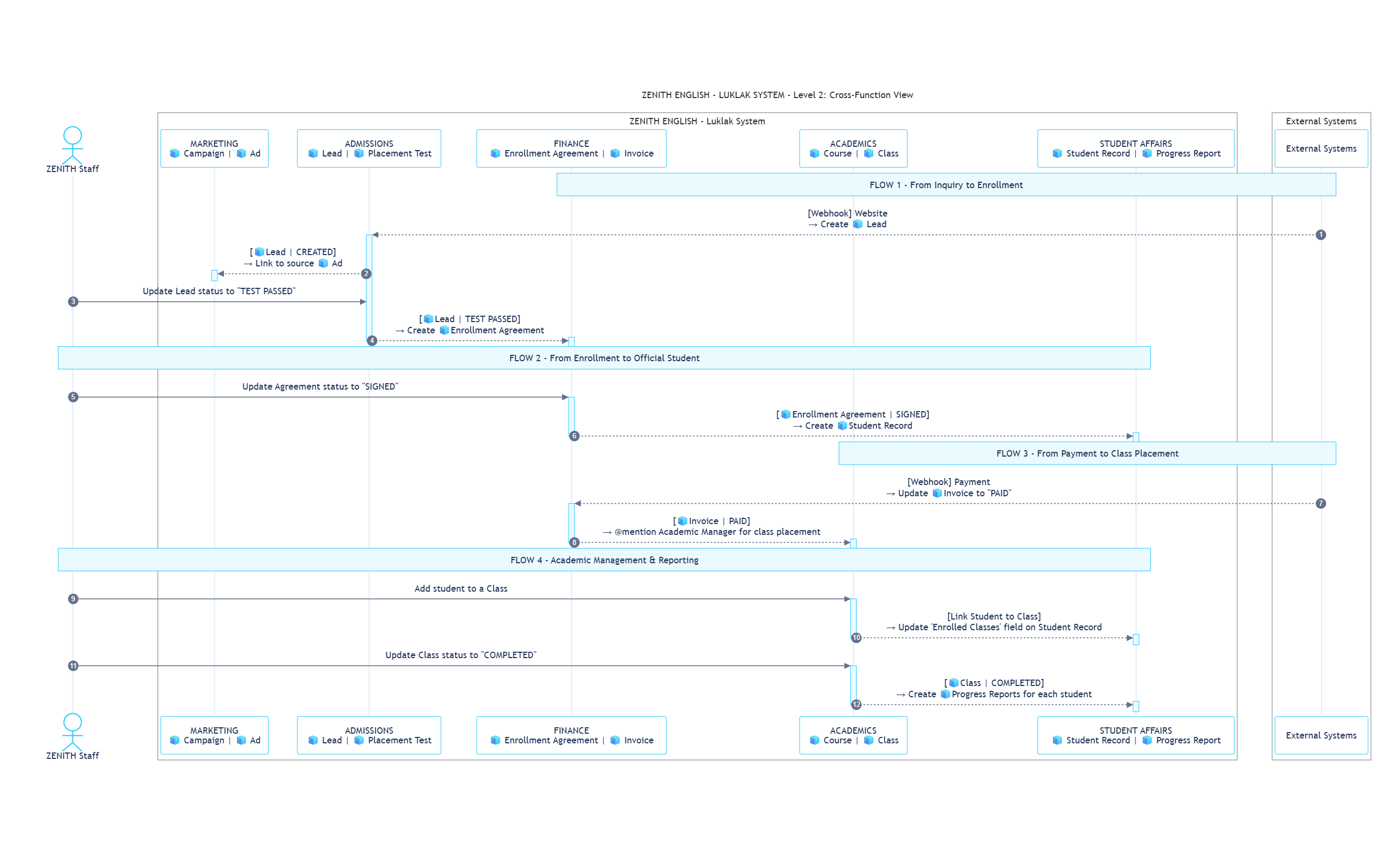
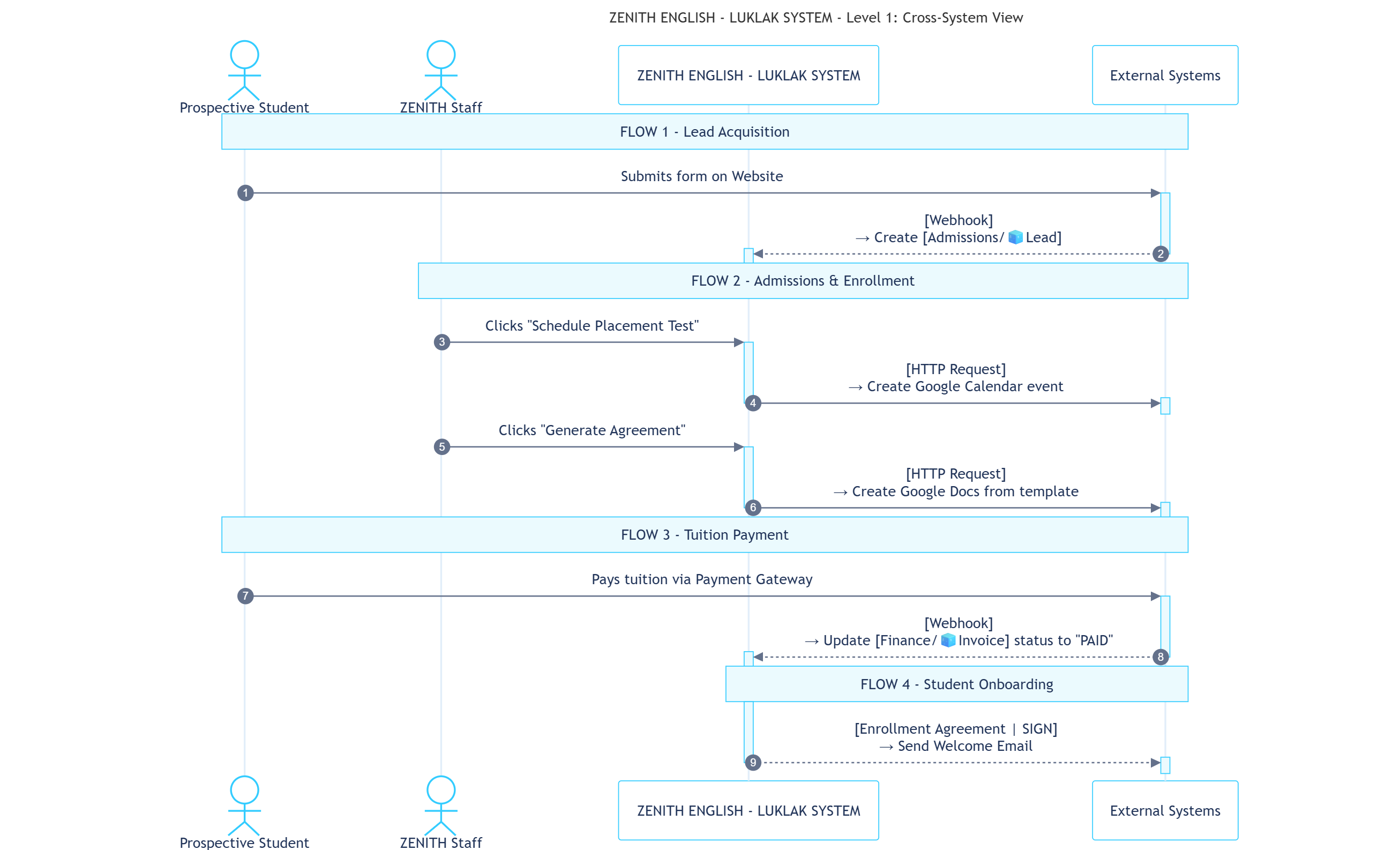
| 1 | CS-01 | Receive Lead from Website | When a form is submitted on the website, a Webhook triggers the creation of an Admissions/🧊Lead and links it to the source Marketing/🧊Ad. |
| 2 | CS-02 | Schedule Test in Google Calendar | An Admissions Counselor clicks a button on a 🧊Lead, sending an HTTP Request to create an event in Google Calendar for the placement test. |
| 4 | CS-03 | Generate Agreement from Template | An Accountant clicks a button on an 🧊Enrollment Agreement, sending an HTTP Request to populate a Google Docs template with student and course data. |
| 6 | CS-04 | Log Payment from Gateway | An external Payment Gateway sends a Webhook upon successful payment, which finds the corresponding Finance/🧊Invoice and updates its status to “Paid”. |
| 7 | CS-05 | Send Welcome Email | When an 🧊Enrollment Agreement status changes to “Signed”, an automated Email is sent to the student with a welcome package and initial instructions. |
Rules that orchestrate and transfer work between different departments inside the Luklak platform.
| Sequence | Rule # | Rule Name | Business Description |
|---|
| 3 | CF-01 | Lead Passed Test -> Create Agreement | A status change on Admissions/🧊Lead to “Test Passed” automatically creates a new Finance/🧊Enrollment Agreement and links it to the lead. |
| 5 | CF-02 | Agreement Signed -> Create Student Record | A status change on Finance/🧊Enrollment Agreement to “Signed” automatically creates a new Student Affairs/🧊Student Record, officially converting the lead to a student. |
| 8 | CF-03 | First Payment Received -> Notify Academics | A status change on the first Finance/🧊Invoice to “Paid” automatically sends a Chat @mention to the Academic Manager role to arrange class placement. |
| 9 | CF-04 | Student Added to Class -> Update Record | When a 🧊Student Record is linked to an Academics/🧊Class, a rule automatically updates the Enrolled Classes field on the 🧊Student Record object. |
| 10 | CF-05 | Class Completed -> Create Progress Reports | A status change on Academics/🧊Class to “Completed” automatically creates a new Student Affairs/🧊Progress Report for each student, assigned to the Teacher. |
ACCESS & GOVERNANCE
This is the highest level of permissions, acting as the “entry ticket” to the entire system and defining a user’s maximum potential authority.
| Privilege Level | Assigned to (at Zenith English) | Permission Description |
|---|
| Owner | CEO | The highest level. Manages billing, can transfer ownership, and holds all Admin privileges. |
| Admin | Center Director, System Administrator | Can configure everything in the system, from Global Settings to user management. |
| App Manager | Heads of Departments (e.g., Head of Admissions, Academic Manager) | A specialized role that can design, edit, and manage Functions 📋. |
| Member | All remaining employees (Counselors, Teachers, Accountants, etc.) | The standard privilege for most users, allowing them to work within the Spaces ⏹️ they are given access to. |
These principles act as a guide for Administrators when assigning access to the “containers” of work and shared assets.
| Item Type | Permission Principle | Rationale & Benefit |
|---|
| 📂 Areas | - Admin: CEO, Center Director - Manager: Head of the respective Area - Member: The respective department’s Group | Creates a focused work environment for each department, reducing clutter and improving navigation efficiency. |
| 👥 Groups | - Manager: Head of the respective department - Member: All members of the Group | Empowers department heads to manage their own team membership, increasing agility and reducing the load on System Admins. |
| 📊Dashboards & Filters | - Admin: The creator, CEO, Center Director - Manager: Relevant Heads of Areas - Member: Shared-with Groups or individuals | Ensures that aggregated data and sensitive business metrics are shared only with the intended audience. |
| 📋 Functions | - Admin: System Administrator, CEO, Center Director - Manager: Users with App Manager privilege - Member: Most employees | Tightly governs core business processes while allowing department heads the flexibility to refine them and enabling all employees to apply them. |
| ⏹️ Spaces | - Admin: Team Lead or Manager (e.g., Academic Manager) - Member: All invited members | Ensures the person with primary responsibility for a workspace (like class management) has full control over it. |
This is the most granular layer of control, defining “who can do what” and “who gets notified about what” for each individual Object within a Space.
| Scheme Type | Selected Scheme for Zenith English | Description & Rationale |
|---|
| Permission Scheme | ”Moderate restriction” | Balances security and collaboration: Everyone in a Space can see that work exists, but only directly assigned users can view details and make updates, protecting sensitive student data. |
| Notification Scheme | ”Notify key actions to direct assignees” | Reduces notification noise: Only important events (status changes, @mentions) trigger alerts for directly involved users, helping staff like teachers and counselors focus on actionable updates. |