> ## Documentation Index
> Fetch the complete documentation index at: https://docs.luklak.com/llms.txt
> Use this file to discover all available pages before exploring further.
# Academic Management Function
**Purpose:** This document defines the **internal** operational logic of the `📋 Function` Academic Management. It details the process from designing a curriculum to completing and archiving a class.
## Why This Matters
This `📋 Function` transforms the management of academics from a manual, disconnected effort on spreadsheets into a streamlined, scalable educational production system. Strategically, it ensures consistent teaching quality across the center and optimizes the use of the most critical resource: teachers. For the Academic Management team, it provides a clear overview of class performance and student progress. For teachers, it eliminates chaos by consolidating all information (schedule, class list, curriculum, attendance) into a single place, allowing them to focus fully on teaching.
## The Big Picture
Architecturally, this system is designed to be the **coordination center** for all teaching and learning activities. It receives input data from the `📋 Finance` Function (via the `🧊 Enrollment Agreement`) and the `📋 Student Affairs` Function (`🧊 Student Record`) to arrange classes. It operates based on three core `🧊 Objects`: `🧊 Course` (the curriculum framework), `🧊 Class` (the actual class), and `🧊 Teacher Profile` (teacher management records). Its key output is student progress data, which is handed over to the `📋 Student Affairs` Function for after-care and consulting on the next study path.
***
### Sneak peek
```expandable theme={null}
🏢 ZENITH ENGLISH (Organization)
│
├── 📂 MARKETING (Area)
│
├── 📂 ADMISSIONS (Area)
│
├── 📂 FINANCE (Area)
│
├── 📂 ACADEMICS (Area) //You are here
│ └── ⏹️ Class Management (Space)
│ └── 📋 Function: Academic Management
│ ├── 🧊 Course
│ ├── 🧊 Class
│ └── 🧊 Teacher Profile
│
└── 📂 STUDENT AFFAIRS (Area)
```
## OBJECT RELATIONSHIPS
| Relationship Type | Connection | Description |
| :------------------------------------ | :-------------------------------- | :-------------------------------------------------------------------------------------------------------------------------------------------------------------------------------------------------------------------------------------------------- |
| **Parent-Child** | `🧊 Course` → `🧊︎ Class` | Each `🧊 Course` (curriculum framework) can have multiple `🧊 Classes` (actual classes) opened. This is the core breakdown relationship, allowing the reuse of one curriculum for many different classes. |
| **Object Reference** | `🧊 Class` → `🧊 Teacher Profile` | Each `🧊 Class` is assigned to a specific `🧊 Teacher Profile`. This relationship helps manage teaching assignments and calculate teacher workloads. |
| **Object Reference (Cross-Function)** | `🧊 Class` → `🧊 Student Record` | A `🧊 Class` will link to multiple `🧊 Student Records` (from the Student Affairs Dept.) to form the class list. This is a critical connection point, bringing students into the actual learning environment, consistent with the global data flow. |
***
## OBJECT TYPES, WORKFLOWS & DATA FIELDS
### 1. 🧊 Course (Standard Object)
* **Process Description**: This is the "parent" object used to define and standardize all curricula at the center. It acts as a **blueprint**, containing all information about objectives, curriculum, duration, and tuition for a course. A `Course` is created once and can be reused to open multiple `Classes`.
* **Example**: The course "IELTS 7.0 Masterclass", course code `AC-001`, defines the IELTS 7.0 output exam preparation program with 36 sessions and a standard tuition fee of 25,000,000 VND.
**Course Workflow**
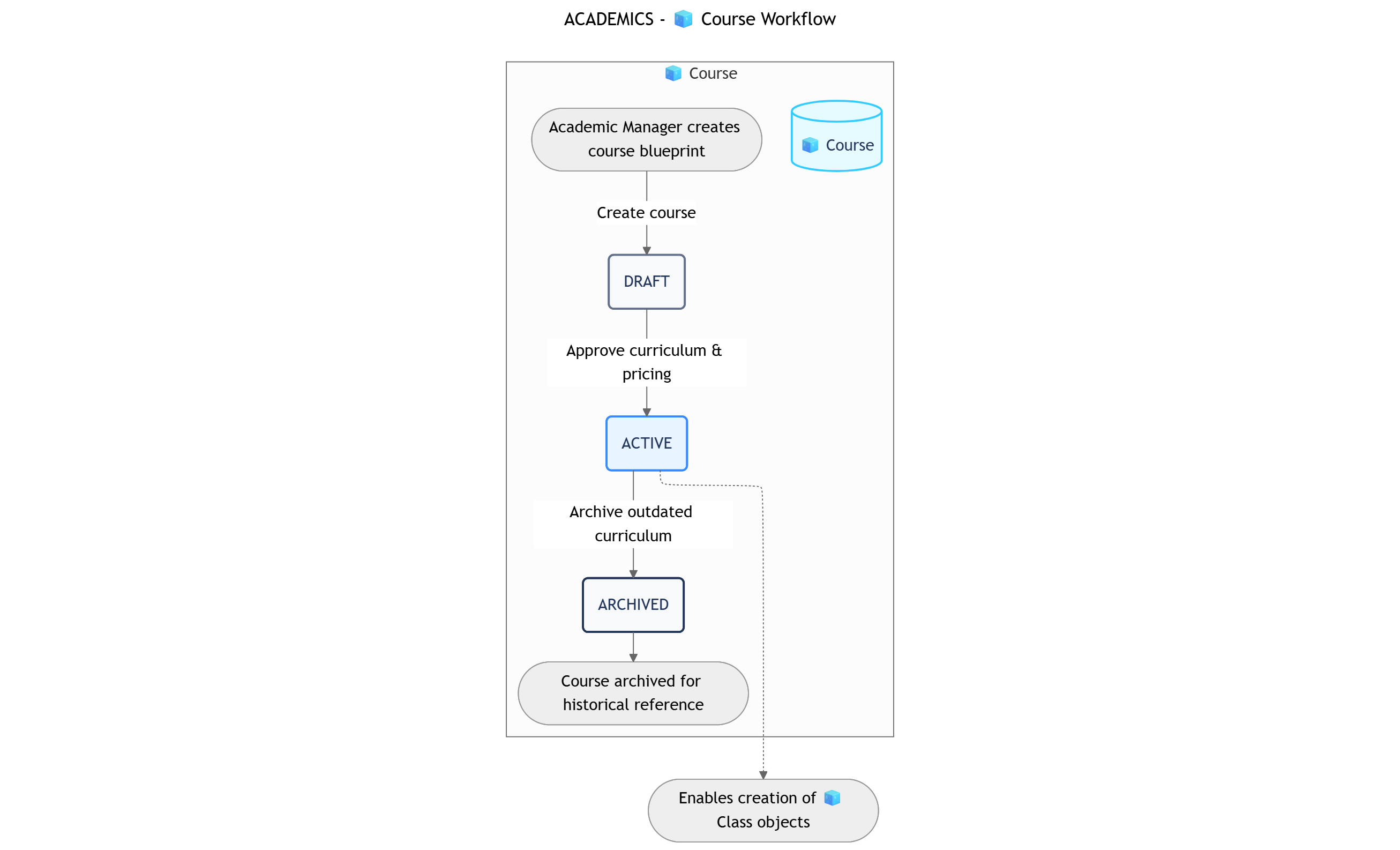 ```
DRAFT → ACTIVE → ARCHIVED
```
| Status | Business Logic | Advanced Settings |
| :-------------- | :--------------------------------------------------------------------------------------------------------------------------------------------------------- | :------------------------------------------------------------------------------------------------------------------------------------------- |
| **1. DRAFT** | The Academic Manager is in the process of drafting the curriculum, learning objectives, and pricing. Courses in this state cannot be used to open classes. | **Transition Permissions**: Academic Manager.
```
DRAFT → ACTIVE → ARCHIVED
```
| Status | Business Logic | Advanced Settings |
| :-------------- | :--------------------------------------------------------------------------------------------------------------------------------------------------------- | :------------------------------------------------------------------------------------------------------------------------------------------- |
| **1. DRAFT** | The Academic Manager is in the process of drafting the curriculum, learning objectives, and pricing. Courses in this state cannot be used to open classes. | **Transition Permissions**: Academic Manager.
**Data Input**: All academic and financial data fields should be completely filled out. |
| **2. ACTIVE** | The course has been approved and is officially in use. From this state, staff can create child `Class` objects from this `Course`. | **Transition Permissions**: Academic Manager.
**Key Action**: Unlocks the feature to create `🧊︎ Class` Sub-Objects. |
| **3. ARCHIVED** | The course is no longer used to open new classes (e.g., the curriculum is outdated). It is archived for historical reference purposes. | **Transition Permissions**: Academic Manager.
**This is a terminal status.** |
**Data Field Groups**
| Group | Field Name (Type) | Notes |
| :-------------------------------------- | :--------------------------------------------------------------------------------------------------------------------------------------------------- | :----------------------------------------------- |
| **Basic Information** *(5 Fields)* | Course Name (Text), Course Code (Text), Level (Dropdown: Beginner, Intermediate...), Short Description (Paragraph), Cover Image (Image) | The main identifying information of the course. |
| **Academic Details** *(4 Fields)* | Learning Objectives (Paragraph), Total Sessions (Number), Curriculum & Materials (File Upload), Assessment Method (Dropdown: Final Exam, Project...) | Defines the teaching content and structure. |
| **Commercial Information** *(2 Fields)* | Standard Tuition Fee (Currency), Applicable Promotions (Text) | Information related to pricing and sales. |
| **Management** *(2 Fields)* | Manager in Charge (User), Created Date (DateTime) | Tracks the responsible person and creation time. |
| **Total: 13 Fields** | | |
### 2. 🧊︎ Class (Sub-Object)
* **Process Description**: This is the "child" object, an **executable instance** of a `Course`. If a `Course` is a car's blueprint, the `Class` is the actual car on the road. This object manages all daily activities: specific schedules, teacher assignments, student lists, attendance, and direct tracking. This is the main working object for Academic Managers and Teachers.
* **Example**: The class `IELTS7.0-C01` is an instance of the course `AC-001 IELTS 7.0 Masterclass`, starting on September 1, 2025, taught by teacher John Doe, on Monday-Wednesday-Friday evenings.
**Class Workflow**
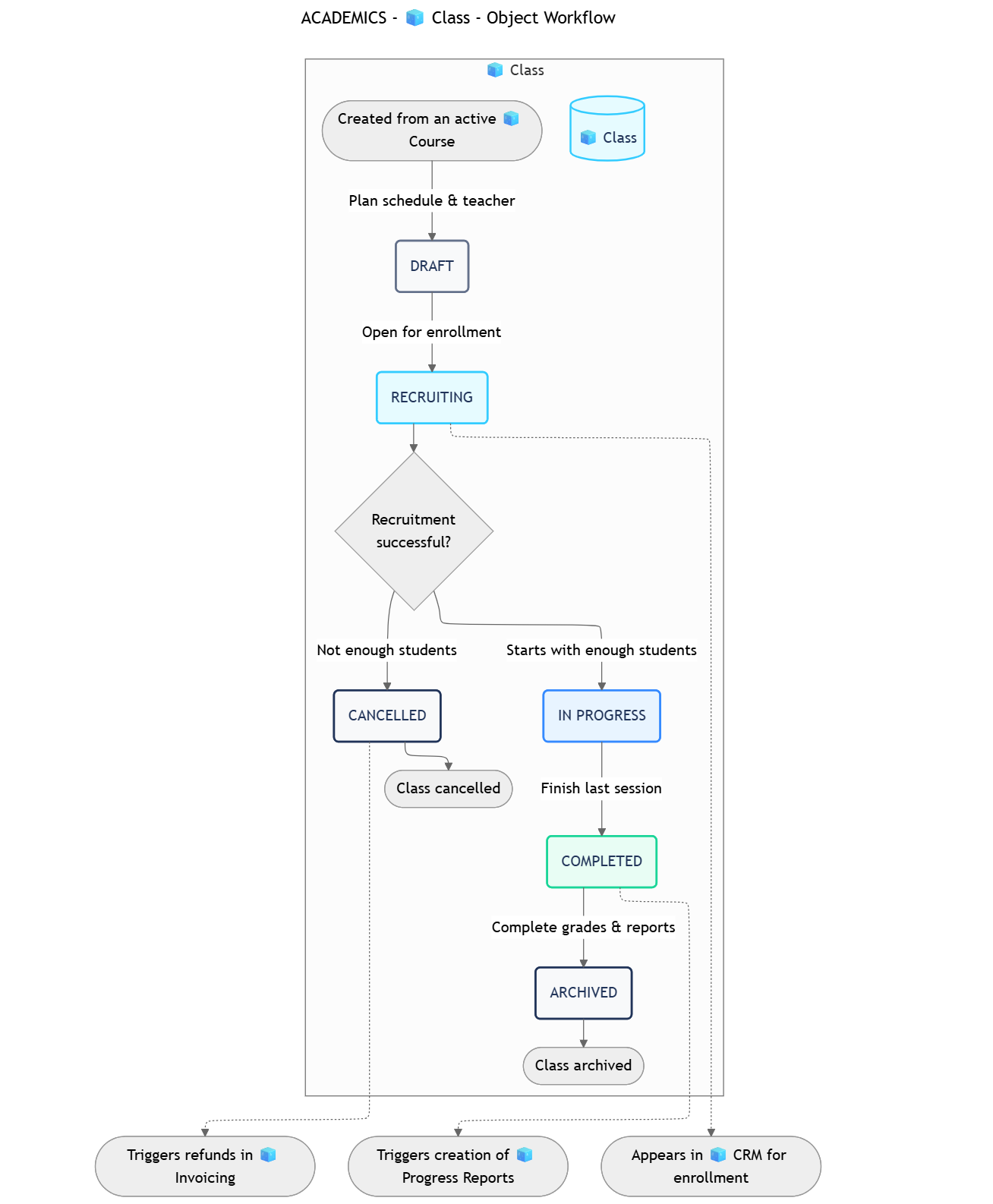 ```
┌──────────> CANCELLED
│
DRAFT → RECRUITING → IN PROGRESS → COMPLETED → ARCHIVED
```
| Status | Business Logic | Advanced Settings & Cross-Function Links |
| :----------------- | :------------------------------------------------------------------------------------------------------------------------------------------------------------------------------------ | :--------------------------------------------------------------------------------------------------------------------------------------------------------------------------------------------------------------------------------------------------------------------------------------------------------------------------------------- |
| **1. DRAFT** | The Academic Manager is planning the details for the class: arranging the schedule, selecting a prospective teacher. The class in this state is not yet visible to other departments. | **Transition Permissions**: Academic Manager.
```
┌──────────> CANCELLED
│
DRAFT → RECRUITING → IN PROGRESS → COMPLETED → ARCHIVED
```
| Status | Business Logic | Advanced Settings & Cross-Function Links |
| :----------------- | :------------------------------------------------------------------------------------------------------------------------------------------------------------------------------------ | :--------------------------------------------------------------------------------------------------------------------------------------------------------------------------------------------------------------------------------------------------------------------------------------------------------------------------------------- |
| **1. DRAFT** | The Academic Manager is planning the details for the class: arranging the schedule, selecting a prospective teacher. The class in this state is not yet visible to other departments. | **Transition Permissions**: Academic Manager.
**Data Input**: Schedule, teacher, maximum class size must be filled. |
| **2. RECRUITING** | The class is open for enrollment. The class is ready to accept student registrations. | **Transition Permissions**: Academic Manager.
**Cross-Function Link**: A class in this state will appear in the selection list of the `📋 Function: CRM` (Admissions Dept.) for them to enroll students. |
| **3. IN PROGRESS** | The class has officially started its first session. | **Transition Permissions**: Academic Manager.
**Automation**: Can lock the student list (only allowing additions/removals with special permission) to stabilize class size. Sends a "Welcome to the class" notification to all students. |
| **4. COMPLETED** | The class has finished its last session. | **Transition Permissions**: Academic Manager, Teacher.
**Cross-Function Automation (CF-05)**: Changing to this state **automatically triggers** the creation of child `🧊︎ Progress Report` objects in the `📋 Function: Student Affairs` for each student in the class, and assigns them to the responsible teacher to fill out. |
| **5. ARCHIVED** | All reports are completed, and grades have been entered. The class is closed and archived. | **Transition Permissions**: Academic Manager.
**This is a successful terminal status.** |
| **6. CANCELLED** | The class was cancelled (e.g., not enough students). | **Transition Permissions**: Academic Manager.
**Automation**: Sends a notification to registered students and to the `📋 Function: Invoicing` (Finance Dept.) to process refunds. |
**Data Field Groups**
| Group | Field Name (Type) | Notes |
| :----------------------------------- | :------------------------------------------------------------------------------------------------------------------------------ | :------------------------------------------------------------------------------------------------------------ |
| **Basic Information** *(6 Fields)* | Class Name (Text - Auto-generated), Class Code (Text), Start Date (Date), End Date (Date), Schedule (Text), Location (Dropdown) | Identifying and time information for the class. |
| **Resource Assignment** *(3 Fields)* | **Main Teacher (Object Reference)**, Teaching Assistant (User), **Student List (Multi-Object Reference)** | Reference fields connecting the `Class` to the relevant `🧊 Teacher Profile` and `🧊 Student Records`. |
| **Operations** *(4 Fields)* | Max Size (Number), Current Size (Formula), **Attendance Sheet (Data Table)**, Operational Notes (Paragraph) | Data for daily management and tracking. The attendance sheet is a Data Table as designed at the global level. |
| **Financials** *(2 Fields)* | Teacher Pay Rate (Currency), Total Revenue (Formula) | Automatically calculated fields for reporting purposes. |
| **Total: 15 Fields** | | |
### 3. 🧊 Teacher Profile (Standard Object)
* **Process Description**: This object acts as a **centralized master data repository** for the entire teaching staff. It is not just a user account, but a complete professional profile, including personal information, skills, certifications, work schedule, salary, and teaching performance. This allows the Academic Manager to assign teachers to classes in the most optimal and scientific way.
* **Example**: Teacher profile for John Doe, code GV-007, specialized in IELTS/TOEFL, currently assigned to 3 classes, and has availability on Tuesday and Thursday afternoons.
**Teacher Profile Workflow**
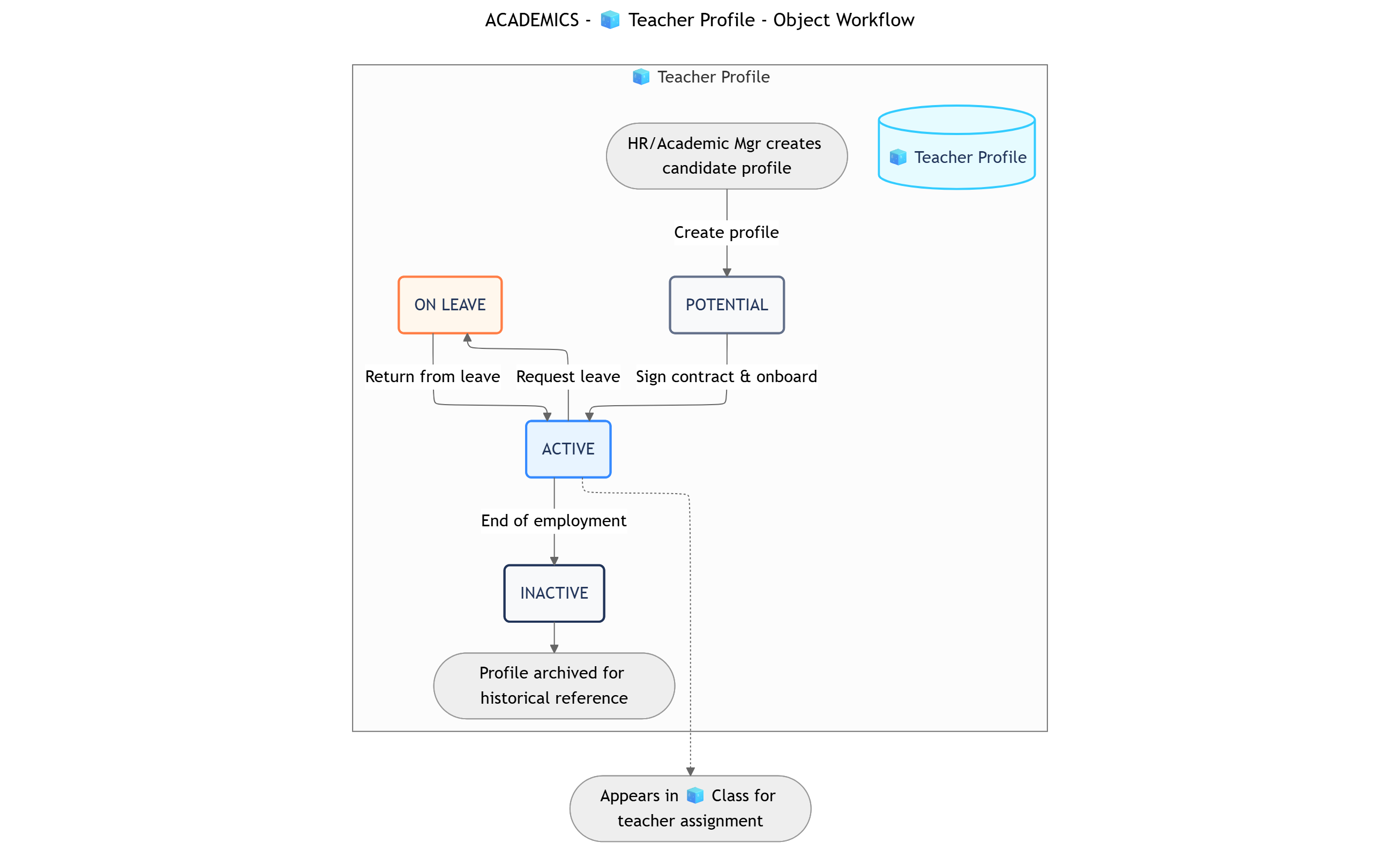 ```
POTENTIAL → ACTIVE ↔ ON LEAVE
↓
INACTIVE
```
| Status | Business Logic | Advanced Settings |
| :--------------- | :--------------------------------------------------------------------------------------------------------------------- | :-------------------------------------------------------------------------------------------------------------------------------------------------------------------------------------------------------------- |
| **1. POTENTIAL** | The candidate has passed the interview and is in the contract signing preparation phase. The profile is being created. | **Transition Permissions**: Academic Manager, HR.
```
POTENTIAL → ACTIVE ↔ ON LEAVE
↓
INACTIVE
```
| Status | Business Logic | Advanced Settings |
| :--------------- | :--------------------------------------------------------------------------------------------------------------------- | :-------------------------------------------------------------------------------------------------------------------------------------------------------------------------------------------------------------- |
| **1. POTENTIAL** | The candidate has passed the interview and is in the contract signing preparation phase. The profile is being created. | **Transition Permissions**: Academic Manager, HR.
**Data Input**: Basic information, CV, and certifications need to be uploaded. |
| **2. ACTIVE** | The teacher is an official, active member of the staff and is ready to be assigned to classes. | **Transition Permissions**: Academic Manager.
**Key Action**: A teacher in this state will appear in the selection list when assigning to a `Class`. |
| **3. ON LEAVE** | The teacher is on a leave of absence (summer break, sick leave...). | **Transition Permissions**: Academic Manager.
**Rule**: Temporarily hides this teacher from the list for new class assignments. |
| **4. INACTIVE** | The teacher is no longer working with the center. | **Transition Permissions**: Academic Manager.
**Rule**: The profile is archived, cannot be assigned, but is kept for historical reference and final payroll calculations. **This is a terminal status.** |
**Data Field Groups**
| Group | Field Name (Type) | Notes |
| :--------------------------------------- | :-------------------------------------------------------------------------------------------------------------- | :----------------------------------------------------------------------------------------------------------------------------------------- |
| **Personal Information** *(4 Fields)* | Full Name (Text), Email (Email), Phone Number (Phone), **Linked User Account (User)** | The "Linked User Account" field is used to connect this profile to the teacher's actual login account. |
| **Professional Profile** *(4 Fields)* | **Specialization (Tags)**, Diplomas/Certificates (File Upload), CV (File Upload), Self-Introduction (Paragraph) | The "Specialization" field using Tags (IELTS, TOEFL, Communication...) allows for very fast filtering and searching for suitable teachers. |
| **Operational Information** *(4 Fields)* | Contract Type (Dropdown), Standard Pay Rate (Currency), Availability (Text), **Current Classes (Formula)** | "Current Classes" is a field that automatically counts the number of `Classes` in the `IN PROGRESS` state assigned to this teacher. |
| **Performance Evaluation** *(2 Fields)* | Avg. Student Rating (Formula), Class Completion Rate (Formula) | Metrics are automatically calculated from class data, providing an objective view of performance. |
| **Total: 14 Fields** | | |
## AUTOMATIONS
This diagram shows the chronological sequence of all automation rules that touch the Academic Management function, illustrating the complete data flow from class setup to student reporting.
You can [open this canvas view](https://mermaid.ink/svg/pako:eNqNV8tu20YU_ZULFrASVHL0lkwUASSasg3LD5hK2ibqYkSO5IHIGWU4dOw8tl100QL9gS677bLfkx9oP6F3hg9RlpRaC0Gc-z733DvUR8sXAbVsq1arTbkv-Jwt7CkHULc0ojZIGiT3xfNrIhmZhTQ2KgArySIiHxwRCmlD5ZtWpz8YjSobwgm9V4VCs9Fqd442FYZCBlQWKr3W8LjwETJOd3uPKSYblIM7PbRrZ2JFpWJl6ag96ox6mXRG_OVCioQHRmQ-mSgijA-Xi63zNF4uKTvjQtH9RWopWhVCdzgajNyycLP8VstxiqDEV0LuyiYVGMvdRvsTMuJxGVe36bqjo6LOdwnlPr1MolkprcfR2R1RTPD_ST7X2ld_KMRqf6YhmdFwKO43zMu5FgpfY5DW2R8jZgtOwkLWbfca_eGGbLetGZccq2NGFpJEGfOYCim8cS_PJqfgXp6Mz7xTqMH41fl4cA7ej97EvdDP9I6G0LJh4JOARsyHC8LJAoeMKxgl3NfAwWtG38OzG3rHYho8z3BNlOCmO1NeailcnNwAiR_7k2WViXOqVSaU-Ldr85m4B7mYkWfNTqcK66_6Yef5V9NLzc0oExw3n60ISp0bTwf5948_fwFHJDKme_TGhd4_f_8KTkjieLfmxDsva05IvNyt6KX1ffntL_CwwiAJ8_opD55U7hXuOVkUuCefq4kJs1P3qYHce1xRSC_wHmJFoz2RTpyxjnQixAJJ5ZCQ6p23W9e9MLoubrAQToii78nDVk6XuHFA3GHeWEQVKWPDaHz1PTSQkqYD4FGVrOAgJwkMYj0Huu-pB7Sr1V6-_NbYvh0xTnACXujenPE7wXwKn-B6cHb803cz-eLll59_hxs9JrHK_F-HxE9pNJcigsxB6jug2dKgms15zvhTB0S-2OBIqqUcxyJ1d4A16wTXpNYmqGuSROZgkpul0GCdWubON65Wkq5AIblimOthKTssZYY-N4NgkzBITjgN4ItXqwBVS4G8B-5DnKsokXuv7GluKR663zrD0NsdRZyq2J2so03sqKeSQCPtcinC0IB-AMdEEZPPNrqDIIA4s8EcK7n9mMWqAnNGw2CjdGP0tqwFW5XfUJ-EfhLqtCtOIqVW9dgHWsFcKhOhcAZwwVGe0MomrqaWwjvmRgOdlen72n8asCh1MJ8TJmNDyPwMU8AbQttOLffy5mo8do-n1haoGO9pQOOaqeK0ZUC3EOhjnLkHuFpRaS48TUtHRFHCmU_Wm1Jfd5kqUdC363UYXKyHGd3WilYUfArAuaX-skQln3BDUMNaGsN7pm7x3kZy68hKBPncb0yCo8F0bomGI2IcL8y1y6mFZ1RfKRokRZYUE1SajjiaJlY6bD_kqD0eCed057lB79EG2pjmkPlLjO6hHC8Y3IiMhPHUglmiVI5aXoFB_O3QSFLLEibawSwJl0DN-jOQ-ObywTe6zK-uLWN3vNVo9L67-frs65PWLnYn9nwVUnNzHyDMK4HbmS-26844GyuikjjlpXN1cT12J2tibk5Bfg2nxE6jfYLCaGujaa1rKRYSaZFlEgPjj8fkqTNgVa2FZIFlK5nQqhVRiTDjo_VRa08t8-9gatn4M6BzkoRKl_EZzfBqeiNElFviS_fi1rLn2A58SgwO2etTcYobwrzOJVxZdqPe7Rsvlv3Rurfsdv-w2-_Ve91mq9VsH3XxQrUeLLt12Gu3u81es9Xrt7r1brf_uWp9MIHrh_2jdq_T77YbvcZRv9FvfP4PewYeLQ) for better readability
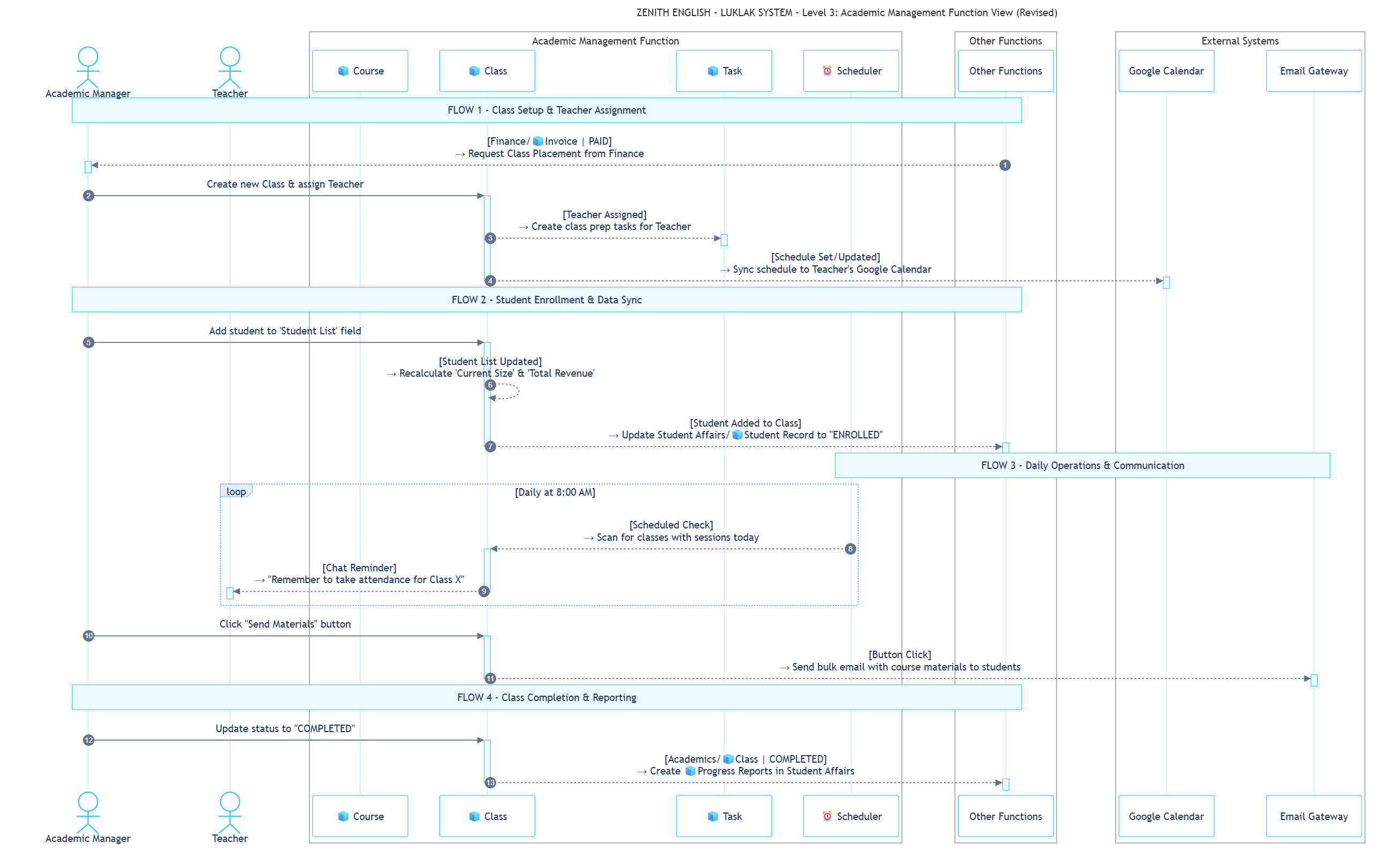 These rules run entirely inside the Academic Management `⏹️ Space` to increase efficiency for the Academic Manager and Teachers.
| ID | Rule Name | Trigger | Action | Description |
| :-------- | :---------------------- | :---------------------------------------------------------- | :--------------------------------------------- | :-------------------------------------------------------------------------------------------------------------------------------------------------- |
| **AC-01** | Calculate Class Metrics | **Update**: `Student List` field on `🧊 Class` is updated. | **Update**: `🧊 Class` | When a student is added or removed, the system automatically recalculates the `Current Size` and `Total Revenue` fields. |
| **AC-02** | Assign Class Prep Tasks | **Update**: `Main Teacher` field on `🧊 Class` is assigned. | **Create**: `☑️ Task` | When a teacher is assigned, the system auto-creates tasks for them, e.g., "Draft welcome email," "Review curriculum," due 3 days before start date. |
| **AC-03** | Attendance Reminder | **Scheduled**: Runs at 8:00 AM daily. | **Send Chat**: Sends a message to the teacher. | The system scans all `IN PROGRESS` classes with a session scheduled for the day and sends a reminder to the teacher to take attendance. |
These rules describe critical data and task handoffs between the Academic Management `⏹️ Space` and other departments, fully consistent with the global blueprint.
| ID | Direction | Rule Name | Trigger | Action & Description |
| :-------- | :--------- | :------------------------------ | :----------------------------------------------------------------------------------- | :------------------------------------------------------------------------------------------------------------------------------------------------------------------------------------------------------------------------------- |
| **CF-04** | `Incoming` | Receive Class Placement Request | **Status Change**: `Finance/🧊 Invoice` to "PAID". | **Send Chat**: Sends an @mention to the `Academic Manager` role, attaching the `Student Record` of the student who just paid. **Description**: The official signal from Finance that a student is ready to be placed in a class. |
| **CF-05** | `Outgoing` | Trigger Progress Reports | **Status Change**: `Academics/🧊 Class` to "COMPLETED". | **Create**: Creates a `Student Affairs/🧊 Progress Report` for each student in the class. **Description**: The core task handoff from Academics to Student Affairs, ensuring the student's journey is fully documented. |
| **CF-06** | `Incoming` | Update Academic Status | **Update**: A `Student Record` is added to the `Student List` field of a `🧊 Class`. | **Update**: Updates a field on the `Student Affairs/🧊 Student Record` to "Enrolled". **Description**: Keeps the student's central record in Student Affairs always up-to-date. |
These rules connect the Academic Management function with platforms outside of Luklak.
| ID | Rule Name | Trigger | Action & Description |
| :-------- | :---------------------------------------- | :------------------------------------------------------------------- | :------------------------------------------------------------------------------------------------------------------------------------------------------------------------------------------------------------------------- |
| **CS-06** | Sync Teaching Schedule to Google Calendar | **Update**: A `Class` is assigned a teacher or its schedule changes. | **HTTP Request**: Creates/updates a recurring event series on the assigned teacher's **Google Calendar**. **Description**: A huge quality-of-life benefit that keeps the teacher's personal calendar automatically synced. |
| **CS-07** | Send Course Materials | **Button Click**: "Send Materials" button on a `🧊 Class`. | **Send Email**: Sends a bulk **Email** to all students in the class, attaching files from the `Curriculum & Materials` field of the parent `Course`. **Description**: Automates the distribution of learning materials. |
```guidejar theme={null}
# How to Assign a Teacher to a New Class
This guide walks through the process of assigning a primary teacher to a class that is currently in the "DRAFT" stage. This action will also automatically sync the schedule to their Google Calendar.
## Section 1: Locate the Draft Class
! Important: You can only assign teachers to classes that are in the "DRAFT" or "RECRUITING" status.
1. Navigate to the "All Classes" Workview.

2. Use the filters to find the class you want to assign a teacher to. Click on it to open the detail view.
* Tip: Filter by Status = "DRAFT" to see all unassigned classes.
## Section 2: Assign the Teacher
1. In the `🧊 Class` detail view, find the **Main Teacher** field in the "Resource Assignment" section.

2. Click on the field and search for the `🧊 Teacher Profile` you wish to assign.
* The list will only show teachers who are currently "ACTIVE".
3. Select the desired teacher from the list.

4. The system will automatically save the change.
* This will trigger automation **CS-06** to sync the schedule to the teacher's Google Calendar and **AC-02** to create their prep tasks.
```
| Workview | Description | Data Configuration |
| :----------------------------- | :------------------------------------------------------------------------------------------------------------------------------------- | :------------------------------------------------------------------------------------------------------------------------------------------ |
| 1. **Class Schedule Calendar** | A visual calendar interface showing all `Classes` by their start and end dates. Helps the Academic Manager avoid scheduling conflicts. | All `🧊 Class` objects, color-coded by `Status` (e.g., Recruiting, In Progress). |
| 2. **Teacher Master List** | A comprehensive table view showing all `Teacher Profiles`. This is the main resource management screen. | All `🧊 Teacher Profile` objects, with key columns like Specialization, Current Classes, Status. Can be quickly filtered by specialization. |
| 3. **Course Catalog** | Displays `Courses` as cards, like a "product catalog" for the academic department. | All `🧊 Course` objects, grouped by Level (Beginner, Intermediate...). |
This dashboard is designed for the `Academic Manager` role to monitor the department's operational performance.
| Gadget | Data | Description |
| :--------------------------------------- | :------------------------------------------------------------------------------------------ | :----------------------------------------------------------------------------------------------------------------------------- |
| 1. **Class Fill Rate (Gauge)** | `SUM(Current Size) / SUM(Max Size)` for all classes in `RECRUITING` state. | Provides a quick indicator of how well upcoming classes are being filled, reflecting the effectiveness of the Admissions team. |
| 2. **Teacher Workload (Bar Chart)** | Counts the number of `IN PROGRESS` classes assigned to each `ACTIVE` teacher. | Helps the Academic Manager balance workloads, prevent teacher burnout, and identify who is available for new classes. |
| 3. **Upcoming Class Pipeline (Counter)** | Counts the number of `Classes` in `RECRUITING` state with a start date in the next 30 days. | A simple forward-looking metric to ensure there are enough "products" ready to sell. |
| Filter | Criteria | Reminder |
| :----------------------------------- | :------------------------------------------------------------------------------------------ | :---------------------------------------------------------------------------------------------------------------------------- |
| 1. **At-Risk Classes** | `Status` = "RECRUITING" AND `Current Size` \< 5 AND `Start Date` is within the next 7 days. | **Daily at 10:00 AM** to the `Academic Manager` and `Admissions Manager` to take timely action to boost enrollment. |
| 2. **Find Available IELTS Teachers** | `Status` = "ACTIVE" AND `Specialization` contains "IELTS" AND `Current Classes` \< 3. | None. This is a filter for the Academic Manager to use manually when needing to quickly find a teacher for a new class. |
| 3. **Classes Awaiting Reports** | `Status` = "COMPLETED" AND has linked `Progress Reports` that are not yet "Submitted". | **Weekly at 4:00 PM on Friday** to the assigned `Main Teacher` of that class to remind them to complete administrative tasks. |
## ROLES, PERMISSIONS & NOTIFICATIONS
These roles are specific to the Academic Management function and define the responsibilities within this operational area.
| Role | Description | Permissions & Notifications |
| :------------------------ | :-------------------------------------------------------------------------------------------------------------------------------- | :-------------------------------------------------------------------------------------------------------------------------------------------------------------------------------------------------------------------------------------------------------------------------------------------------------------------------------------------------------------------- |
| **1. Academic Manager** | Responsible for the entire creation, management, and operation of `Courses` and `Classes`. The main coordinator of this function. | **Permissions**: Full control (Create, Edit, Delete) over all three objects: `🧊 Course`, `🧊 Class`, and `🧊 Teacher Profile`.
These rules run entirely inside the Academic Management `⏹️ Space` to increase efficiency for the Academic Manager and Teachers.
| ID | Rule Name | Trigger | Action | Description |
| :-------- | :---------------------- | :---------------------------------------------------------- | :--------------------------------------------- | :-------------------------------------------------------------------------------------------------------------------------------------------------- |
| **AC-01** | Calculate Class Metrics | **Update**: `Student List` field on `🧊 Class` is updated. | **Update**: `🧊 Class` | When a student is added or removed, the system automatically recalculates the `Current Size` and `Total Revenue` fields. |
| **AC-02** | Assign Class Prep Tasks | **Update**: `Main Teacher` field on `🧊 Class` is assigned. | **Create**: `☑️ Task` | When a teacher is assigned, the system auto-creates tasks for them, e.g., "Draft welcome email," "Review curriculum," due 3 days before start date. |
| **AC-03** | Attendance Reminder | **Scheduled**: Runs at 8:00 AM daily. | **Send Chat**: Sends a message to the teacher. | The system scans all `IN PROGRESS` classes with a session scheduled for the day and sends a reminder to the teacher to take attendance. |
These rules describe critical data and task handoffs between the Academic Management `⏹️ Space` and other departments, fully consistent with the global blueprint.
| ID | Direction | Rule Name | Trigger | Action & Description |
| :-------- | :--------- | :------------------------------ | :----------------------------------------------------------------------------------- | :------------------------------------------------------------------------------------------------------------------------------------------------------------------------------------------------------------------------------- |
| **CF-04** | `Incoming` | Receive Class Placement Request | **Status Change**: `Finance/🧊 Invoice` to "PAID". | **Send Chat**: Sends an @mention to the `Academic Manager` role, attaching the `Student Record` of the student who just paid. **Description**: The official signal from Finance that a student is ready to be placed in a class. |
| **CF-05** | `Outgoing` | Trigger Progress Reports | **Status Change**: `Academics/🧊 Class` to "COMPLETED". | **Create**: Creates a `Student Affairs/🧊 Progress Report` for each student in the class. **Description**: The core task handoff from Academics to Student Affairs, ensuring the student's journey is fully documented. |
| **CF-06** | `Incoming` | Update Academic Status | **Update**: A `Student Record` is added to the `Student List` field of a `🧊 Class`. | **Update**: Updates a field on the `Student Affairs/🧊 Student Record` to "Enrolled". **Description**: Keeps the student's central record in Student Affairs always up-to-date. |
These rules connect the Academic Management function with platforms outside of Luklak.
| ID | Rule Name | Trigger | Action & Description |
| :-------- | :---------------------------------------- | :------------------------------------------------------------------- | :------------------------------------------------------------------------------------------------------------------------------------------------------------------------------------------------------------------------- |
| **CS-06** | Sync Teaching Schedule to Google Calendar | **Update**: A `Class` is assigned a teacher or its schedule changes. | **HTTP Request**: Creates/updates a recurring event series on the assigned teacher's **Google Calendar**. **Description**: A huge quality-of-life benefit that keeps the teacher's personal calendar automatically synced. |
| **CS-07** | Send Course Materials | **Button Click**: "Send Materials" button on a `🧊 Class`. | **Send Email**: Sends a bulk **Email** to all students in the class, attaching files from the `Curriculum & Materials` field of the parent `Course`. **Description**: Automates the distribution of learning materials. |
```guidejar theme={null}
# How to Assign a Teacher to a New Class
This guide walks through the process of assigning a primary teacher to a class that is currently in the "DRAFT" stage. This action will also automatically sync the schedule to their Google Calendar.
## Section 1: Locate the Draft Class
! Important: You can only assign teachers to classes that are in the "DRAFT" or "RECRUITING" status.
1. Navigate to the "All Classes" Workview.

2. Use the filters to find the class you want to assign a teacher to. Click on it to open the detail view.
* Tip: Filter by Status = "DRAFT" to see all unassigned classes.
## Section 2: Assign the Teacher
1. In the `🧊 Class` detail view, find the **Main Teacher** field in the "Resource Assignment" section.

2. Click on the field and search for the `🧊 Teacher Profile` you wish to assign.
* The list will only show teachers who are currently "ACTIVE".
3. Select the desired teacher from the list.

4. The system will automatically save the change.
* This will trigger automation **CS-06** to sync the schedule to the teacher's Google Calendar and **AC-02** to create their prep tasks.
```
| Workview | Description | Data Configuration |
| :----------------------------- | :------------------------------------------------------------------------------------------------------------------------------------- | :------------------------------------------------------------------------------------------------------------------------------------------ |
| 1. **Class Schedule Calendar** | A visual calendar interface showing all `Classes` by their start and end dates. Helps the Academic Manager avoid scheduling conflicts. | All `🧊 Class` objects, color-coded by `Status` (e.g., Recruiting, In Progress). |
| 2. **Teacher Master List** | A comprehensive table view showing all `Teacher Profiles`. This is the main resource management screen. | All `🧊 Teacher Profile` objects, with key columns like Specialization, Current Classes, Status. Can be quickly filtered by specialization. |
| 3. **Course Catalog** | Displays `Courses` as cards, like a "product catalog" for the academic department. | All `🧊 Course` objects, grouped by Level (Beginner, Intermediate...). |
This dashboard is designed for the `Academic Manager` role to monitor the department's operational performance.
| Gadget | Data | Description |
| :--------------------------------------- | :------------------------------------------------------------------------------------------ | :----------------------------------------------------------------------------------------------------------------------------- |
| 1. **Class Fill Rate (Gauge)** | `SUM(Current Size) / SUM(Max Size)` for all classes in `RECRUITING` state. | Provides a quick indicator of how well upcoming classes are being filled, reflecting the effectiveness of the Admissions team. |
| 2. **Teacher Workload (Bar Chart)** | Counts the number of `IN PROGRESS` classes assigned to each `ACTIVE` teacher. | Helps the Academic Manager balance workloads, prevent teacher burnout, and identify who is available for new classes. |
| 3. **Upcoming Class Pipeline (Counter)** | Counts the number of `Classes` in `RECRUITING` state with a start date in the next 30 days. | A simple forward-looking metric to ensure there are enough "products" ready to sell. |
| Filter | Criteria | Reminder |
| :----------------------------------- | :------------------------------------------------------------------------------------------ | :---------------------------------------------------------------------------------------------------------------------------- |
| 1. **At-Risk Classes** | `Status` = "RECRUITING" AND `Current Size` \< 5 AND `Start Date` is within the next 7 days. | **Daily at 10:00 AM** to the `Academic Manager` and `Admissions Manager` to take timely action to boost enrollment. |
| 2. **Find Available IELTS Teachers** | `Status` = "ACTIVE" AND `Specialization` contains "IELTS" AND `Current Classes` \< 3. | None. This is a filter for the Academic Manager to use manually when needing to quickly find a teacher for a new class. |
| 3. **Classes Awaiting Reports** | `Status` = "COMPLETED" AND has linked `Progress Reports` that are not yet "Submitted". | **Weekly at 4:00 PM on Friday** to the assigned `Main Teacher` of that class to remind them to complete administrative tasks. |
## ROLES, PERMISSIONS & NOTIFICATIONS
These roles are specific to the Academic Management function and define the responsibilities within this operational area.
| Role | Description | Permissions & Notifications |
| :------------------------ | :-------------------------------------------------------------------------------------------------------------------------------- | :-------------------------------------------------------------------------------------------------------------------------------------------------------------------------------------------------------------------------------------------------------------------------------------------------------------------------------------------------------------------- |
| **1. Academic Manager** | Responsible for the entire creation, management, and operation of `Courses` and `Classes`. The main coordinator of this function. | **Permissions**: Full control (Create, Edit, Delete) over all three objects: `🧊 Course`, `🧊 Class`, and `🧊 Teacher Profile`.
**Notifications**: Receives notifications for new class placement requests from Finance, when a class is at risk of cancellation, and when teachers submit progress reports. |
| **2. Teacher** | The primary teaching executor, responsible for the `Classes` they are assigned, including taking attendance and writing reports. | **Permissions**: Only `Edit` rights on `🧊 Classes` where they are assigned as the "Main Teacher". No rights to create new `Classes` or edit `Course` information. `View` rights on other `Teacher Profiles`.
**Notifications**: Receives a notification when assigned to a new class, daily attendance reminders, and reminders to complete progress reports. |
| **3. Admissions Manager** | Monitors the status of recruiting classes to coordinate the counseling team. | **Permissions**: `View` rights on `🧊 Class` objects that are in the "RECRUITING" state to know which classes have openings and are starting soon.
**Notifications**: Receives a notification when a class is at risk of being cancelled due to low enrollment. |
#### General Permission Scheme
**Approach Used**: Option 3 - Moderate Permissions
* **`View ⏹️ Space`**: All roles defined above can view the Academic Management Space.
* **`View & Edit 🧊 Object`**:
* For `🧊 Class`: Only the `Academic Manager` and the directly assigned `Teacher` can view and edit.
* For `🧊 Course` and `🧊 Teacher Profile`: Only the `Academic Manager` has create/edit rights. Other roles only have view rights.
* **Object Chat**: Anyone who can view the `🧊 Object` can participate in its chat.
#### General Notification Scheme
**Approach Used**: Option 2 - Notify Relevant People Only
All actions performed on an `🧊 Object` will only send notifications to users who are directly assigned to that specific `🧊 Object` (e.g., the Manager in Charge, the assigned Teacher). This adheres to the "reduce notification noise" principle set at the global level.
**What's Next?**
* [**CRM Function**](path/to/crm-function): See how students are enrolled and become ready for class placement.
* [**Student Affairs Function**](path/to/student-affairs-function): Understand how the `Progress Reports` generated by this function are used for student support and re-enrollment consultation.
* [**Invoicing Function**](path/to/invoicing-function): Learn how tuition fees are processed, which triggers the class placement process.