> ## Documentation Index
> Fetch the complete documentation index at: https://docs.luklak.com/llms.txt
> Use this file to discover all available pages before exploring further.
# Interior Design Function
**Purpose:** This document defines the **internal** operational logic of the Interior Design `📋 Function`. It governs the creation, review, and approval of all client-facing design deliverables.
## Why This Matters
This `📋 Function` streamlines the creative process by organizing all design deliverables under a single package, ensuring a consistent and clear approval workflow for each asset type. It provides a centralized hub for all design communication and files, reducing the risk of errors from using outdated versions. Strategically, this creates an auditable record of client feedback and approvals, accelerates the design phase, and ensures a smooth handover of finalized assets to the project execution teams.
## The Big Picture
Architecturally, this `📋 Function` is initiated in parallel with a `🧊 Project`. The central object is the `🧊 Design`, which acts as the main container for the entire design scope. This package holds four distinct types of sub-objects: `🧊︎ Floor Plan`, `🧊︎ Concept`, `🧊︎ 3D`, and `🧊︎ 2D`, each representing a key deliverable. Each of these sub-objects follows its own lifecycle of creation, feedback, and approval, allowing for granular tracking of the entire design effort.
***
## OBJECT TYPES & WORKFLOWS
### 1. 🧊 Design (Standard Object)
* **Process Description**: The top-level container for a complete design package for a client project. It groups all related deliverables like floor plans, concepts, and 3D/2D drawings.
* **Example**: "Design - Sarah & Michael Westbrook".
**Design Package Workflow**
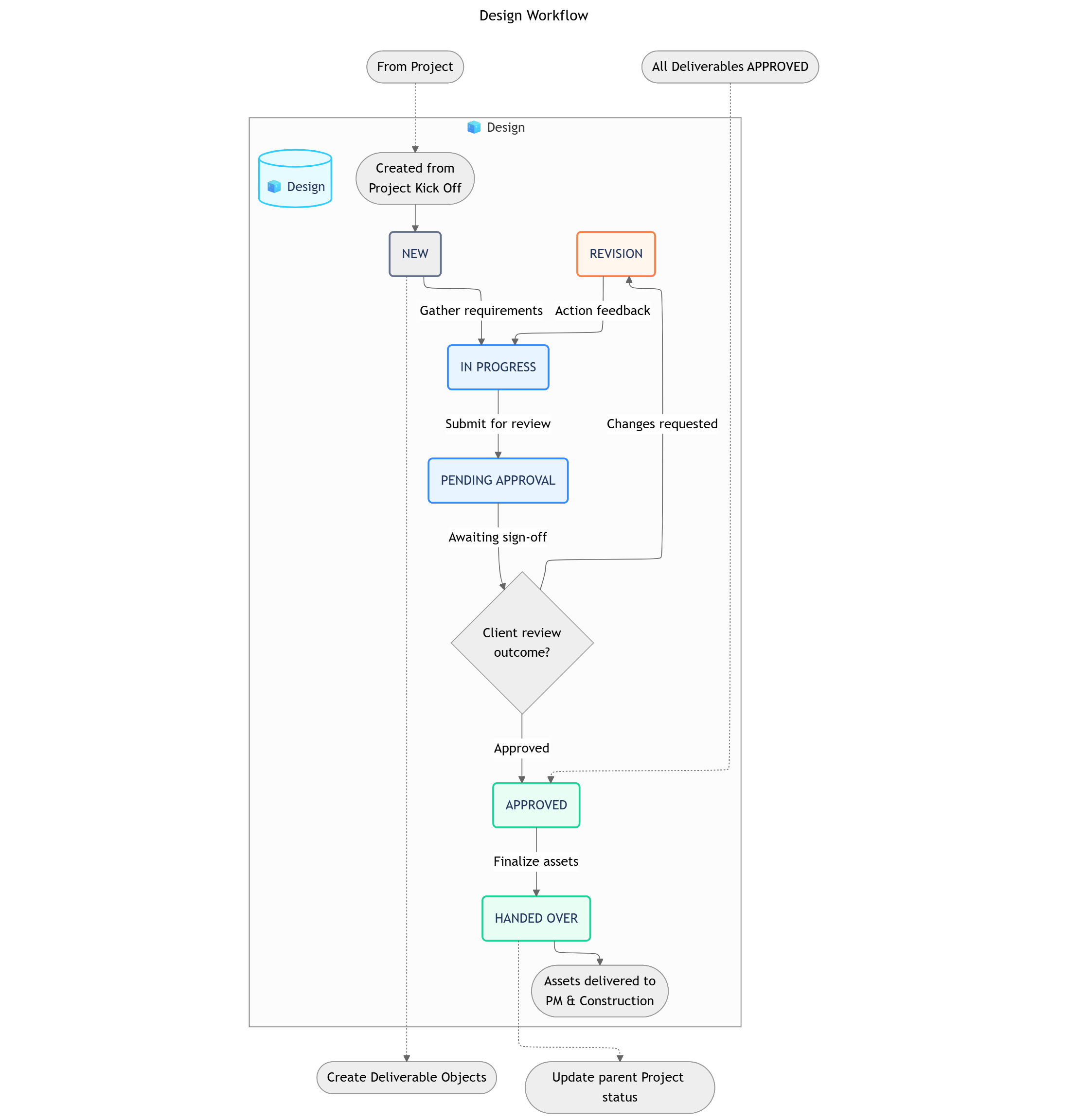 ```
┌─────> REVISION ─────┐
│ ↓
NEW → IN PROGRESS → PENDING APPROVAL → APPROVED → HANDED OVER
```
| Status | Business Logic | Advanced Settings |
| :---------------------- | :-------------------------------------------------------------------------------------------------------------------- | :--------------------------------------------------------------------------------------------------------------------------------------- |
| **1. NEW** | The `Design` Object has been created and is in the initial briefing phase where requirements are gathered. | **Automation**: A set of standard child `🧊︎ Deliverable` Objects (e.g., Floor Plan, Concept, 3D Render) can be created from a template. |
| **2. IN PROGRESS** | The design team is actively working on the various deliverables within the design package. | **Transition Permissions**: Lead Designer. |
| **3. PENDING APPROVAL** | All individual deliverables are complete, and the entire package is awaiting final sign-off from the client. | **Automation**: Can trigger a notification to the client and sales rep for the final review meeting. |
| **4. REVISION** | The client has requested changes, sending the design package back to the `IN PROGRESS` status for the team to action. | **Data Input**: A required field for "Revision Notes" should capture the client's feedback. |
| **5. APPROVED** | The client has formally approved the entire design package. | **Condition**: All child `🧊︎ Deliverable` Objects must be in `APPROVED` status before the parent package can be moved to `APPROVED`. |
| **6. HANDED OVER** | The finalized and approved design assets have been delivered to the Project Management and Construction teams. | **This is the terminal status for the Design function's workflow.** It can trigger a status change on the parent `🧊 Project`. |
| Group | Field Name (Type) |
| :-------------------- | :----------------------------------------------------------------------------------------------------- |
| **Basic Information** | Package Code (Text), Related Project (Object Reference), Design Style (Dropdown), Lead Designer (User) |
***
### 2. Design Deliverables (Sub-Objects)
The following four objects (`🧊︎ Floor Plan`, `🧊︎ Concept`, `🧊︎ 3D`, `🧊︎ 2D`) represent the core deliverables of the design process. They all share a common workflow for creation, feedback, and approval.
**Deliverable Workflow**
`TO DO` → `IN PROGRESS` → `PENDING REVIEW` → `APPROVED`
*`A deliverable in PENDING REVIEW can also be moved to a REVISION NEEDED status.`*
| Status | Business Logic | Advanced Settings |
| :----------------- | :----------------------------------------------------------------- | :---------------------------------------------------------------------------------------------- |
| 1. TO DO | The deliverable has been planned but work has not yet started. | - |
| 2. IN PROGRESS | A designer is actively working on creating the deliverable. | **Input Screen**: Upload draft files and add notes. |
| 3. PENDING REVIEW | The deliverable has been submitted for client or manager feedback. | **Automation**: Notifies the relevant stakeholders (Client, Design Manager) to review the file. |
| 4. APPROVED | The deliverable has been officially approved. | **Automation**: Locks the record from further changes. |
| 5. REVISION NEEDED | The deliverable was reviewed and requires changes. | **Input Screen**: Feedback notes detailing the required revisions. |
| Group | Field Name (Type) |
| :---------------------- | :-------------------------------------------------------------------------------------------------------------- |
| **Deliverable Details** | Title (Text), Designer (User), Due Date (Date), Version (Number), File (Attachment), Feedback Notes (Paragraph) |
***
## OBJECT RELATIONSHIPS
| Relationship | Type | Description |
| :----------------------------- | :----------- | :--------------------------------------------------------------- |
| `🧊 Design` → `🧊︎ Floor Plan` | Parent-Child | A design contains one or more floor plan deliverables. |
| `🧊 Design` → `🧊︎ Concept` | Parent-Child | A design contains one or more concept deliverables. |
| `🧊 Design` → `🧊︎ 3D` | Parent-Child | A design contains one or more 3D render deliverables. |
| `🧊 Design` → `🧊︎ 2D` | Parent-Child | A design contains one or more 2D technical drawing deliverables. |
| `🧊 Design ` → `🧊 Project` | Reference | Each design is linked to one master project. |
***
## WORKVIEWS, DASHBOARDS & FILTERS
| Workview | Description |
| :------------------------------ | :------------------------------------------------------------------------------------------------------------------------------- |
| 1. **Deliverable Kanban Board** | A board view for tracking all `Design Deliverables` (`Floor Plans`, `3D`, etc.) through the workflow from `TO DO` to `APPROVED`. |
| 2. **Design Asset Gallery** | A visual gallery of all submitted deliverable files, allowing for quick visual review and comparison. |
| Widget | Description |
| :------------------------------ | :------------------------------------------------------------------------------------------------------------------------------------- |
| 1. **Design Progress Overview** | Charts showing the status breakdown of all deliverables within a `Design Package` (e.g., 5 Approved, 2 Pending Review, 3 To Do). |
| 2. **Feedback Cycle Time** | A chart that measures the average time a deliverable spends in the `PENDING REVIEW` status before being approved or sent for revision. |
| Filter | Criteria |
| :---------------------------------- | :----------------------------- |
| 1. **Deliverables Awaiting Review** | `Status` is `PENDING REVIEW`. |
| 2. **Designs Needing Revision** | `Status` is `REVISION NEEDED`. |
***
## AUTOMATIONS
You can [open this canvas view](https://mermaid.ink/svg/pako:eNqNV81y4kYQfpUppSqbVMBrJDBGldoKv7suY-NaWG8lZg-D1MDEYoaMRhjW8TWHHHLIC-SYV8jz5AWSR0jP6AdhpM1yAEn99Xzd33T3iEfLEz5YrlWtVqfcE3zOFu6UE6KWsAKXSPCjbXZ_SyWjswBCAyFkLdmKyl1XBEK65MUXTuO8PRi8ODBOYKsygF1z6o3WIaAjpA8ygzSdTi9bI2AcilcPAYP18-TdJvrVE7MCqVjeOqgPGoNmYp1R734hRcR9YzKfxLSijHfuF0fPY77Ukl-MCwXlSWoremXGfmfQHvTzxsP0HafbzUipp4QsiiY2GM9ip_KAjHmY17Vv9_uDVpbnTxFwD66j1SwX1nN2tqGKCf4_waeosvwDIdblkQZ0BkFHbA_c87FmgE9VkMaUc4RswWmQ2c7qzdp558BW7GvaJdWqx-hC0lVSeUwFQIbti8s2qZLhu8th-5KMvx9P-lf6HjYQEMclFxxLlAlJeqB5yCDintaK3DJ4SASMlOBmG6Y8t3ekN35NaJg4auPe1B1PtKkbhUqs9n4zsSVyMaNf2Y1Ghey_Tk8aX5dGEruaRqXYTB5bU66Q_Foz_PvHn78mDsW4wfAmxf3z129kgFstyU1AS-Dd0XUe3hUo61oVYydOL491eiUw-wBmJzDg_mfJMsKJJzMxwmKO0eSN5ijEfi5Rf4v6Y6GR8S5UsCph6l8NNVMf5xMiQW6YBzkefRF_X-NMIWKD8WBwFdwuF_di9J7UsPrGDG3jSG5gR96tfaogYUNotfrq1TcGfteVgCY3D39pNtw8CNiKKdPXH76dyZev_v7ld03K5rusJImYEw4PBEdmqCROVJWLTbLFUmmEIRvNfgQP939JlWuWq5IRz5dXgkhshohBSL7zUy46E5HS5xNhYRgBMUgyx3KbgUJpyRqrjjO-IJT7-tDx9LVHAy8K6L7QfUgGFujA0p0rU9NGNZP4Lpl3XxXzOfkSn2B3i_UK0oSLdb2RwiR9RTldgEbH8ibP97LGDsfNVqDjjYRqIKgPPnlgaol5xhxLhqNA7sySOn8JAWx0QYVxGWAR0JNPKYDTJssgiSeWHleYVYXZnDCFXptssZndfOxHHZ1jQuyhMw6OI-fn0yPnj_BDf5wOR_7ZiMhA9jEoHRDFYjx7NkmXzD_TK6Rr7AsHBaxgHSSF42DhmImrOz6poLewyYZ-IreRMG5REmK3RSFRAjcPD5xQ4e_eAZEmJUNx90xu8jMZt4f9MXnbv73ovz9q2DHFlznkX5t-yS97WGJm8aRVveNWzTOWtGuomSQSYRpYmxvmA5kD-PpV7Lj-kK-4Up535aG4dRS3GzBsKN0PIf7mGjyv7F0nUni4arB3_4FMrTFOUVJDadM6tQ7VxfGLXm-UWqNaZhP2WhrfNchQ4J6yj9iBXqIF6GldXvLxNy6tKfDodpPxbho4abI5C_TI5fdHy6CfVbEWkvmWq2QEFQtPfPTHW-tRo6eWeWmfWi5e-jCnUWDyekI3PFN-EGKVeuK78GJpuXMahHgXmbpL3moyCGapX7Iiriy3ZVaw3Edra7m1eu3k7PS0WT-r26dN_FSsHT61Wye2c-60HNux7Xr9zH6qWB8N5-lJs1Fr1luOc9astRqIrFjgM5xTV_GfEfOf5Ok_ItIQxA) for better readability
```
┌─────> REVISION ─────┐
│ ↓
NEW → IN PROGRESS → PENDING APPROVAL → APPROVED → HANDED OVER
```
| Status | Business Logic | Advanced Settings |
| :---------------------- | :-------------------------------------------------------------------------------------------------------------------- | :--------------------------------------------------------------------------------------------------------------------------------------- |
| **1. NEW** | The `Design` Object has been created and is in the initial briefing phase where requirements are gathered. | **Automation**: A set of standard child `🧊︎ Deliverable` Objects (e.g., Floor Plan, Concept, 3D Render) can be created from a template. |
| **2. IN PROGRESS** | The design team is actively working on the various deliverables within the design package. | **Transition Permissions**: Lead Designer. |
| **3. PENDING APPROVAL** | All individual deliverables are complete, and the entire package is awaiting final sign-off from the client. | **Automation**: Can trigger a notification to the client and sales rep for the final review meeting. |
| **4. REVISION** | The client has requested changes, sending the design package back to the `IN PROGRESS` status for the team to action. | **Data Input**: A required field for "Revision Notes" should capture the client's feedback. |
| **5. APPROVED** | The client has formally approved the entire design package. | **Condition**: All child `🧊︎ Deliverable` Objects must be in `APPROVED` status before the parent package can be moved to `APPROVED`. |
| **6. HANDED OVER** | The finalized and approved design assets have been delivered to the Project Management and Construction teams. | **This is the terminal status for the Design function's workflow.** It can trigger a status change on the parent `🧊 Project`. |
| Group | Field Name (Type) |
| :-------------------- | :----------------------------------------------------------------------------------------------------- |
| **Basic Information** | Package Code (Text), Related Project (Object Reference), Design Style (Dropdown), Lead Designer (User) |
***
### 2. Design Deliverables (Sub-Objects)
The following four objects (`🧊︎ Floor Plan`, `🧊︎ Concept`, `🧊︎ 3D`, `🧊︎ 2D`) represent the core deliverables of the design process. They all share a common workflow for creation, feedback, and approval.
**Deliverable Workflow**
`TO DO` → `IN PROGRESS` → `PENDING REVIEW` → `APPROVED`
*`A deliverable in PENDING REVIEW can also be moved to a REVISION NEEDED status.`*
| Status | Business Logic | Advanced Settings |
| :----------------- | :----------------------------------------------------------------- | :---------------------------------------------------------------------------------------------- |
| 1. TO DO | The deliverable has been planned but work has not yet started. | - |
| 2. IN PROGRESS | A designer is actively working on creating the deliverable. | **Input Screen**: Upload draft files and add notes. |
| 3. PENDING REVIEW | The deliverable has been submitted for client or manager feedback. | **Automation**: Notifies the relevant stakeholders (Client, Design Manager) to review the file. |
| 4. APPROVED | The deliverable has been officially approved. | **Automation**: Locks the record from further changes. |
| 5. REVISION NEEDED | The deliverable was reviewed and requires changes. | **Input Screen**: Feedback notes detailing the required revisions. |
| Group | Field Name (Type) |
| :---------------------- | :-------------------------------------------------------------------------------------------------------------- |
| **Deliverable Details** | Title (Text), Designer (User), Due Date (Date), Version (Number), File (Attachment), Feedback Notes (Paragraph) |
***
## OBJECT RELATIONSHIPS
| Relationship | Type | Description |
| :----------------------------- | :----------- | :--------------------------------------------------------------- |
| `🧊 Design` → `🧊︎ Floor Plan` | Parent-Child | A design contains one or more floor plan deliverables. |
| `🧊 Design` → `🧊︎ Concept` | Parent-Child | A design contains one or more concept deliverables. |
| `🧊 Design` → `🧊︎ 3D` | Parent-Child | A design contains one or more 3D render deliverables. |
| `🧊 Design` → `🧊︎ 2D` | Parent-Child | A design contains one or more 2D technical drawing deliverables. |
| `🧊 Design ` → `🧊 Project` | Reference | Each design is linked to one master project. |
***
## WORKVIEWS, DASHBOARDS & FILTERS
| Workview | Description |
| :------------------------------ | :------------------------------------------------------------------------------------------------------------------------------- |
| 1. **Deliverable Kanban Board** | A board view for tracking all `Design Deliverables` (`Floor Plans`, `3D`, etc.) through the workflow from `TO DO` to `APPROVED`. |
| 2. **Design Asset Gallery** | A visual gallery of all submitted deliverable files, allowing for quick visual review and comparison. |
| Widget | Description |
| :------------------------------ | :------------------------------------------------------------------------------------------------------------------------------------- |
| 1. **Design Progress Overview** | Charts showing the status breakdown of all deliverables within a `Design Package` (e.g., 5 Approved, 2 Pending Review, 3 To Do). |
| 2. **Feedback Cycle Time** | A chart that measures the average time a deliverable spends in the `PENDING REVIEW` status before being approved or sent for revision. |
| Filter | Criteria |
| :---------------------------------- | :----------------------------- |
| 1. **Deliverables Awaiting Review** | `Status` is `PENDING REVIEW`. |
| 2. **Designs Needing Revision** | `Status` is `REVISION NEEDED`. |
***
## AUTOMATIONS
You can [open this canvas view](https://mermaid.ink/svg/pako:eNqNV81y4kYQfpUppSqbVMBrJDBGldoKv7suY-NaWG8lZg-D1MDEYoaMRhjW8TWHHHLIC-SYV8jz5AWSR0jP6AdhpM1yAEn99Xzd33T3iEfLEz5YrlWtVqfcE3zOFu6UE6KWsAKXSPCjbXZ_SyWjswBCAyFkLdmKyl1XBEK65MUXTuO8PRi8ODBOYKsygF1z6o3WIaAjpA8ygzSdTi9bI2AcilcPAYP18-TdJvrVE7MCqVjeOqgPGoNmYp1R734hRcR9YzKfxLSijHfuF0fPY77Ukl-MCwXlSWoremXGfmfQHvTzxsP0HafbzUipp4QsiiY2GM9ip_KAjHmY17Vv9_uDVpbnTxFwD66j1SwX1nN2tqGKCf4_waeosvwDIdblkQZ0BkFHbA_c87FmgE9VkMaUc4RswWmQ2c7qzdp558BW7GvaJdWqx-hC0lVSeUwFQIbti8s2qZLhu8th-5KMvx9P-lf6HjYQEMclFxxLlAlJeqB5yCDintaK3DJ4SASMlOBmG6Y8t3ekN35NaJg4auPe1B1PtKkbhUqs9n4zsSVyMaNf2Y1Ghey_Tk8aX5dGEruaRqXYTB5bU66Q_Foz_PvHn78mDsW4wfAmxf3z129kgFstyU1AS-Dd0XUe3hUo61oVYydOL491eiUw-wBmJzDg_mfJMsKJJzMxwmKO0eSN5ijEfi5Rf4v6Y6GR8S5UsCph6l8NNVMf5xMiQW6YBzkefRF_X-NMIWKD8WBwFdwuF_di9J7UsPrGDG3jSG5gR96tfaogYUNotfrq1TcGfteVgCY3D39pNtw8CNiKKdPXH76dyZev_v7ld03K5rusJImYEw4PBEdmqCROVJWLTbLFUmmEIRvNfgQP939JlWuWq5IRz5dXgkhshohBSL7zUy46E5HS5xNhYRgBMUgyx3KbgUJpyRqrjjO-IJT7-tDx9LVHAy8K6L7QfUgGFujA0p0rU9NGNZP4Lpl3XxXzOfkSn2B3i_UK0oSLdb2RwiR9RTldgEbH8ibP97LGDsfNVqDjjYRqIKgPPnlgaol5xhxLhqNA7sySOn8JAWx0QYVxGWAR0JNPKYDTJssgiSeWHleYVYXZnDCFXptssZndfOxHHZ1jQuyhMw6OI-fn0yPnj_BDf5wOR_7ZiMhA9jEoHRDFYjx7NkmXzD_TK6Rr7AsHBaxgHSSF42DhmImrOz6poLewyYZ-IreRMG5REmK3RSFRAjcPD5xQ4e_eAZEmJUNx90xu8jMZt4f9MXnbv73ovz9q2DHFlznkX5t-yS97WGJm8aRVveNWzTOWtGuomSQSYRpYmxvmA5kD-PpV7Lj-kK-4Up535aG4dRS3GzBsKN0PIf7mGjyv7F0nUni4arB3_4FMrTFOUVJDadM6tQ7VxfGLXm-UWqNaZhP2WhrfNchQ4J6yj9iBXqIF6GldXvLxNy6tKfDodpPxbho4abI5C_TI5fdHy6CfVbEWkvmWq2QEFQtPfPTHW-tRo6eWeWmfWi5e-jCnUWDyekI3PFN-EGKVeuK78GJpuXMahHgXmbpL3moyCGapX7Iiriy3ZVaw3Edra7m1eu3k7PS0WT-r26dN_FSsHT61Wye2c-60HNux7Xr9zH6qWB8N5-lJs1Fr1luOc9astRqIrFjgM5xTV_GfEfOf5Ok_ItIQxA) for better readability
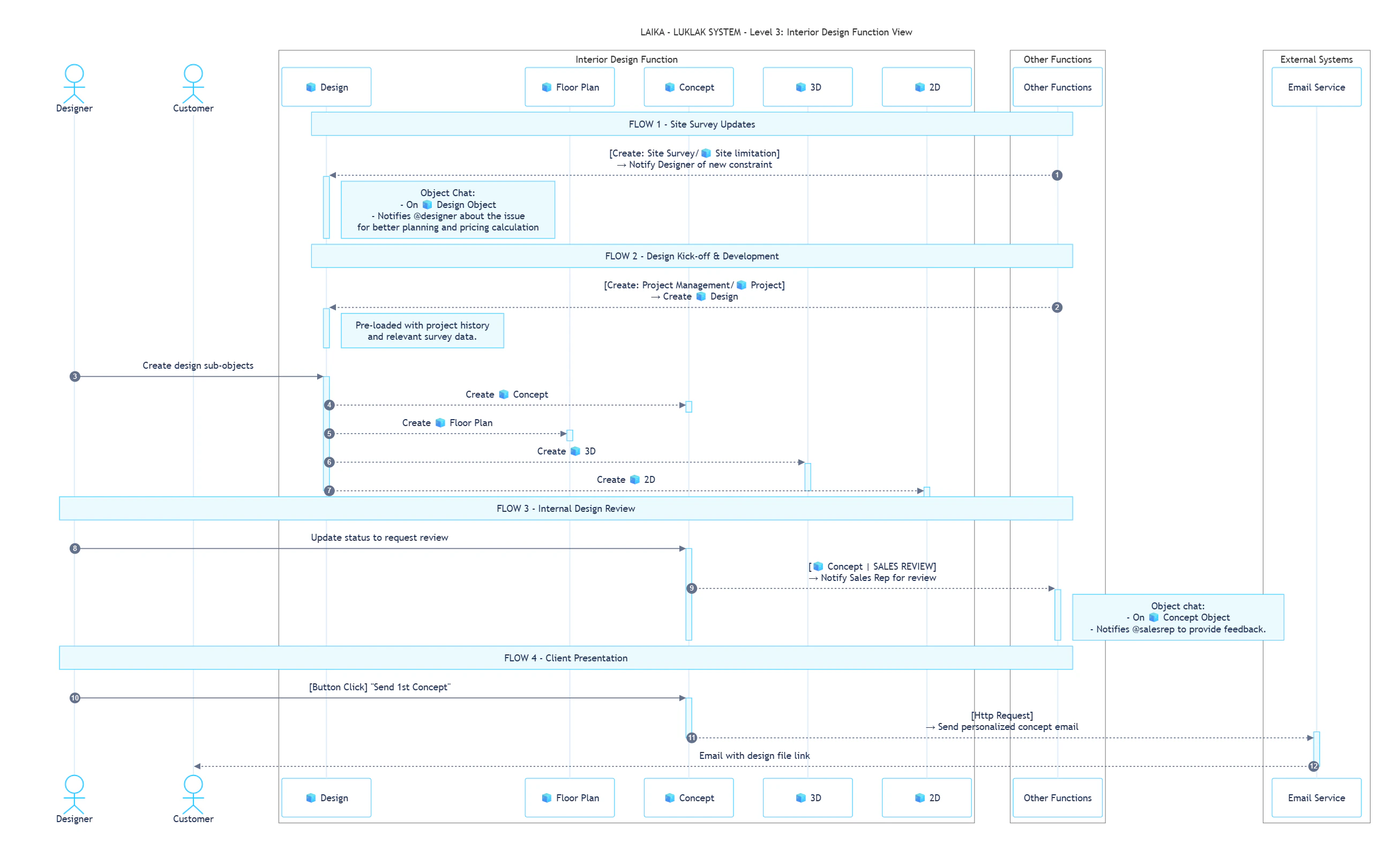 These rules operate within the `Design & Build` Space to facilitate collaboration between team members.
| Sequence | ID | Rule Name | Trigger | Action | Description |
| :------- | :-------- | :--------------------------------- | :------------------------------------------------- | :------------------------------------------ | :-------------------------------------------------------------------------------------------------------------------------------------------------------------------------------------------------- |
| **1** | **ID-01** | Notify Designer of Site Limitation | **Create**: `🧊 Site limitation` | **Send Message**: `🧊 Site limitation` Chat | When a Site Worker creates a new `🧊 Site limitation` Object, the system automatically notifies the assigned Designer. *e.g., Alerting Max about the "Old Brick Wall Not Safe" issue found by Tony* |
| **2** | **ID-02** | Request Internal Sales Review | **Status Change**: `🧊︎ Concept` to `SALES REVIEW` | **Send Message**: `🧊︎ Concept` Chat | When a Designer changes a `🧊︎ Concept` status, the system automatically notifies the responsible Sales Rep. *e.g., Tagging @David for a review after Max completes the concept* |
This rule describes how the Design function is initiated by the Project Management team.
| Sequence | ID | Direction | Rule Name | Trigger | Action |
| :------- | :-------- | :--------- | :---------------------------------- | :------------------------------------------ | :------------------------------------------------------------------------------------------------------------------------------------------------- |
| **1** | **CF-07** | `Incoming` | Create Design from Project Kick-off | **Create**: `Project Management/🧊 Project` | A new, linked `🧊 Design` Object is automatically created in the `Design & Build` `⏹️ Space`, pre-loaded with all relevant history and survey data |
This rule connects the Design function with external communication platforms to interact with the client.
| Sequence | ID | Rule Name | Trigger | Action | Description |
| :------- | :-------- | :---------------------------------------- | :----------------------------------- | :-------------------------- | :--------------------------------------------------------------------------------------------------------------------------------------------------------------------------- |
| **3** | **CS-08** | Send Personalized Concept Email to Client | **Button Click**: "Send 1st Concept" | **API Call**: Email Service | A user clicks a button to automatically draft and send a personalized email to the client, pulling in data like their name, style preferences, and a link to the design file |
***
## ROLES, PERMISSIONS & NOTIFICATIONS
| Role | Description |
| :----------------- | :----------------------------------------------------------------------------------------- |
| **Design Manager** | Approves final designs, manages the design team's workload, and ensures quality standards. |
| **Designer** | Creates, revises, and submits all design deliverables. |
| **Client** | Provides timely feedback and gives final approval on deliverables. |
This `📋 Function` uses **Scheme 4 - Extended Permissions**.
* **`View ⏹️ Space`**: All users with a role in the Space.
* **`View & Update 🧊 Object`**: All users who can view the Space.
* **`Create 🧊 Object`**: `Design Manager` and `Designer` roles only.
* **`Delete 🧊 Object`**: `Design Manager` role only.
This `📋 Function` uses **Scheme 3 - Balanced Notifications**.
* **Object Updates**: Notifications for creating or updating an Object are sent only to the assignee and the person who created the Object.
* **Messages**: Chat messages sent within an Object will notify all users who are following that Object.
***
## What's Next?
* [**Project Management Function**](https://claude.ai/chat/path/to/project-function): Learn how the `HANDED OVER` designs are used to create tasks and manage the construction phase.
* [**Contract & Invoice Function**](https://claude.ai/chat/path/to/contract-function): See how design milestones can trigger payment installments from the client.
These rules operate within the `Design & Build` Space to facilitate collaboration between team members.
| Sequence | ID | Rule Name | Trigger | Action | Description |
| :------- | :-------- | :--------------------------------- | :------------------------------------------------- | :------------------------------------------ | :-------------------------------------------------------------------------------------------------------------------------------------------------------------------------------------------------- |
| **1** | **ID-01** | Notify Designer of Site Limitation | **Create**: `🧊 Site limitation` | **Send Message**: `🧊 Site limitation` Chat | When a Site Worker creates a new `🧊 Site limitation` Object, the system automatically notifies the assigned Designer. *e.g., Alerting Max about the "Old Brick Wall Not Safe" issue found by Tony* |
| **2** | **ID-02** | Request Internal Sales Review | **Status Change**: `🧊︎ Concept` to `SALES REVIEW` | **Send Message**: `🧊︎ Concept` Chat | When a Designer changes a `🧊︎ Concept` status, the system automatically notifies the responsible Sales Rep. *e.g., Tagging @David for a review after Max completes the concept* |
This rule describes how the Design function is initiated by the Project Management team.
| Sequence | ID | Direction | Rule Name | Trigger | Action |
| :------- | :-------- | :--------- | :---------------------------------- | :------------------------------------------ | :------------------------------------------------------------------------------------------------------------------------------------------------- |
| **1** | **CF-07** | `Incoming` | Create Design from Project Kick-off | **Create**: `Project Management/🧊 Project` | A new, linked `🧊 Design` Object is automatically created in the `Design & Build` `⏹️ Space`, pre-loaded with all relevant history and survey data |
This rule connects the Design function with external communication platforms to interact with the client.
| Sequence | ID | Rule Name | Trigger | Action | Description |
| :------- | :-------- | :---------------------------------------- | :----------------------------------- | :-------------------------- | :--------------------------------------------------------------------------------------------------------------------------------------------------------------------------- |
| **3** | **CS-08** | Send Personalized Concept Email to Client | **Button Click**: "Send 1st Concept" | **API Call**: Email Service | A user clicks a button to automatically draft and send a personalized email to the client, pulling in data like their name, style preferences, and a link to the design file |
***
## ROLES, PERMISSIONS & NOTIFICATIONS
| Role | Description |
| :----------------- | :----------------------------------------------------------------------------------------- |
| **Design Manager** | Approves final designs, manages the design team's workload, and ensures quality standards. |
| **Designer** | Creates, revises, and submits all design deliverables. |
| **Client** | Provides timely feedback and gives final approval on deliverables. |
This `📋 Function` uses **Scheme 4 - Extended Permissions**.
* **`View ⏹️ Space`**: All users with a role in the Space.
* **`View & Update 🧊 Object`**: All users who can view the Space.
* **`Create 🧊 Object`**: `Design Manager` and `Designer` roles only.
* **`Delete 🧊 Object`**: `Design Manager` role only.
This `📋 Function` uses **Scheme 3 - Balanced Notifications**.
* **Object Updates**: Notifications for creating or updating an Object are sent only to the assignee and the person who created the Object.
* **Messages**: Chat messages sent within an Object will notify all users who are following that Object.
***
## What's Next?
* [**Project Management Function**](https://claude.ai/chat/path/to/project-function): Learn how the `HANDED OVER` designs are used to create tasks and manage the construction phase.
* [**Contract & Invoice Function**](https://claude.ai/chat/path/to/contract-function): See how design milestones can trigger payment installments from the client.