> ## Documentation Index
> Fetch the complete documentation index at: https://docs.luklak.com/llms.txt
> Use this file to discover all available pages before exploring further.
# CRM Function
**Purpose:** This document defines the **internal** operational logic of the CRM (Business) `📋 Function`. It details the process from lead acquisition to deal closure and handover.
## Why This Matters
This `📋 Function` transforms the lead management process from a manual, disconnected effort into a streamlined, automated revenue engine. From a strategic standpoint, it provides clear ROI tracking from ad spend to signed contracts. For the sales team, it eliminates guesswork by automating lead assignment, standardizing follow-up procedures, and integrating essential tools like Google Calendar, directly increasing conversion rates and team efficiency.
## The Big Picture
Architecturally, this system is designed to capture leads from external webhooks (e.g., landing pages), process them through a structured pipeline using two core `🧊 Objects` (`🧊 Customer` and `🧊︎ Demo`), and then seamlessly hand off successful deals to downstream `📋 Functions` like Contracts and Site Surveys. It relies on both internal automations for efficiency and external API calls for calendar integration.
***
### Sneak peek
```expandable theme={null}
🏢 LAIKA (Organization)
│
├── 📂 MARKETING (Area)
│ └── ⏹️ Marketing Campaigns (Space)
│
├── 📂 SALES (Area)
│ └── ⏹️ Sales & CRM (Space) //You are here
│ └── 📋 Function: CRM
│ └── 🧊 Customer
│ └── 🧊︎ Demo (Sub-Object)
│
├── 📂 ACCOUNTING (Area)
│ └── ⏹️ Contracts & Invoices (Space)
├── 📂 DESIGN & CONSTRUCTION (Area)
│ ├── ⏹️ Project Management (Space)
│ ├── ⏹️ Design (Space)
│ └── ⏹️ Interior Construction (Space)
└── 📂 CUSTOMER SUCCESS (Area)
└── ⏹️ Customer Success (Space)
```
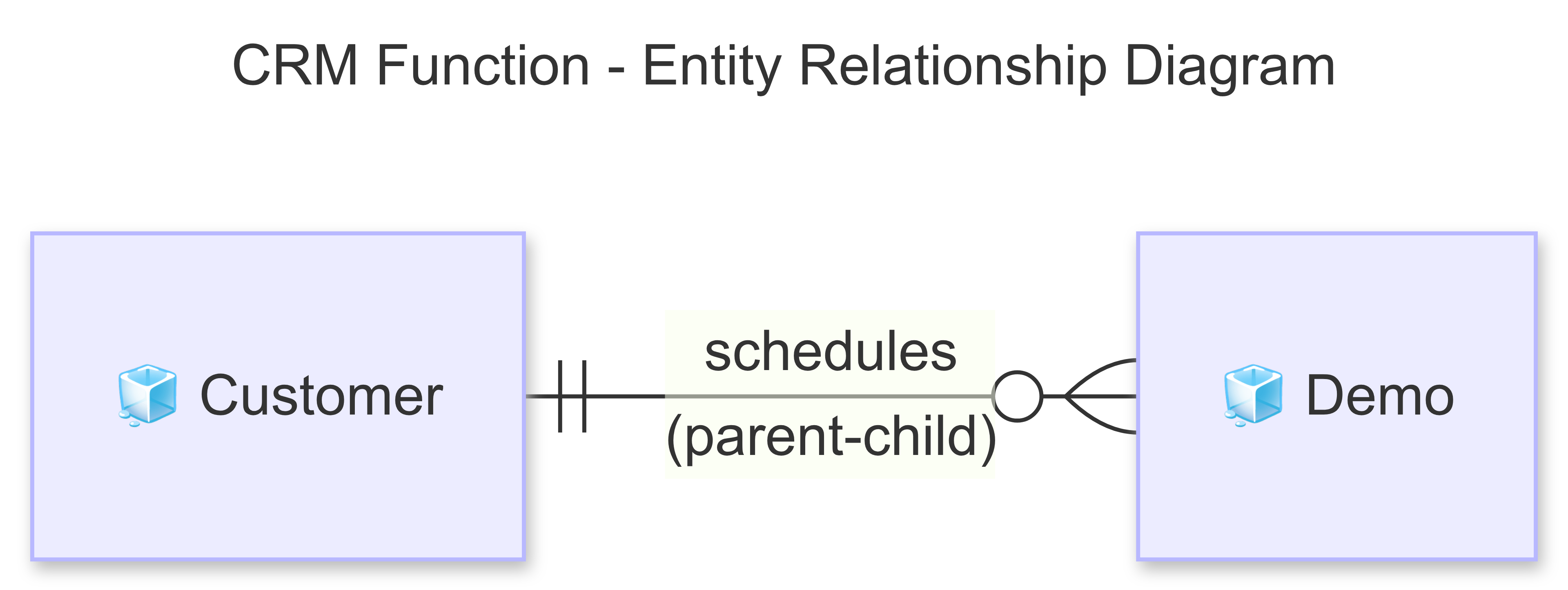
## OBJECT RELATIONSHIPS
 | Relationship Type | Connection | Description |
| :------------------- | :---------------------------------------- | :-------------------------------------------------------------------------------------- |
| **Parent-Child** | `🧊 Customer` → `🧊︎ Demo` | Each `🧊 Customer` can have multiple `🧊︎ Demo` appointments. |
| **Object Reference** | `🧊 Customer` (Ad Source field) → `🧊 Ad` | Connects the lead to the specific ad campaign that generated it, enabling ROI tracking. |
***
## OBJECT TYPES, WORKFLOWS & DATA FIELDS
### 1. 🧊 Customer (Standard Object)
* **Process Description**: Manages potential customers from the moment they are captured via a landing page webhook until they are converted into a signed contract. This includes automated assignment and progress tracking through various statuses.
* **Example**: A potential customer, "Sarah & Michael Westbrook," is captured from the "Scandinavian Simplicity" ad campaign, which has the ad key `MKT-236`. Their prospective budget is recorded as \$40,000 - \$55,000
**Customer Workflow**
| Relationship Type | Connection | Description |
| :------------------- | :---------------------------------------- | :-------------------------------------------------------------------------------------- |
| **Parent-Child** | `🧊 Customer` → `🧊︎ Demo` | Each `🧊 Customer` can have multiple `🧊︎ Demo` appointments. |
| **Object Reference** | `🧊 Customer` (Ad Source field) → `🧊 Ad` | Connects the lead to the specific ad campaign that generated it, enabling ROI tracking. |
***
## OBJECT TYPES, WORKFLOWS & DATA FIELDS
### 1. 🧊 Customer (Standard Object)
* **Process Description**: Manages potential customers from the moment they are captured via a landing page webhook until they are converted into a signed contract. This includes automated assignment and progress tracking through various statuses.
* **Example**: A potential customer, "Sarah & Michael Westbrook," is captured from the "Scandinavian Simplicity" ad campaign, which has the ad key `MKT-236`. Their prospective budget is recorded as \$40,000 - \$55,000
**Customer Workflow**
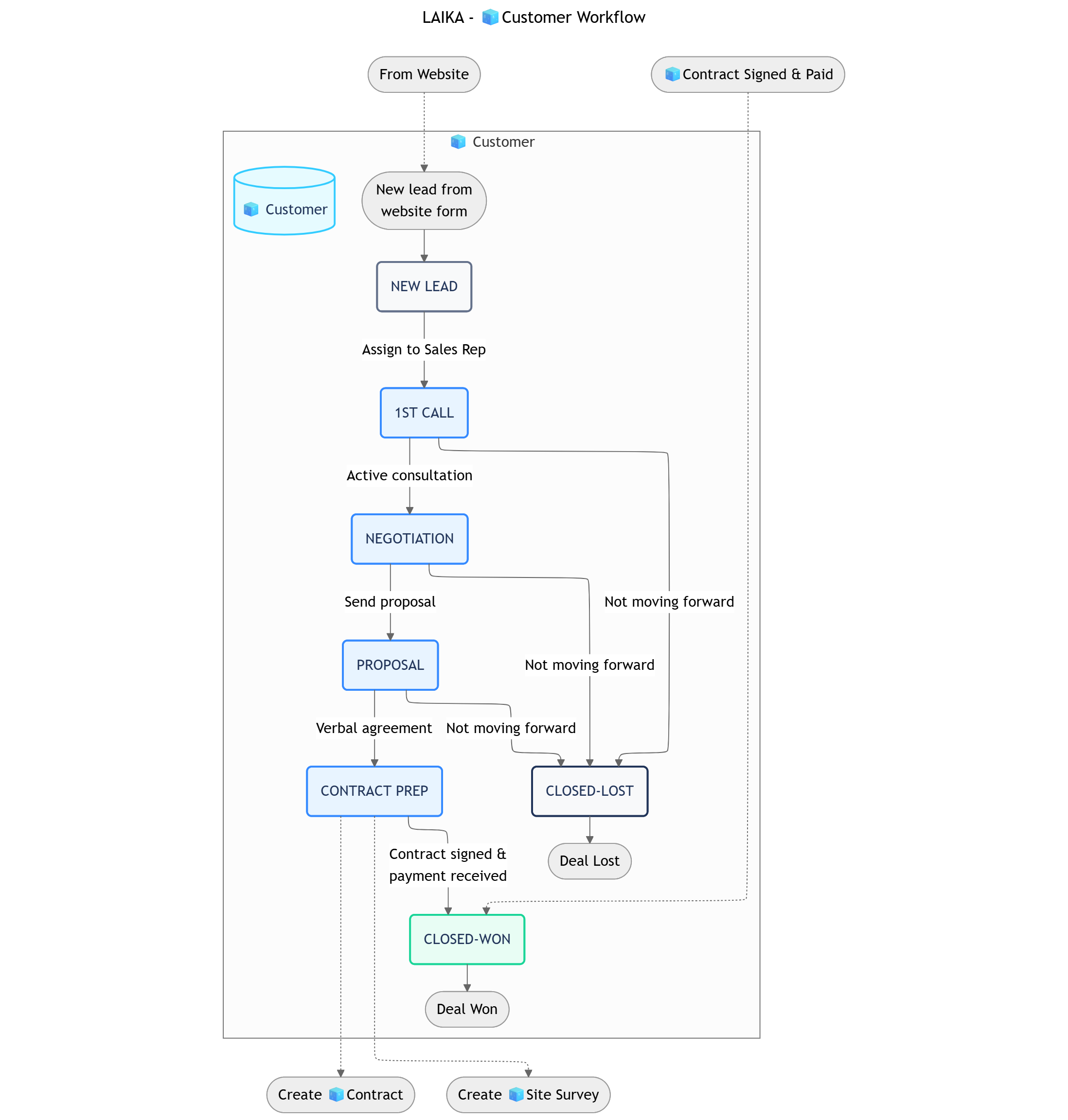 ```
NEW LEAD → 1ST CALL → NEGOTIATION → PROPOSAL → CONTRACT PREP → CLOSED-WON
↓ ↓ ↓ ↓ ↓
CLOSED-LOST CLOSED-LOST CLOSED-LOST CLOSED-LOST CLOSED-LOST
```
| Status | Business Logic | Advanced Settings |
| :------------------- | :-------------------------------------------------------------------------------------------------- | :------------------------------------------------------------------------------------------------------------------------------------------------------ |
| **1. NEW LEAD** | A new customer has been created from the website form and automatically assigned to a sales rep. | **Transition Permissions**: Assigned Sales Rep.
```
NEW LEAD → 1ST CALL → NEGOTIATION → PROPOSAL → CONTRACT PREP → CLOSED-WON
↓ ↓ ↓ ↓ ↓
CLOSED-LOST CLOSED-LOST CLOSED-LOST CLOSED-LOST CLOSED-LOST
```
| Status | Business Logic | Advanced Settings |
| :------------------- | :-------------------------------------------------------------------------------------------------- | :------------------------------------------------------------------------------------------------------------------------------------------------------ |
| **1. NEW LEAD** | A new customer has been created from the website form and automatically assigned to a sales rep. | **Transition Permissions**: Assigned Sales Rep.
**Data Input**: The Object is pre-populated with data from the webform, including the ad source. |
| **2. 1ST CALL** | The assigned sales rep has made initial contact and is in active consultation with the customer. | **Transition Permissions**: Assigned Sales Rep.
**Data Input**: Call notes, customer needs, and style preferences are recorded. |
| **3. NEGOTIATION** | The customer has shown strong interest and is discussing specific terms, budget, and scope. | **Transition Permissions**: Assigned Sales Rep.
**Data Input**: Fields for specific terms and pricing adjustments are updated. |
| **4. PROPOSAL** | A formal proposal has been sent to the customer for review. | **Transition Permissions**: Assigned Sales Rep. |
| **5. CONTRACT PREP** | The customer has verbally agreed to proceed. This status triggers the handoff to other departments. | **Automation**: Triggers the creation of a `Contract & Invoice/🧊Contract` and a `Design & Build/🧊Site Survey`. |
| **6. CLOSED-WON** | The contract has been signed and the first payment received. The deal is won. | **This is a terminal success status.** |
| **7. CLOSED-LOST** | The customer is not moving forward with the project at this time. | **Transition Permissions**: Assigned Sales Rep.
**Data Input**: A "Reason for Loss" field should be required to improve sales analytics. |
**Data Field Groups**
| Group | Field Name (Type) | Notes |
| :----------------------------------------- | :---------------------------------------------------------------------------------------------------------------------------- | :----------------------------------------------- |
| **Basic Information** *(6 Fields)* | Full Name (Text), Phone Number (Phone), Email (Email), Address (Text), Preferred Style (Dropdown), Expected Budget (Currency) | Information captured from the landing page form. |
| **Tracking & Assignment** *(4 Fields)* | Ad Source (Object Reference), UTM Tracking (Text), Assigned Rep (User), Received Date (DateTime) | Tracks lead origin and assignment. |
| **Consultation & Evaluation** *(4 Fields)* | Interest Level (Dropdown), Consultation Notes (Paragraph), Failure Reason (Dropdown), Last Contact Date (DateTime) | Tracks the consultation process. |
| **Voucher & Incentives** *(3 Fields)* | Next Purchase Voucher (Currency), Voucher Percentage (Percent), Voucher Expiry (Date) | Incentives for returning customers. |
| **Total: 17 Fields** | | |
***
### 2. 🧊︎ Demo (Sub-Object)
* **Process Description**: Manages direct consultation appointments with customers, fully integrated with Google Calendar to synchronize schedules and send invitations to all participants.
* **Example**: A demo titled "LAIKA x Sarah & Michael - Interior Renovation Demo" is scheduled for June 18th at 2:00 PM, with designer Max and sales rep David attending.
**Demo Workflow**
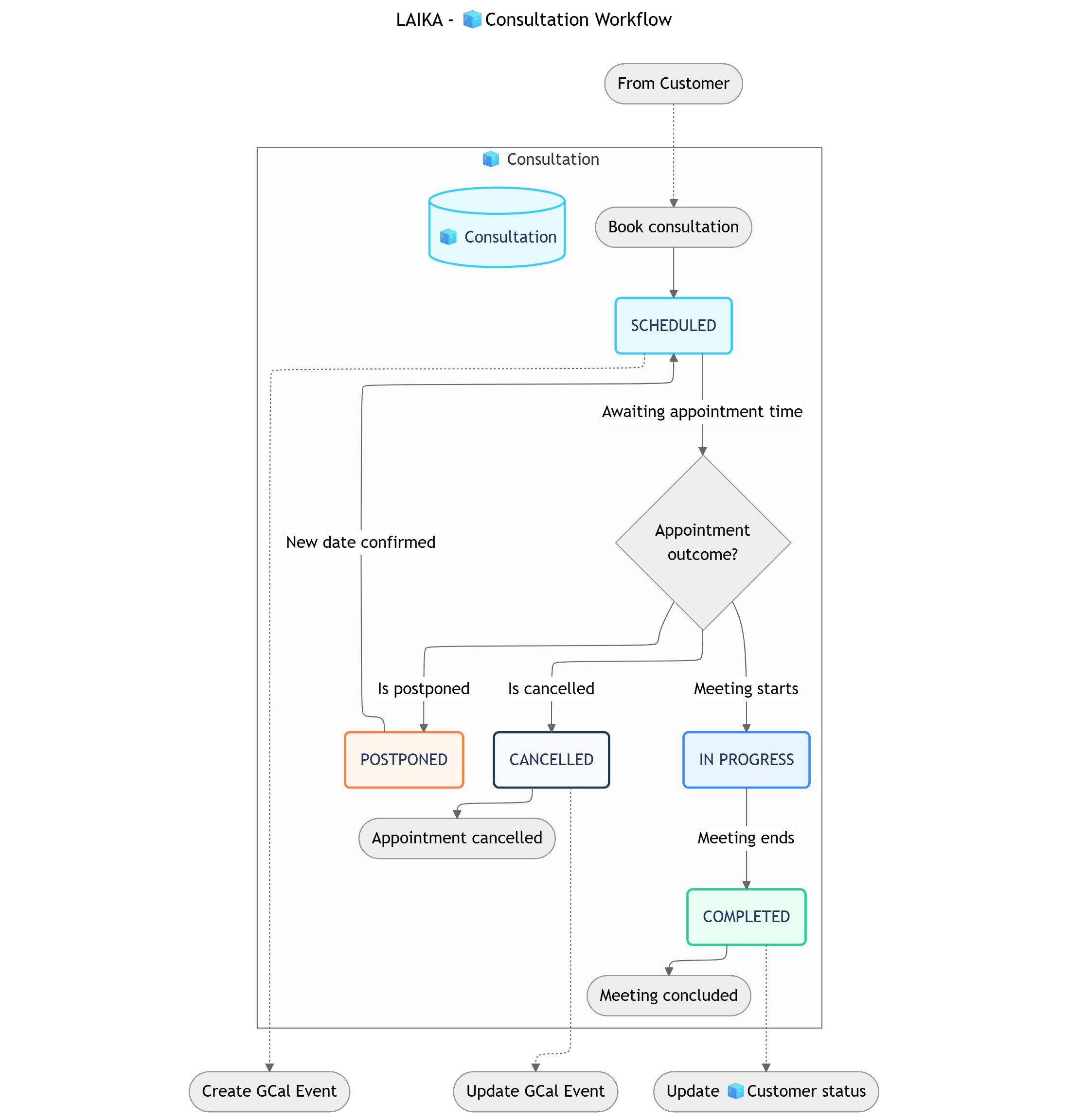 ```
┌──────────> POSTPONED ────────┐
│ ↓
SCHEDULED → IN PROGRESS → COMPLETED
│
└──────────> CANCELLED
```
| Status | Business Logic | Advanced Settings |
| :----------------- | :---------------------------------------------------------------- | :------------------------------------------------------------------------------------------------------------------------------------------------------------------------- |
| **1. SCHEDULED** | A consultation has been booked for a specific time. | **Automation**: Creates a Google Calendar event and invites the customer, sales rep, and designer.
```
┌──────────> POSTPONED ────────┐
│ ↓
SCHEDULED → IN PROGRESS → COMPLETED
│
└──────────> CANCELLED
```
| Status | Business Logic | Advanced Settings |
| :----------------- | :---------------------------------------------------------------- | :------------------------------------------------------------------------------------------------------------------------------------------------------------------------- |
| **1. SCHEDULED** | A consultation has been booked for a specific time. | **Automation**: Creates a Google Calendar event and invites the customer, sales rep, and designer.
**Data Input**: Time, location, participants. |
| **2. IN PROGRESS** | The live consultation meeting is currently happening. | **Transition Permissions**: Assigned Sales Rep, Designer.
**Data Input**: Live notes are taken during the consultation. |
| **3. COMPLETED** | The meeting has concluded with a clear outcome. | **Transition Permissions**: Assigned Sales Rep.
**Automation**: Can update the parent `🧊 Customer` status accordingly (e.g., to `NEGOTIATION` or `CONTRACT PREP`). |
| **4. CANCELLED** | The appointment was cancelled by either the customer or the team. | **Transition Permissions**: Assigned Sales Rep.
**Automation**: Updates the Google Calendar event and notifies all participants. |
| **5. POSTPONED** | The appointment has been deferred to a later, unconfirmed date. | **Transition Permissions**: Assigned Sales Rep.
**Condition**: Should loop back to `SCHEDULED` once a new date is confirmed. |
**Data Field Groups**
| Group | Field Name (Type) | Notes |
| :--------------------------------------- | :-------------------------------------------------------------------------------------------------------------------------------------------- | :------------------------------- |
| **Appointment Information** *(6 Fields)* | Demo Title (Text), Time (DateTime), Location (Text), Attending Designer (User), Google Calendar Event ID (Text), Consultation Type (Dropdown) | Basic details about the meeting. |
| **Results & Follow-up** *(4 Fields)* | Interest Level (Dropdown), Consultation Notes (Paragraph), Next Steps (Text), Actual Duration (Decimal) | Outcome and subsequent actions. |
| **Total: 10 Fields** | | |
***
## AUTOMATIONS
You can [open this canvas view](https://kroki.io/mermaid/svg/eNqNVsFu20YQvfsrBi6Q2Kjo1JZVJ0JhgKIoW7AsGaJsowiCYkWO6a1JrrpcKjbiXHvIIYf-QI_9hX5Pf6D9hM4uRYpUqTQ-GF7O7MybeW9mbVnWji-SOx52dwDUPcbYBYlB9lgcb5jkbB5hqh0AFpLHTD45IhKyCy-_aXde24PBy6ptho-qtB8dto87b2r2npABytLjpN3rFxEinmBj6BQJZVBN7JzQrePcqlAqXjUOjgedwUlunDP_IZQiSwJjMT-5JWY86T2Em5_zXIWhEikRCrcWp410p7S5vYE9cCu2etXttuMUCZmvhGwAkn839xqvbMVirKNqL90j1x28Ker7JcPEx3EWzyuINjLzJVNcJF-GXThtqTsSYrEVZMTmGPXEY-1yBWZp_4JctMvWBCkPExaVpu-PTw5f96qmxpsWTUTRoT5noWRxrjGuIoSRPbywwYLR9cXIvgDvR2_mXuozLjGCdhec6SUMssTXbYEbju_zVmVKJKbdO2uCYOpeAUvBYzRdMMVFbpuLR5DhnO0ddTotWP_67qCzXwtvvM1cMZK_zxcsUeBcezrmP7__8QmcLFUippxNjn3CvXL8-8_P0MdYGD9Mgq_AMaHdIEskaWOGyexcZ2hy_bok7iMNNvEE3lOqMG7Ocuv2dJacmFucp1xho-OZM9KOZ0KERKRDTdcLpQ5nTIMKYkl4KWyLetmFwWhyC4eGYhbAMAkxNdy-oL85bZ0IrqTwMU15EpoYdNOyTk-_NbffEqJ7IR7ewQ9z-er0r19_A0cioyw1hmBv7N7CyLX7-2sckof3CsQdmEilK0-NnCyWahVjAEoAW4uoZRItOYP3qAOQg1l-lhRznuRlUkADkRgiiHUkvoEXVADTInnQSVKRSR_hkskHVFTtK33RDkzEAFfbADXttSx5H64XARm79bIPTE89X0isNohFfhbpUGvzZhIKuskYTVOLOF4xdkSMaU3T9Xt6zqKCHfJak9PLFM0lOBH3iaHdlSuViKbA3RJSTjVlKsekaCGNEQWyiZDYrMJ3TTwXA_bsOedu_3rk9rfWQ_FMXFPJ2-rlBmZWKTYkDe4SE9WgIxNzmCxpQlJ6BWgmlOiaYFZJyepYyml17qMRm9zETSE3P1EF5lO13aZLuQTqDXEml1cjd7ZqSFG8YafivlZnqpjKUtjDg_CgpUU5ds8ms6E9G07G-01NbQDXoBszCEY3bdLNOUsCcXenw9NsB5m_Gnjb92mSVJOUNmor8D6DMxnPprYzgyty_-_w1ZaBSJQkpJTJnD3iCbxMLvGpacb-fyLIq7LDjqmyKfrIl1QAJRZpahVbmbZYXkG-Y-liZYUZMCQbwWn6n-HKHvYrGvRIc0D_MNFDqVKIMWUhbtth3oJRCP-eqVx2M2Rxl-bOiO2FftzykbukdUphyFSkvaPn8sMHf9XWnxIW48ePtN55cLC7tRMNZRCfPyO1WBOTK69x8dyIzNev1pJFGTUzMYTUntN_AWKxeOc) for better readability
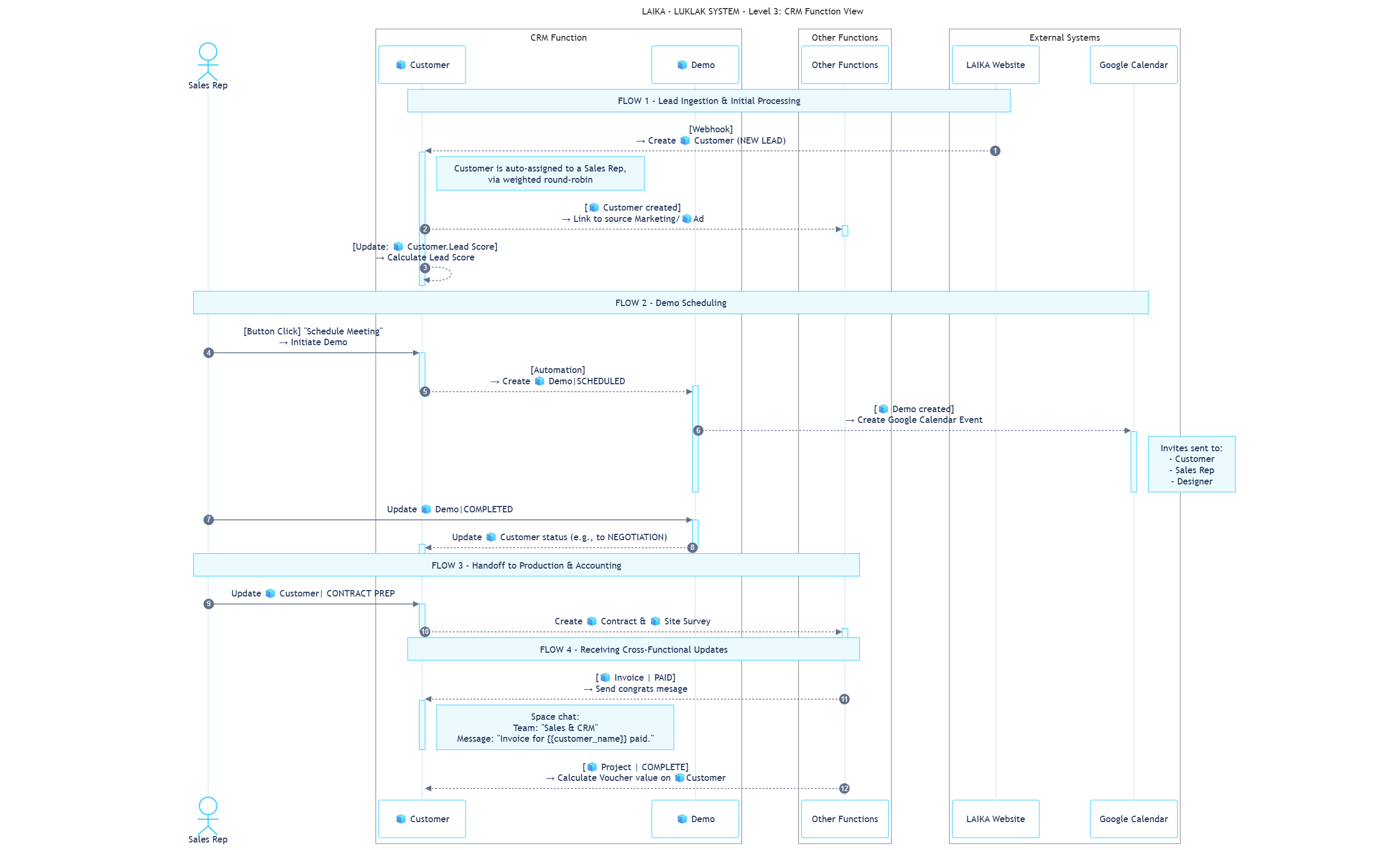 These rules run entirely within the `Sales & CRM` Space to enhance sales efficiency and ensure process consistency.
| Sequence | ID | Rule Name | Trigger | Action | Description |
| :------- | :-------- | :---------------------------- | :--------------------------------- | :------------------------ | :----------------------------------------------------------------------------------------------------------------------------------------------------------------------------------------------------- |
| **3** | **IC-01** | Calculate Lead Score | **Create/Update**: `🧊 Customer` | **Update**: `🧊 Customer` | When a new `🧊 Customer` is created or key data is updated, a formula runs to update the `Lead Score` field. *For example, Sarah's lead was automatically given a score of 87.* |
| **4** | **IC-02** | Create Initial Follow-up Task | **Update**: `🧊 Customer` assigned | **Create**: `☑️ Task` | When a `🧊 Customer` is assigned to a sales rep, a `☑️ Task` Sub-Object is automatically created and assigned to them, due within 24 hours. *e.g., Assigning a task to David to call Sarah Westbrook.* |
These rules describe the critical handoffs of data and tasks between the `Sales & CRM` `⏹️ Space` and other functions.
| Sequence | ID | Direction | Rule Name | Trigger | Action |
| :------- | :-------- | :--------- | :--------------------------------- | :--------------------------------------------------------------- | :---------------------------------------------------------------------------------------------------------------------------------------------------------------------- |
| **2** | **CF-01** | `Incoming` | Link Lead to Source Ad | **Create**: `🧊 Customer` (from CS-01) | Links the new `🧊 Customer` with its source `Marketing/🧊 Ad`. *For example, linking Sarah's new lead to the "Scandinavian Simplicity" ad.* |
| **6** | **CF-03** | `Outgoing` | Handoff to Production & Accounting | **Status Change**: `🧊 Customer` to "CONTRACT PREP" | Creates a `Design & Build/🧊 Site Survey` Object for Tony.
These rules run entirely within the `Sales & CRM` Space to enhance sales efficiency and ensure process consistency.
| Sequence | ID | Rule Name | Trigger | Action | Description |
| :------- | :-------- | :---------------------------- | :--------------------------------- | :------------------------ | :----------------------------------------------------------------------------------------------------------------------------------------------------------------------------------------------------- |
| **3** | **IC-01** | Calculate Lead Score | **Create/Update**: `🧊 Customer` | **Update**: `🧊 Customer` | When a new `🧊 Customer` is created or key data is updated, a formula runs to update the `Lead Score` field. *For example, Sarah's lead was automatically given a score of 87.* |
| **4** | **IC-02** | Create Initial Follow-up Task | **Update**: `🧊 Customer` assigned | **Create**: `☑️ Task` | When a `🧊 Customer` is assigned to a sales rep, a `☑️ Task` Sub-Object is automatically created and assigned to them, due within 24 hours. *e.g., Assigning a task to David to call Sarah Westbrook.* |
These rules describe the critical handoffs of data and tasks between the `Sales & CRM` `⏹️ Space` and other functions.
| Sequence | ID | Direction | Rule Name | Trigger | Action |
| :------- | :-------- | :--------- | :--------------------------------- | :--------------------------------------------------------------- | :---------------------------------------------------------------------------------------------------------------------------------------------------------------------- |
| **2** | **CF-01** | `Incoming` | Link Lead to Source Ad | **Create**: `🧊 Customer` (from CS-01) | Links the new `🧊 Customer` with its source `Marketing/🧊 Ad`. *For example, linking Sarah's new lead to the "Scandinavian Simplicity" ad.* |
| **6** | **CF-03** | `Outgoing` | Handoff to Production & Accounting | **Status Change**: `🧊 Customer` to "CONTRACT PREP" | Creates a `Design & Build/🧊 Site Survey` Object for Tony.
Creates a `Contract & Invoice/🧊 Contract` Object for the finance team. |
| **7** | **CF-05** | `Incoming` | Receive Payment Notification | **Status Change**: `Contract & Invoice/🧊 Invoice` to "PAID" | Sends an automatic message to the `Sales & CRM` Space chat. *e.g., Notifying David that Sarah's \$11,500 deposit has been paid.* |
| **8** | **CF-09** | `Incoming` | Update Loyalty Voucher | **Status Change**: `Project Management/🧊 Project` to "COMPLETE" | Automatically calculates and updates the `Voucher` field in the original `🧊 Customer`. *e.g., Adding a \$500 voucher to Sarah's record after her project is finished.* |
These rules connect the CRM function with platforms outside of Luklak.
| Sequence | ID | Rule Name | Trigger | Action | Description |
| :------- | :-------- | :----------------------------- | :----------------------------------- | :----------------------------------- | :---------------------------------------------------------------------------------------------------------------------------------------------------------------- |
| **1** | **CS-01** | Receive Lead from Landing Page | **Webhook**: Website form submitted | **Create**: `Sales & CRM/🧊Customer` | A form submission triggers a webhook that creates a new `🧊 Customer` Object. *This is how Sarah Westbrook's inquiry became a new lead in the system.* |
| **5** | **CS-02** | Create Google Calendar Event | **Button Click**: "Schedule Meeting" | **HTTP Request**: Google Calendar | A sales rep clicks a button to create a shared meeting invite. *e.g., Creating the "LAIKA x Sarah & Michael" event in Google Calendar for David, Max, and Sarah.* |
```guidejar theme={null}
# How to Schedule a Customer Demo
This guide shows you how to book a new consultation for an existing customer lead, which will also create a Google Calendar event automatically.
## Section 1: Find Your Customer
! Important: Ensure the Customer is in the "CONTACTING" or a later stage before scheduling.
1. Navigate to the main "Kanban Customer Pipeline" Workview.

2. Click on the 🧊 Customer you wish to schedule a demo for.
* This will open the detailed view of the Customer.
## Section 2: Book the Consultation
1. In the 🧊 Customer detail view, click the "..." menu button in the top-right corner.

2. Select "Book Consultation" from the dropdown menu.
* A pop-up form will appear to enter the demo details.
3. Fill in the required fields: Demo Title, Time, Location, and select an Attending Designer.

4. Click "Schedule".
* This will create a new `🧊︎ Demo` Sub-Object and send a Google Calendar invitation to all participants.
```
***
## **WORKVIEWS, DASHBOARDS & FILTERS**
| Workview | Description | Data Configuration |
| :------------------------------ | :------------------------------------------------------------------------------------------- | :----------------------------------------------------------------------------- |
| 1. **Kanban Customer Pipeline** | Displays customers as cards in columns representing each stage from `NEW LEAD` to `SUCCESS`. | All `🧊 Customer` Objects, grouped by status, sorted by received date. |
| 2. **Demo Calendar** | A monthly calendar view showing all scheduled consultation appointments. | All `🧊︎ Demo` Objects with a scheduled time, integrated with Google Calendar. |
| 3. **Customer List** | A detailed table view of all customers with comprehensive information. | All `🧊 Customer` Objects, with filters for sales rep, ad source, and status. |
| Gadget | Data | Description |
| :------------------------------------ | :--------------------------------------------------------------------- | :---------------------------------------------------------------------- |
| 1. **Conversion Funnel Chart** | Conversion rate from Ad → Customer → Contract. | Analyzes the efficiency of the entire pipeline from Marketing to Sales. |
| 2. **Sales Rep Performance Counters** | Count of assigned Customers, Demos completed, and deal close rate. | Evaluates the performance of individual sales representatives. |
| 3. **2D Ad Source Statistics** | Distribution of Customers based on the UTM tracking from ad campaigns. | Analyzes the ROI of each marketing campaign. |
| Filter | Criteria | Reminder |
| :----------------------- | :-------------------------------------------------------------------- | :------------------------------------------------------- |
| 1. **Uncontacted Leads** | Status = "NEW LEAD" AND Received Date > 24 hours ago. | Daily at 9:00 AM to the assigned Sales Rep. |
| 2. **Upcoming Demos** | Status = "SCHEDULED" AND Time is within the next 24 hours. | Daily at 8:00 AM to the assigned Sales Rep and Designer. |
| 3. **Stale Leads** | Status IN ("CONTACTING", "SCHEDULING") AND Last Updated > 7 days ago. | Weekly on Monday at 9:00 AM to the Sales Manager. |
***
## ROLES, PERMISSIONS & NOTIFICATIONS
| Role | Description | Permissions & Notifications |
| :-------------------------- | :-------------------------------------------------------------------------------- | :--------------------------------------------------------------------------------------------------------------------------------------------------------------------------------------------------------------------------------------------------------------------- |
| **1. Sales Representative** | Manages `🧊 Customer` Objects and conducts `🧊︎ Demo` consultations. | **Permissions**: Full control over assigned `🧊 Customer` Objects and the ability to create/edit their child `🧊︎ Demo` Objects.
**Notifications**: Receives a notification when a new `🧊 Customer` is assigned and a reminder 15 minutes before a `🧊︎ Demo`. |
| **2. Marketing Manager** | Creates campaigns that generate leads for the CRM and monitors their performance. | **Permissions**: Read-only access to `🧊 Customer` Objects to track lead sources and conversion rates.
**Notifications**: Does not receive real-time notifications per lead, but uses the data for campaign performance reports. |
#### General Permission Scheme
**Approach Used**: Option 3 - Moderate Permissions
* **`View ⏹️ Space`**: All members with a role in the Space can view it.
* **`View & Update 🧊 Object`**: Only users who are directly assigned to an `🧊 Object` can view and update it.
* **Object Chat**: Anyone who can view the `🧊 Object` can participate in its chat.
#### General Notification Scheme
**Approach Used**: Option 2 - Notify Relevant People Only
All actions performed on an `🧊 Object` will only send notifications to the users who are directly assigned to that specific `🧊 Object`.
**What's Next?**
* [**Marketing Campaigns Function**](https://www.google.com/search?q=https://claude.ai/chat/path/to/marketing-function): Understand how leads are generated and tracked before they enter this CRM pipeline.
* [**Contract & Invoice Function**](https://www.google.com/search?q=https://claude.ai/chat/path/to/contract-function): See the next step in the journey after a customer agrees to a deal.
* [**Site Survey & Construction Function**](https://www.google.com/search?q=https://claude.ai/chat/path/to/survey-function): Learn how project details are captured and managed post-sale.