> ## Documentation Index
> Fetch the complete documentation index at: https://docs.luklak.com/llms.txt
> Use this file to discover all available pages before exploring further.
# LAIKA system blueprint
> Build a unified & universal system that works for your business, not the other way around
## **ORGANIZATION STRUCTURE & WORKSPACES**
**This is a Scalable Example:** The structure shown here is for demonstration purposes. You can add, remove, or rename any `📂 Area`, `⏹️ Space`, `📋 Function`, or `🧊 Object` to perfectly tailor the system to your company's unique workflow.
This diagram illustrates the clear hierarchy of functional units and business object types within the system. This format places the Function (the blueprint) directly under the Space (the instance) to clarify their relationship.
```
🏢 LAIKA (Organization)
│
├── 📂 MARKETING (Area)
│ └── ⏹️ Marketing Campaigns (Space)
│ └── 📋 Function: Marketing Campaigns
│ ├── 🧊 Campaign
│ │ └── 🧊︎ Ad (Sub-Object)
│ └── # Add other Objects like 🧊 Events, etc.
│
├── 📂 SALES (Area)
│ └── ⏹️ Sales & CRM (Space)
│ └── 📋 Function: CRM
│ ├── 🧊 Customer
│ │ └── 🧊︎ Demo (Sub-Object)
│ └── # Add other Objects like 🧊 Deal, 🧊 Proposal, etc.
│
├── 📂 ACCOUNTING (Area)
│ └── ⏹️ Contracts & Invoices (Space)
│ └── 📋 Function: Contract & Invoice
│ ├── 🧊 Contract
│ │ └── 🧊︎ Invoice (Sub-Object)
│ └── # Add other Objects like 🧊 Quotes, 🧊 Payment Records, etc.
│
├── 📂 DESIGN & CONSTRUCTION (Area)
│ ├── ⏹️ Project Management (Space)
│ │ └── 📋 Function: Project Management
│ │ ├── 🧊 Master Project
│ │ └── # Add other Objects like 🧊 Milestones, 🧊 Tasks, etc.
│ │
│ ├── ⏹️ Design (Space)
│ │ └── 📋 Function: Interior Design
│ │ ├── 🧊 Design Package
│ │ │ ├── 🧊︎ Floor Plan
│ │ │ ├── 🧊︎ Concept
│ │ │ ├── 🧊︎ 3D
│ │ │ └── 🧊︎ 2D
│ │ └── # Add other Objects like 🧊 Mood Boards, 🧊 Material Samples, etc.
│ │
│ └── ⏹️ Build (Space)
│ └── 📋 Function: Site Survey & Construction
│ ├── 🧊 Site Survey
│ │ └── 🧊︎ Constraint (Sub-Object)
│ ├── 🧊 Construction
│ └── # Add other Objects like 🧊 Daily Logs, 🧊 Material Requests, etc.
│
└── 📂 CUSTOMER SUCCESS (Area)
└── ⏹️ Customer Success (Space)
└── 📋 Function: Customer Success
├── 🧊 After Care
├── 🧊 Ticket
└── # Add other Objects like 🧊 Satisfaction Surveys, etc.
```
Virtual workspaces designed to serve specific user groups or objectives, helping to focus on relevant work by aggregating necessary items.
| Workspace Name | Design Rationale | Items Included (Dashboards, Filters, Spaces) |
| :---------------------- | :------------------------------------------------------------------------------------------------------------------------------- | :----------------------------------------------------------------------------------------------------------------------------------------- |
| **Executive Workspace** | Aggregates key metrics and strategic reports, allowing leadership to monitor overall business health without complex navigation. | - **Dashboard**: Business Overview
- **Filter**: Major Projects (>500M)
- **Space (Read-only)**: Sales & CRM, Project Management |
| **Revenue Operations** | A shared environment for Marketing, Sales, and Customer Success to track the entire customer funnel and coordinate seamlessly. | - **Space**: Marketing Campaigns, Sales & CRM, Customer Success
- **Filter**: VIP Customers |
| **Project Delivery** | A central hub for Project Managers, Designers, and Construction teams to coordinate all active projects. | - **Space**: Project Management, Design, Interior Construction, Contracts & Invoices |
***
## **USER MANAGEMENT**
The system uses two types of accounts to clearly distinguish between human actions and automated system processes.
| Account Type | Description | Application at LAIKA |
| :--------------------- | :--------------------------------------------------------------------------------------------------------------------------- | :------------------------------------------------------------------------------------------------ |
| **User Account** | The standard account for team members, associated with a specific person who logs into the platform to work and collaborate. | For all LAIKA employees. |
| **Functional Account** | A special, non-login account used exclusively for Universal Automation to ensure a clear audit trail. | A single account, `automation@laika.com`, will be created to execute all global automation rules. |
A group is a collection of user accounts, used to efficiently assign access permissions and notifications at scale.
| Group Name | Description & Example Members |
| :-------------------------------- | :------------------------------------------------ |
| `Marketing Department` | Includes all members of the Marketing department. |
| `Sales Department` | Includes all sales employees. |
| `Accounting Department` | Includes all accounting staff. |
| `Project Management Office (PMO)` | Includes all Project Managers. |
| `Design Department` | Includes Design Leads and design staff. |
| `Construction Team` | Includes Site Supervisors and construction staff. |
| `Customer Success Team` | Includes all customer success agents. |
| `Board of Directors` | Includes the CEO, COO, and senior management. |
A Role is an abstract placeholder or title (e.g., "Project Manager") not tied to a specific user or group. Permissions are assigned to the Role, and then actual users/groups are mapped to that Role within each specific Space.
| Role Name | Core Responsibilities |
| :------------------ | :---------------------------------------------------------------------------- |
| `Marketing Manager` | Manages campaigns, advertising budgets, and marketing performance. |
| `Sales Executive` | Nurtures and consults with customers, closes deals. |
| `Project Manager` | Coordinates entire projects, ensuring timeline and quality standards are met. |
| `Design Lead` | Responsible for the quality and direction of all design work. |
| `Site Supervisor` | Supervises all survey and construction activities on-site. |
| `Accountant` | Manages contracts, accounts payable/receivable, and other financial matters. |
| `CSKH Agent` | Manages customer care after project completion. |
***
## **OBJECT RELATIONSHIP MODEL**
 A built-in, strict hierarchy between a standard `Object` and its `Sub-Objects`. This method is best for work breakdown structures.
**Application at LAIKA:**
| Parent Object | Child Object(s) | Architectural Rationale |
| :----------------------------------------- | :-------------------------------------------------------------------------------- | :----------------------------------------------------------------------------------------------------------------------------------------- |
| `Marketing Campaigns/🧊Campaign` | `Marketing Campaigns/🧊Ad` | **Work Breakdown Structure:** Each `Campaign` is a major plan that contains multiple specific `Ads`. |
| `Contract & Invoice/🧊Contract` | `Contract & Invoice/🧊Invoice` | **Financial Breakdown Structure:** A `Contract`'s total value is broken down into multiple `Invoices` corresponding to payment milestones. |
| `Site Survey & Construction/🧊Site Survey` | `Site Survey & Construction/🧊Constraint` | **Work Breakdown Structure:** A `Site Survey` may identify and record multiple `Constraints` (issues to be addressed). |
| `Interior Design/🧊Design Package` | `Interior Design/🧊Functional Layout`, `🧊Concept`, `🧊3D`, `🧊2D`, `🧊Revisions` | **Work Breakdown Structure:** A master `Design Package` is broken down into sub-items for each phase of the design process. |
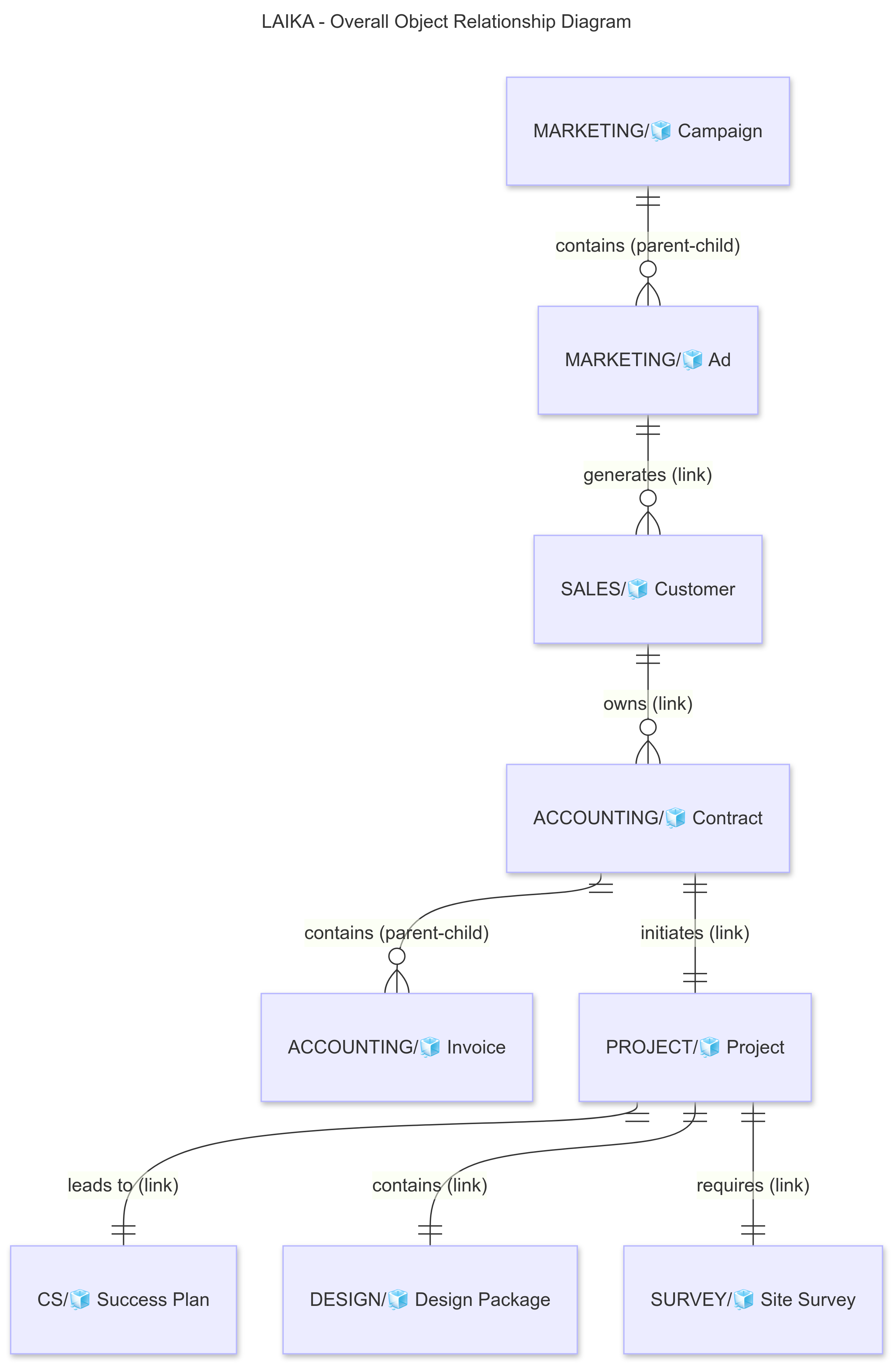
A centrally-managed library of reusable relationship *types* that standardize the *meaning* of bidirectional relationships across the entire system.
**Application at LAIKA:** This is where the core business relationships between different functions are defined.
| Connection Type | Object A | A → B Relationship | Object B | B → A Relationship |
| :----------------------- | :------------------------------ | :----------------- | :----------------------------------------- | :----------------- |
| **Marketing → Sales** | `Marketing Campaigns/🧊Ad` | Generates | `CRM/🧊Customer` | Sourced from |
| **Sales ↔ Accounting** | `CRM/🧊Customer` | Owns | `Contract & Invoice/🧊Contract` | For |
| **Accounting → Project** | `Contract & Invoice/🧊Contract` | Initiates | `Project Management/🧊Project` | From |
| **Project ↔ Design** | `Project Management/🧊Project` | Contains | `Interior Design/🧊Design Package` | Part of |
| **Project ↔ Survey** | `Project Management/🧊Project` | Requires | `Site Survey & Construction/🧊Site Survey` | Serves |
| **Project → CS** | `Project Management/🧊Project` | Leads to | `Customer Success/🧊Success Plan` | For |
A flexible field that allows one `Object` to reference one or more other `Objects`. This is the tool used to *implement* the relationships defined above.
**Application at LAIKA:**
| Defined on Object | Field Name | Reference Type | Purpose |
| :--------------------------------- | :------------------- | :--------------------------------------- | :----------------------------------------------------------------------------- |
| `CRM/🧊Customer` | `Ad Source` | Select 1 `Marketing Campaigns/🧊Ad` | To record the ad that brought in the customer for ROI measurement. |
| `Contract & Invoice/🧊Contract` | `Customer` | Select 1 `CRM/🧊Customer` | To specify which customer this contract belongs to. |
| `Project Management/🧊Project` | `Original Contract` | Select 1 `Contract & Invoice/🧊Contract` | To link the project back to the signed contract for scope and value reference. |
| `Interior Design/🧊Design Package` | `Belongs to Project` | Select 1 `Project Management/🧊Project` | To assign the design package to an overall managed project. |
| `Customer Success/🧊Success Plan` | `Related Project` | Select 1 `Project Management/🧊Project` | To link the care plan to the completed project. |
An embedded 'spreadsheet' within an `Object` to manage structured lists of data, ideal for modeling 'contained' one-to-many data.
**Application at LAIKA:**
| Used on Object | Data Table Name | Example Columns | Rationale & Benefit |
| :--------------------------------- | :------------------------ | :------------------------------------------------------------------ | :------------------------------------------------------------------------------------------------------------------------------------------------- |
| `Contract & Invoice/🧊Contract` | `Payment Schedule` | `Milestone Name`, `Amount`, `Due Date`, `Status`, `Related Invoice` | Provides a structured overview of the entire payment schedule directly on the Contract. Simplifies calculation of total paid and outstanding debt. |
| `Interior Design/🧊Design Package` | `Bill of Materials (BOM)` | `Item`, `Supplier`, `Unit Price`, `Quantity`, `Total Cost` | Helps designers and project managers manage a detailed budget for materials and equipment directly within the design package. |
***
## **WORKVIEWS, DASHBOARDS, FILTERS & REMINDERS**
This section defines the tools for aggregating and presenting data from across all functions, helping users work efficiently and enabling leadership to make informed decisions based on a holistic view of the business.
These are pre-saved work screens at the global level, consolidating work items from various Spaces for operational management purposes.
| Workview Name | View Type | Data Source & Filter Logic | Audience |
| :---------------------- | :-------- | :----------------------------------------------------------------------------------------------------- | :-------------------------------------------- |
| **All Active Projects** | List View | **Source:** `Project Management/🧊Project`
A built-in, strict hierarchy between a standard `Object` and its `Sub-Objects`. This method is best for work breakdown structures.
**Application at LAIKA:**
| Parent Object | Child Object(s) | Architectural Rationale |
| :----------------------------------------- | :-------------------------------------------------------------------------------- | :----------------------------------------------------------------------------------------------------------------------------------------- |
| `Marketing Campaigns/🧊Campaign` | `Marketing Campaigns/🧊Ad` | **Work Breakdown Structure:** Each `Campaign` is a major plan that contains multiple specific `Ads`. |
| `Contract & Invoice/🧊Contract` | `Contract & Invoice/🧊Invoice` | **Financial Breakdown Structure:** A `Contract`'s total value is broken down into multiple `Invoices` corresponding to payment milestones. |
| `Site Survey & Construction/🧊Site Survey` | `Site Survey & Construction/🧊Constraint` | **Work Breakdown Structure:** A `Site Survey` may identify and record multiple `Constraints` (issues to be addressed). |
| `Interior Design/🧊Design Package` | `Interior Design/🧊Functional Layout`, `🧊Concept`, `🧊3D`, `🧊2D`, `🧊Revisions` | **Work Breakdown Structure:** A master `Design Package` is broken down into sub-items for each phase of the design process. |
A centrally-managed library of reusable relationship *types* that standardize the *meaning* of bidirectional relationships across the entire system.
**Application at LAIKA:** This is where the core business relationships between different functions are defined.
| Connection Type | Object A | A → B Relationship | Object B | B → A Relationship |
| :----------------------- | :------------------------------ | :----------------- | :----------------------------------------- | :----------------- |
| **Marketing → Sales** | `Marketing Campaigns/🧊Ad` | Generates | `CRM/🧊Customer` | Sourced from |
| **Sales ↔ Accounting** | `CRM/🧊Customer` | Owns | `Contract & Invoice/🧊Contract` | For |
| **Accounting → Project** | `Contract & Invoice/🧊Contract` | Initiates | `Project Management/🧊Project` | From |
| **Project ↔ Design** | `Project Management/🧊Project` | Contains | `Interior Design/🧊Design Package` | Part of |
| **Project ↔ Survey** | `Project Management/🧊Project` | Requires | `Site Survey & Construction/🧊Site Survey` | Serves |
| **Project → CS** | `Project Management/🧊Project` | Leads to | `Customer Success/🧊Success Plan` | For |
A flexible field that allows one `Object` to reference one or more other `Objects`. This is the tool used to *implement* the relationships defined above.
**Application at LAIKA:**
| Defined on Object | Field Name | Reference Type | Purpose |
| :--------------------------------- | :------------------- | :--------------------------------------- | :----------------------------------------------------------------------------- |
| `CRM/🧊Customer` | `Ad Source` | Select 1 `Marketing Campaigns/🧊Ad` | To record the ad that brought in the customer for ROI measurement. |
| `Contract & Invoice/🧊Contract` | `Customer` | Select 1 `CRM/🧊Customer` | To specify which customer this contract belongs to. |
| `Project Management/🧊Project` | `Original Contract` | Select 1 `Contract & Invoice/🧊Contract` | To link the project back to the signed contract for scope and value reference. |
| `Interior Design/🧊Design Package` | `Belongs to Project` | Select 1 `Project Management/🧊Project` | To assign the design package to an overall managed project. |
| `Customer Success/🧊Success Plan` | `Related Project` | Select 1 `Project Management/🧊Project` | To link the care plan to the completed project. |
An embedded 'spreadsheet' within an `Object` to manage structured lists of data, ideal for modeling 'contained' one-to-many data.
**Application at LAIKA:**
| Used on Object | Data Table Name | Example Columns | Rationale & Benefit |
| :--------------------------------- | :------------------------ | :------------------------------------------------------------------ | :------------------------------------------------------------------------------------------------------------------------------------------------- |
| `Contract & Invoice/🧊Contract` | `Payment Schedule` | `Milestone Name`, `Amount`, `Due Date`, `Status`, `Related Invoice` | Provides a structured overview of the entire payment schedule directly on the Contract. Simplifies calculation of total paid and outstanding debt. |
| `Interior Design/🧊Design Package` | `Bill of Materials (BOM)` | `Item`, `Supplier`, `Unit Price`, `Quantity`, `Total Cost` | Helps designers and project managers manage a detailed budget for materials and equipment directly within the design package. |
***
## **WORKVIEWS, DASHBOARDS, FILTERS & REMINDERS**
This section defines the tools for aggregating and presenting data from across all functions, helping users work efficiently and enabling leadership to make informed decisions based on a holistic view of the business.
These are pre-saved work screens at the global level, consolidating work items from various Spaces for operational management purposes.
| Workview Name | View Type | Data Source & Filter Logic | Audience |
| :---------------------- | :-------- | :----------------------------------------------------------------------------------------------------- | :-------------------------------------------- |
| **All Active Projects** | List View | **Source:** `Project Management/🧊Project`
**Logic:** `Status` IS NOT "Completed" AND "Cancelled" | COO, Board of Directors, All Project Managers |
This dashboard is placed in the "Executive Workspace" to provide a 360-degree view of business performance.
| Dashboard Name | Purpose & Audience |
| :------------------------------------ | :----------------------------------------------------------------------------------------------------------------------------------------- |
| **Business Overview (CEO Dashboard)** | Provides a comprehensive overview of the sales funnel, cash flow, advertising effectiveness, and project progress for the leadership team. |
**Detailed Structure of the "Business Overview" Dashboard:**
| # | Gadget Name | Chart Type | Data Source (Functions & Objects) | Logic & Key Metrics |
| :- | :----------------------------- | :-------------------- | :--------------------------------------------------------- | :--------------------------------------------------------------------------------------------------------------------------------- |
| 1 | **Customer Conversion Funnel** | Funnel Chart | `CRM/🧊Customer` | Counts the number of `Customers` by `Status` (e.g., New, Consulting, Deal Closed...) to calculate conversion rates between stages. |
| 2 | **Revenue & Outstanding Debt** | Counter & Calculation | `Contract & Invoice/🧊Invoice` | - **Revenue**: `SUM(Amount)` WHERE `Status` = "Paid".
- **Debt**: `SUM(Amount)` WHERE `Status` = "Pending". |
| 3 | **Top Ads by Revenue** | Pie Chart | `Contract & Invoice/🧊Contract` linked to `CRM/🧊Customer` | `SUM(Total Contract Value)` grouped by `Ad Source` on the `Customer` object. |
| 4 | **Project Progress Status** | Bar Chart | `Project Management/🧊Project` | Counts the number of `Projects` by `Status` (e.g., Planning, In Design, In Construction...). |
Saved filters that allow users to quickly access critical lists of work items.
| Filter Name | Data Source & Filter Logic | Purpose & Audience |
| :------------------------- | :------------------------------------------------------------------------------------- | :--------------------------------------------------------------------------------------- |
| **Major Projects (>500M)** | **Source:** `Project Management/🧊Project`
**Logic:** `Total Value` > 500,000,000 | Helps leadership and project managers focus on high-value contracts. |
| **VIP Customers** | **Source:** `CRM/🧊Customer`
**Logic:** `Number of completed projects` >= 2 | Filters the list of loyal customers for special care programs by CS and Marketing teams. |
Automated notifications based on saved filters to ensure important tasks are not missed.
| Reminder Name | Data Source & Filter Used | Frequency & Time | Recipients (Roles/Groups) |
| :----------------------------------- | :---------------------------------------------------------------------------------------------------------------------------- | :--------------- | :------------------------------------- |
| **Customer Care Follow-up Reminder** | **Source:** `Customer Success/🧊Success Plan`
**Logic:** `Next Check-in Date` is within the next 3 days. | Daily at 8:00 AM | - CSKH Agent
- CSKH Manager |
| **Overdue Contract Alert** | **Source:** `Contract & Invoice/🧊Contract`
**Logic:** `Expected Sign Date` is in the past AND `Status` IS NOT "Signed". | Daily at 8:30 AM | - Sales Executive
- Sales Manager |
***
## **GLOBAL LOGIC & AUTOMATION**
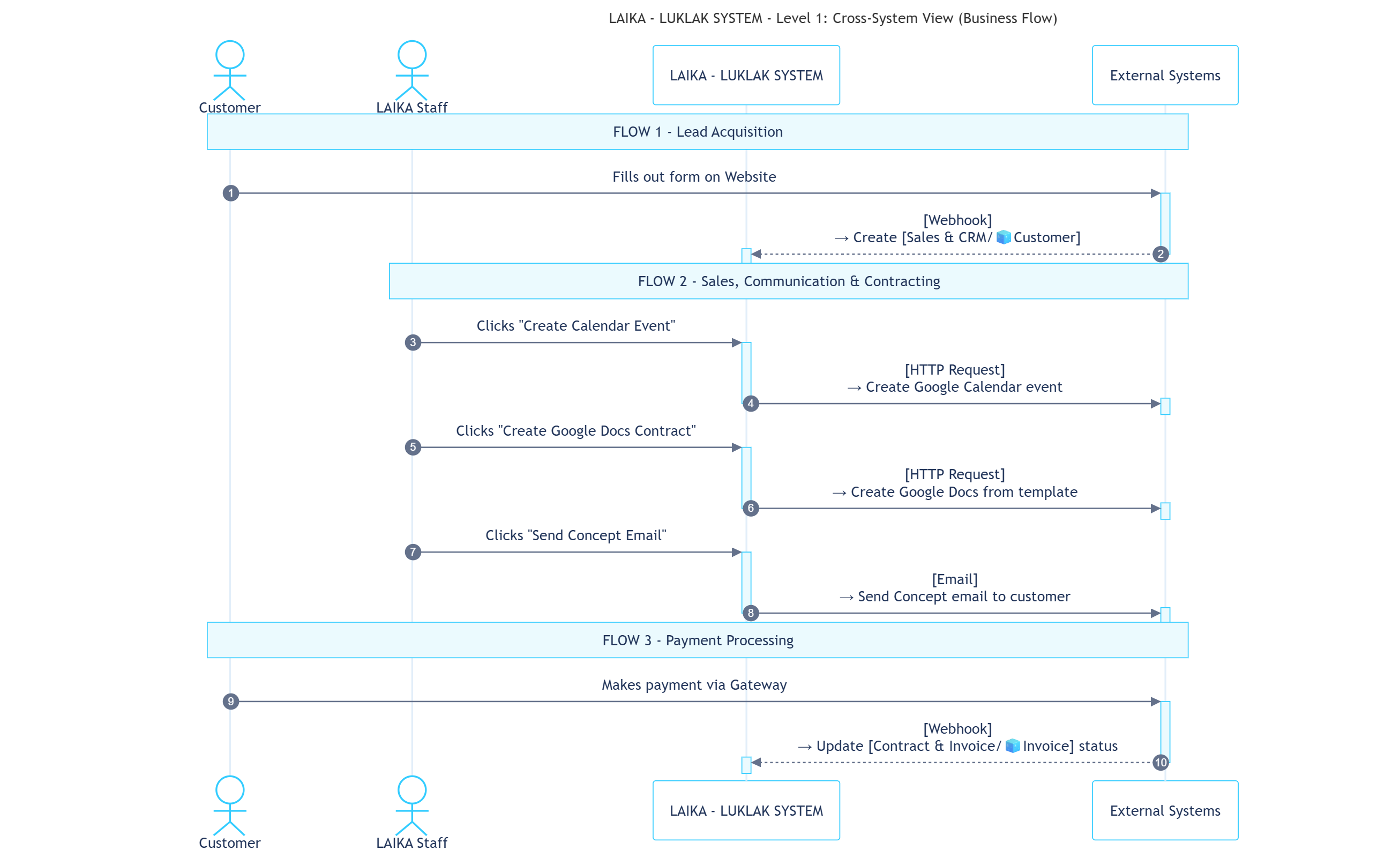
Rules that connect Luklak with external applications and services (e.g., Website, Google, SEPAY, Email).
You can [open this canvas view](https://mermaid.ink/svg/pako:eNqlVs1y4kYQfpUupSqbVMCLECCjSrkKZLTZMt64FrybxPgwSAOeQpphZ0YY4vI1hxzzAjnmvfIEeYS0Rj8rbEhcCSdmvq-7v-7pbniwQhFRy7OazeaMh4Iv2NKbcQB9RxPqgaRRuq3OH4hkZB5TZSgAa8kSIne-iIX04NUXTvd0EASv9sAp3eqK0LadTre_TxgKGVFZUVxneF75iBmnh70rimKjenDfRbtOAWsqNaujQSfoBm6Bzkm4WkqR8shA5lNACWF8uFo-u8_jlUjdGReaHk8yQ9GqAkfDYBCM6uB--o7j-1VQEmohD6nJAWN52Oi4IAOP63UdtUejoF_l-SmlPKTv0mRek_U0OtsQzQT_F_El61j-sRDr40pjMqfxUGz3zOtaK8I_dVDGOR5DsSUncYX1Oq59OtzDDtuacSlrdc7IUpKk6DymYwrjwduLATRhfH0xHlzA5MfJdHSZnemGxmB74EuhVHOyU5om8IHRe_hqmCp8FqUgiMX910URUy24eYoZr70f-NcTIAr8VGmRZOBnaDLFKcnAXMNEk8WiNF4THIuQrQnXmTTDSlcxWeXk56TRD9OMNNriQGExIBesSn_vsIFBbKgR1ECyB8H4-49gm1RJBIPwU8oUy7ogt0Be8-zsm5zK4liBSDUshExAcPhI50imORU5zYyLQj24QehOiNXtt3P5-uzPX37DClKC0W8mBBcSfAn--8vXf_3-x69lTW5zLxEtGpFmDp_dofP87mlCpoy1lNqYkgnVAF8kScpZaJo7iyy4lplHvsy9GNtKuh-zcKVgZhWKffSSrS4YbSjXMyu3QWpVmJvvptMreJ-1l9LPMn4jxDKuuaHGzdHEnhbgJRKLEOciVFV2_1mo8bKQIsGtnKxjUr7v_xY7wfwzeSFdY6fi5o4PajTIZ3F7VjTDQAsI9ybp5dKOTYCD7XJFdgk-DVxJEeJcV-1Rn4FLssLuXRfMDSPwBiPck92LZuB6HZkZKN8Im_Et3wgWUjMKxfdbUJroVL10IKyGtZQssjwtU9qwsCpYJTxaDxl7Zpn_AjPLw68RXZA0Nr3xiGa4M34SIikt8Sd2eWd5CxIrPKVGbLEsKwq-Rra7U64tr288WN6DtbU8u2Wf9Fott93pdnp9u9ttN6wdXrfdk7Zz6vRbruuedpye89iwfjZBWydu13Y7fcfpuXa_a7f7j38D7HDI6Q) for better readability
 | Rule # | Rule Name | Business Description |
| --------- | ------------------------------ | -------------------------------------------------------------------------------------------------------------------------------------------------------- |
| **CS-01** | Receive Lead from Website | When a form is submitted on the website, a **Webhook** triggers the creation of a `Sales & CRM/🧊Customer` and links it to the source `Marketing/🧊Ad`. |
| **CS-02** | Create Google Calendar Event | A Sales user clicks a button on a `Sales & CRM/🧊Customer`, sending an **HTTP Request** via N8N to create an event in **Google Calendar**. |
| **CS-04** | Create Google Docs Contract | An Accountant clicks a button on a `Contract & Invoice/🧊Contract`, sending an **HTTP Request** to populate a **Google Docs** template with Object data. |
| **CS-05** | Log External Payment | An external payment gateway sends a **Webhook** upon payment, which finds the corresponding `Contract & Invoice/🧊Invoice` and updates its status. |
| **CS-08** | Send Concept Email to Customer | A Sales user clicks a button to automatically compose and send a personalized **Email** with design variables and links to the customer. |
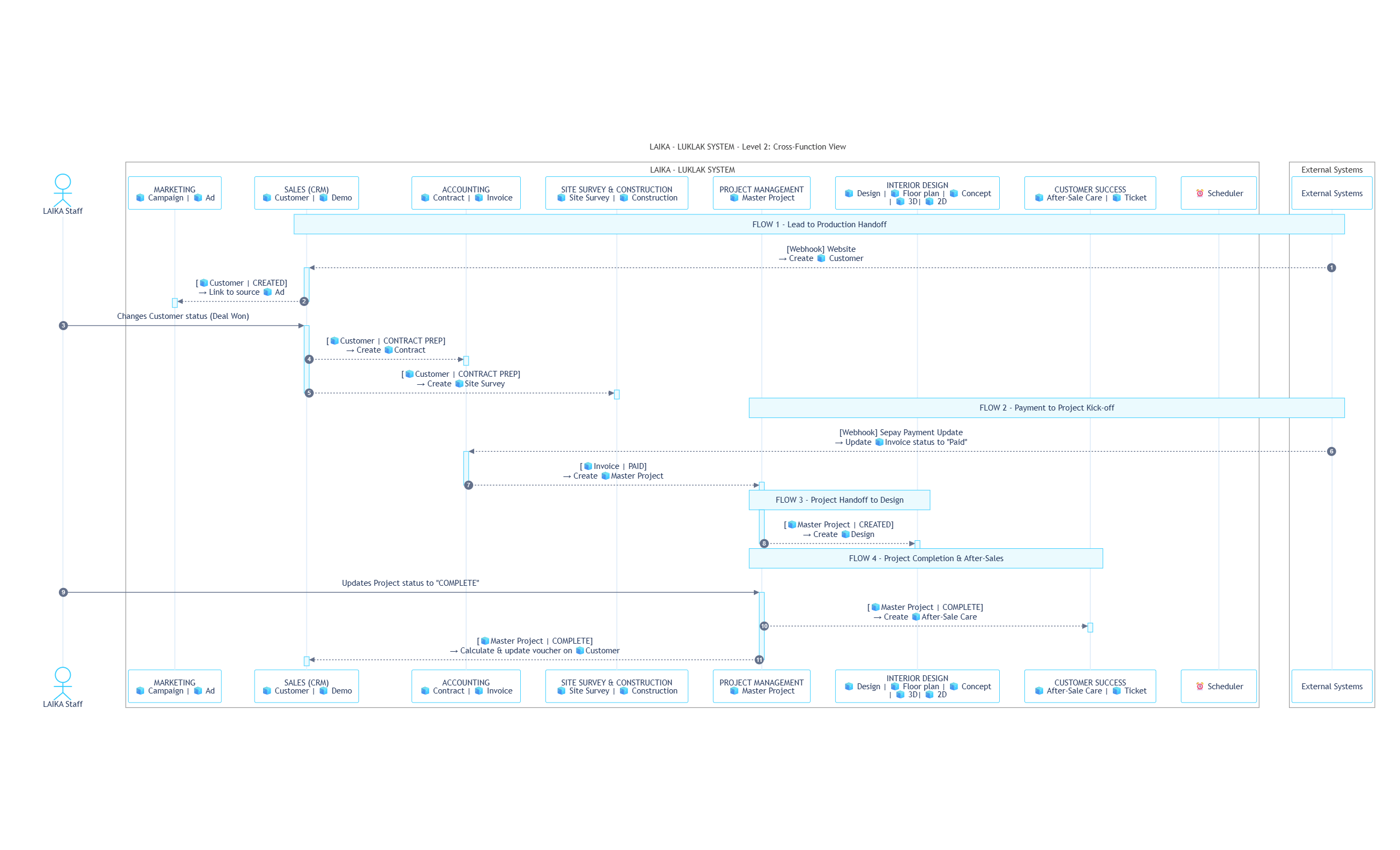
Rules that orchestrate and transfer work between different functions *inside* the Luklak platform.
You can [open this canvas view](https://mermaid.live/view#pako:eNqdV81y4kYQfpUppcprV8ABBJZRpVwlhPCy_BYSdjbGh0EasGKhYfVDIF5fc8ghqcoL5JhrjnmefYHkEdIzEmIAkWzFB6xRT3_99TfdLelFsqlDJFUqFosT36b-zJ2rEx-h6IksiIoC4sTrbH2HAxdPPRLyLQgtA3eBg41OPRqo6M0Xcu1aa7Xe7Bktso6yDZWyXK3V9zc0aOCQINuiyI1mhuG5PslHDwmQdcTgugJ-1dQckSByRWur2qq1lNQ6xfbzPKCx73AT_0tNC-z6jef50f0k3tYigvk0IqeTZFbwyoxGo6W1DNG4n74s63oWFNsRDfLYJAbume90mhA3d0VdjYphtOpZnh9i4tukHy-mAq3D6O4KRy71_4P8dtep_D1Kl6eZenhKvAZd77mLXLMN_1ZBbM_pGKE797GX2a6qSvm6sWfL9-XtstWq6eJ5gBdp5bmRR1BXa3c0VETdcaerdZD53rSMHluTFfFQRUV6QMOw2Ip9mymE7lzyfSpbHFGfi5-shVNDpgUNgHCYwpsRns3EXVO6RsF8is8rtVoB7X5Kl7WLfEqJH-9GDB1ju0vsR6jXsViUnjbqGFa7f_v1NPjq5u_ffv8J6XixxKAL-ojY-q8_f0aakw-ij3oMxNS6honOYXUhwMRhRBckEGCaZEHzgTRdZ0DwbzDuH9ChfhSANgJO219R1yb5UKbJocy2ZSBzPLoz3qMzpA_6pjUa61Z70N9Bm25EkBkHK7JJ0Vm0MApifmL5-MPRO4Y_HA3eGboFAva1W6Nn9K0dbg-HMJzQMKDfETvKh2mCYgDT7lvGqD0YsXX7VuDWJOH-GbSgkwK09LB4E-jaZBkh7ifcl5u760rzxOFxAvrYtAY9YwRa6bphmjsG2gySKJoYSl3HAdkqZLn2MzmRlKm_ZZiffvkDmfYTPFe8bYkTH0roMyrYWENQaElkbkDDRZgfx_iGF2_-ZiFUH4Yvois4C_AoQH2qqNUd3KMyb1PsoIiyU3KS80Zvse_QbbuBR7F4c_Ml93q4J9MnSp8fEVyEUDZcpk8__gpNTjAE2Sv5BAAcOQB0GgCwDUJL6CNDs4zmY4YD4_qZ0QlpHNjkqPMcks5awjr36B7EEocEHyIZef0J-3MS7joyjHAUh-i8SUC7e-pf7BOGLswhPOhbIw0Kfjgyho956W8b9Ygc4O0HgBb9PwGEdj2KAZD5ouQVArRwWggVKIQh3iwIFFVSC6xjUQdqvHhUCYkuWSWYZIk3mfd46bCYGe90zXin42orO8SZSEPsOhMpwQdcjs9pPYgeH9FQazdzxcibMULugJV_Dod6wMYCzJ5UD5npkYqQdgPjmwyjvWe-EAIuOH8O83BMLq_chUxEcIEtoJ3OKi8LfZtEVUhCp4ulR3h3nwkTLTzoEy59cmRh5iuelz7oDbuGZWzPbJuzfjrl1CM354PZely65kEYPoQ-Nw727NhjMGcoTspwRWOYxwECGcS2Oz1H9kWXCtI8cB1JhUcjKUjgCe_QsJRe2O6JxL8cJpIKlw6Z4diLmE6v4Abj-ltKF1tPeCGfP0nqDHshrBJy6atVtgXmN3vTi_1IUuscQVJfpLWklkvly6tSSalUa9WrerlWqxSkDdyuKJcV-VqulxRFua7KV_JrQfqBBy1dKrWyUq3L8pVSrtfKckEijguvWb3ki4h_GL3-A7V1SWs) for better readability
| Rule # | Rule Name | Business Description |
| --------- | ------------------------------ | -------------------------------------------------------------------------------------------------------------------------------------------------------- |
| **CS-01** | Receive Lead from Website | When a form is submitted on the website, a **Webhook** triggers the creation of a `Sales & CRM/🧊Customer` and links it to the source `Marketing/🧊Ad`. |
| **CS-02** | Create Google Calendar Event | A Sales user clicks a button on a `Sales & CRM/🧊Customer`, sending an **HTTP Request** via N8N to create an event in **Google Calendar**. |
| **CS-04** | Create Google Docs Contract | An Accountant clicks a button on a `Contract & Invoice/🧊Contract`, sending an **HTTP Request** to populate a **Google Docs** template with Object data. |
| **CS-05** | Log External Payment | An external payment gateway sends a **Webhook** upon payment, which finds the corresponding `Contract & Invoice/🧊Invoice` and updates its status. |
| **CS-08** | Send Concept Email to Customer | A Sales user clicks a button to automatically compose and send a personalized **Email** with design variables and links to the customer. |
Rules that orchestrate and transfer work between different functions *inside* the Luklak platform.
You can [open this canvas view](https://mermaid.live/view#pako:eNqdV81y4kYQfpUppcprV8ABBJZRpVwlhPCy_BYSdjbGh0EasGKhYfVDIF5fc8ghqcoL5JhrjnmefYHkEdIzEmIAkWzFB6xRT3_99TfdLelFsqlDJFUqFosT36b-zJ2rEx-h6IksiIoC4sTrbH2HAxdPPRLyLQgtA3eBg41OPRqo6M0Xcu1aa7Xe7Bktso6yDZWyXK3V9zc0aOCQINuiyI1mhuG5PslHDwmQdcTgugJ-1dQckSByRWur2qq1lNQ6xfbzPKCx73AT_0tNC-z6jef50f0k3tYigvk0IqeTZFbwyoxGo6W1DNG4n74s63oWFNsRDfLYJAbume90mhA3d0VdjYphtOpZnh9i4tukHy-mAq3D6O4KRy71_4P8dtep_D1Kl6eZenhKvAZd77mLXLMN_1ZBbM_pGKE797GX2a6qSvm6sWfL9-XtstWq6eJ5gBdp5bmRR1BXa3c0VETdcaerdZD53rSMHluTFfFQRUV6QMOw2Ip9mymE7lzyfSpbHFGfi5-shVNDpgUNgHCYwpsRns3EXVO6RsF8is8rtVoB7X5Kl7WLfEqJH-9GDB1ju0vsR6jXsViUnjbqGFa7f_v1NPjq5u_ffv8J6XixxKAL-ojY-q8_f0aakw-ij3oMxNS6honOYXUhwMRhRBckEGCaZEHzgTRdZ0DwbzDuH9ChfhSANgJO219R1yb5UKbJocy2ZSBzPLoz3qMzpA_6pjUa61Z70N9Bm25EkBkHK7JJ0Vm0MApifmL5-MPRO4Y_HA3eGboFAva1W6Nn9K0dbg-HMJzQMKDfETvKh2mCYgDT7lvGqD0YsXX7VuDWJOH-GbSgkwK09LB4E-jaZBkh7ifcl5u760rzxOFxAvrYtAY9YwRa6bphmjsG2gySKJoYSl3HAdkqZLn2MzmRlKm_ZZiffvkDmfYTPFe8bYkTH0roMyrYWENQaElkbkDDRZgfx_iGF2_-ZiFUH4Yvois4C_AoQH2qqNUd3KMyb1PsoIiyU3KS80Zvse_QbbuBR7F4c_Ml93q4J9MnSp8fEVyEUDZcpk8__gpNTjAE2Sv5BAAcOQB0GgCwDUJL6CNDs4zmY4YD4_qZ0QlpHNjkqPMcks5awjr36B7EEocEHyIZef0J-3MS7joyjHAUh-i8SUC7e-pf7BOGLswhPOhbIw0Kfjgyho956W8b9Ygc4O0HgBb9PwGEdj2KAZD5ouQVArRwWggVKIQh3iwIFFVSC6xjUQdqvHhUCYkuWSWYZIk3mfd46bCYGe90zXin42orO8SZSEPsOhMpwQdcjs9pPYgeH9FQazdzxcibMULugJV_Dod6wMYCzJ5UD5npkYqQdgPjmwyjvWe-EAIuOH8O83BMLq_chUxEcIEtoJ3OKi8LfZtEVUhCp4ulR3h3nwkTLTzoEy59cmRh5iuelz7oDbuGZWzPbJuzfjrl1CM354PZely65kEYPoQ-Nw727NhjMGcoTspwRWOYxwECGcS2Oz1H9kWXCtI8cB1JhUcjKUjgCe_QsJRe2O6JxL8cJpIKlw6Z4diLmE6v4Abj-ltKF1tPeCGfP0nqDHshrBJy6atVtgXmN3vTi_1IUuscQVJfpLWklkvly6tSSalUa9WrerlWqxSkDdyuKJcV-VqulxRFua7KV_JrQfqBBy1dKrWyUq3L8pVSrtfKckEijguvWb3ki4h_GL3-A7V1SWs) for better readability
 | Rule # | Rule Name | Business Description |
| --------- | ------------------------------------- | ---------------------------------------------------------------------------------------------------------------------------------------------------------------------------------------------------------------------------------------- |
| **CF-03** | Handoff from Sales to Production | A status change on `Sales & CRM/🧊Customer` automatically creates a `Contract & Invoice/🧊Contract` and a `Design & Build/🧊Site Survey`. |
| **CF-06** | Payment Confirmed, Kick-off Project | A status change on `Contract & Invoice/🧊Invoice` (triggered by rule CS-05) automatically creates a new `Project Management/🧊Project`. |
| **CF-07** | Project Created, Assign Design Work | The creation of a `Project Management/🧊Project` automatically creates and links a new `Design & Build/🧊Design` Object. |
| **CF-09** | Project Complete, Trigger After-Sales | A status change on `Project Management/🧊Project` to "Complete" triggers two actions: it creates a `Customer Success/🧊After-Sales Care` Object, and it updates the original `Sales & CRM/🧊Customer` with a calculated loyalty voucher. |
***
## **ACCESS & GOVERNANCE**
This is the highest level of permissions, acting as the "entry ticket" to the entire system and defining a user's maximum potential authority.
| Privilege Level | Assigned to (at LAIKA) | Permission Description |
| :-------------- | :------------------------------------------------------ | :---------------------------------------------------------------------------------------------------------- |
| **Owner** | CEO | The highest level. Manages billing, can transfer ownership, and holds all Admin privileges. |
| **Admin** | COO, System Administrator | Can configure everything in the system, from Global Settings to user management. |
| **App Manager** | Heads of Areas (e.g., Head of Sales, Head of Design...) | A specialized role that can design, edit, and manage Functions 📋. |
| **Member** | All remaining employees | The standard privilege for most users, allowing them to work within the Spaces ⏹️ they are given access to. |
These principles act as a guide for Administrators when assigning access to the "containers" of work and shared assets.
| Item Type | Permission Principle | Rationale & Benefit |
| :------------------------- | :----------------------------------------------------------------------------------------------------------------------------------- | :----------------------------------------------------------------------------------------------------------------------------------------------- |
| **📂 Areas** | - **Admin:** CEO, COO
| Rule # | Rule Name | Business Description |
| --------- | ------------------------------------- | ---------------------------------------------------------------------------------------------------------------------------------------------------------------------------------------------------------------------------------------- |
| **CF-03** | Handoff from Sales to Production | A status change on `Sales & CRM/🧊Customer` automatically creates a `Contract & Invoice/🧊Contract` and a `Design & Build/🧊Site Survey`. |
| **CF-06** | Payment Confirmed, Kick-off Project | A status change on `Contract & Invoice/🧊Invoice` (triggered by rule CS-05) automatically creates a new `Project Management/🧊Project`. |
| **CF-07** | Project Created, Assign Design Work | The creation of a `Project Management/🧊Project` automatically creates and links a new `Design & Build/🧊Design` Object. |
| **CF-09** | Project Complete, Trigger After-Sales | A status change on `Project Management/🧊Project` to "Complete" triggers two actions: it creates a `Customer Success/🧊After-Sales Care` Object, and it updates the original `Sales & CRM/🧊Customer` with a calculated loyalty voucher. |
***
## **ACCESS & GOVERNANCE**
This is the highest level of permissions, acting as the "entry ticket" to the entire system and defining a user's maximum potential authority.
| Privilege Level | Assigned to (at LAIKA) | Permission Description |
| :-------------- | :------------------------------------------------------ | :---------------------------------------------------------------------------------------------------------- |
| **Owner** | CEO | The highest level. Manages billing, can transfer ownership, and holds all Admin privileges. |
| **Admin** | COO, System Administrator | Can configure everything in the system, from Global Settings to user management. |
| **App Manager** | Heads of Areas (e.g., Head of Sales, Head of Design...) | A specialized role that can design, edit, and manage Functions 📋. |
| **Member** | All remaining employees | The standard privilege for most users, allowing them to work within the Spaces ⏹️ they are given access to. |
These principles act as a guide for Administrators when assigning access to the "containers" of work and shared assets.
| Item Type | Permission Principle | Rationale & Benefit |
| :------------------------- | :----------------------------------------------------------------------------------------------------------------------------------- | :----------------------------------------------------------------------------------------------------------------------------------------------- |
| **📂 Areas** | - **Admin:** CEO, COO
- **Manager:** Head of the respective Area
- **Member:** The respective department's Group | Creates a focused work environment for each department, reducing clutter and improving navigation efficiency. |
| **👥 Groups** | - **Manager:** Head of the respective department
- **Member:** All members of the Group | Empowers department heads to manage their own team membership, increasing agility and reducing the load on System Admins. |
| **📊Dashboards & Filters** | - **Admin:** The creator, CEO, COO
- **Manager:** Relevant Heads of Areas
- **Member:** Shared-with Groups or individuals | Ensures that aggregated data and sensitive business metrics are shared only with the intended audience. |
| **📋 Functions** | - **Admin:** System Administrator, CEO, COO
- **Manager:** Users with `App Manager` privilege
- **Member:** Most employees | Tightly governs core business processes while allowing department heads the flexibility to refine them and enabling all employees to apply them. |
| **⏹️ Spaces** | - **Admin:** Project Manager or Team Lead
- **Member:** All invited members | Ensures the person with primary responsibility for a project or workspace has full control over it. |
This is the most granular layer of control, defining "who can do what" and "who gets notified about what" for Objects within a Space.
| Scheme Type | Selected Scheme for LAIKA | Description & Rationale |
| :---------------------- | :------------------------------------------- | :------------------------------------------------------------------------------------------------------------------------------------------------------------------------------------------- |
| **Permission Scheme** | **"Moderate restriction"** | **Balances security and collaboration:** Everyone in a Space can see that work exists, but only directly assigned users can view details and make updates, protecting sensitive information. |
| **Notification Scheme** | **"Notify key actions to direct assignees"** | **Reduces notification noise:** Only important events (status changes, @mentions) trigger alerts for directly involved users, helping the team focus on actionable updates. |