> ## Documentation Index
> Fetch the complete documentation index at: https://docs.luklak.com/llms.txt
> Use this file to discover all available pages before exploring further.
# Universal Automation: Your Digital Workforce
> An overview of Luklak's Universal Automation engine, built on the Trigger-Condition-Action model to connect and automate processes across your entire business.
## Why Universal Automation Matters
In traditional software stacks, your CRM, project management tool, and HR system are separate apps. To make them work together, you rely on clunky, third-party integration tools that are brittle, limited, and create yet another system to manage.
Luklak's **Universal Automation** is fundamentally different. Because every process in Luklak is built on the `🧊 Universal Object`, our automation engine is not an external add-on; it's a **native, universal layer** woven into the fabric of the platform.
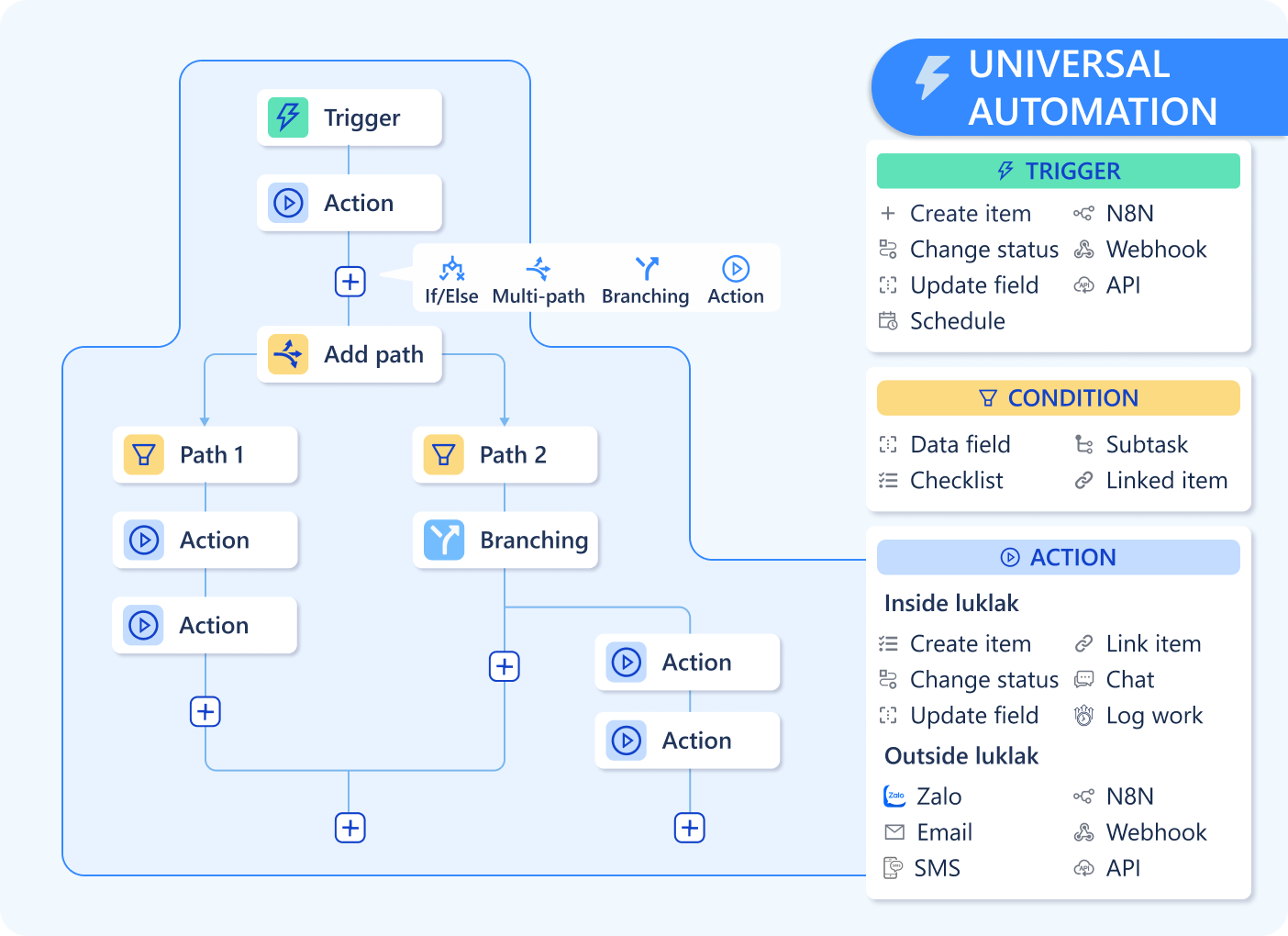 This allows you to build a powerful, reliable "digital workforce" that can automate entire value streams—from a new lead in your CRM `Function` triggering a project kick-off in your Operations `Function`—without ever leaving the platform.
## The Core Principle: Trigger → Condition → Action
Every automation rule in Luklak, from the simplest to the most complex, follows a simple, logical pattern:
The event that starts the automation. This could be an `🧊 Object` being created, a field being updated, a specific time of day, or an incoming signal from another app.
The logical check that determines if the automation should proceed. It acts as a smart filter, ensuring the rule only runs when your specific criteria are met.
The work that the automation performs. This can be anything from updating a field and sending a message to creating a new `🧊 Object` or calling an external system.
\[Image Placeholder: A clean, simple diagram showing three icons (Bolt → Branch → Rocket) connected by arrows, labeled Trigger, Condition, and Action.]
Because Luklak's automation is universal, you can do things that are impossible in other systems without complex code. An update to a `🧊 Customer` Object in your CRM can automatically create a `🧊 Task` Object in your Project Management `Function`. No external integration tool is required.
## What's Next?
You now understand the core concepts of Universal Automation. It's time to dive into the details of how to build your digital workforce, piece by piece.
* [**Start with the fundamentals: The Trigger-Condition-Action Model**](/en/02-platform/platform-overview/universal-automation/automation-basics)
* [**Learn what starts a rule: Trigger Types**](/en/02-platform/platform-overview/universal-automation/trigger-types)
* [**Add logic to your rules: Building Conditions with UQL**](/en/02-platform/platform-overview/universal-automation/building-conditions)
* [**See what's possible: Action Types**](/en/02-platform/platform-overview/universal-automation/action-types)
* [**Use dynamic data in your actions: A Guide to Smart Values**](/en/02-platform/platform-overview/universal-automation/smart-values)
* [**Ensure your rules are reliable: Execution & Debugging**](/en/02-platform/platform-overview/universal-automation/automation-testing)
This allows you to build a powerful, reliable "digital workforce" that can automate entire value streams—from a new lead in your CRM `Function` triggering a project kick-off in your Operations `Function`—without ever leaving the platform.
## The Core Principle: Trigger → Condition → Action
Every automation rule in Luklak, from the simplest to the most complex, follows a simple, logical pattern:
The event that starts the automation. This could be an `🧊 Object` being created, a field being updated, a specific time of day, or an incoming signal from another app.
The logical check that determines if the automation should proceed. It acts as a smart filter, ensuring the rule only runs when your specific criteria are met.
The work that the automation performs. This can be anything from updating a field and sending a message to creating a new `🧊 Object` or calling an external system.
\[Image Placeholder: A clean, simple diagram showing three icons (Bolt → Branch → Rocket) connected by arrows, labeled Trigger, Condition, and Action.]
Because Luklak's automation is universal, you can do things that are impossible in other systems without complex code. An update to a `🧊 Customer` Object in your CRM can automatically create a `🧊 Task` Object in your Project Management `Function`. No external integration tool is required.
## What's Next?
You now understand the core concepts of Universal Automation. It's time to dive into the details of how to build your digital workforce, piece by piece.
* [**Start with the fundamentals: The Trigger-Condition-Action Model**](/en/02-platform/platform-overview/universal-automation/automation-basics)
* [**Learn what starts a rule: Trigger Types**](/en/02-platform/platform-overview/universal-automation/trigger-types)
* [**Add logic to your rules: Building Conditions with UQL**](/en/02-platform/platform-overview/universal-automation/building-conditions)
* [**See what's possible: Action Types**](/en/02-platform/platform-overview/universal-automation/action-types)
* [**Use dynamic data in your actions: A Guide to Smart Values**](/en/02-platform/platform-overview/universal-automation/smart-values)
* [**Ensure your rules are reliable: Execution & Debugging**](/en/02-platform/platform-overview/universal-automation/automation-testing)